EasyManua.ls Logo

Yamaha MT8XII - User Manual

Yamaha MT8XII
65 pages
Print Icon
To Next Page IconTo Next Page
Loading...
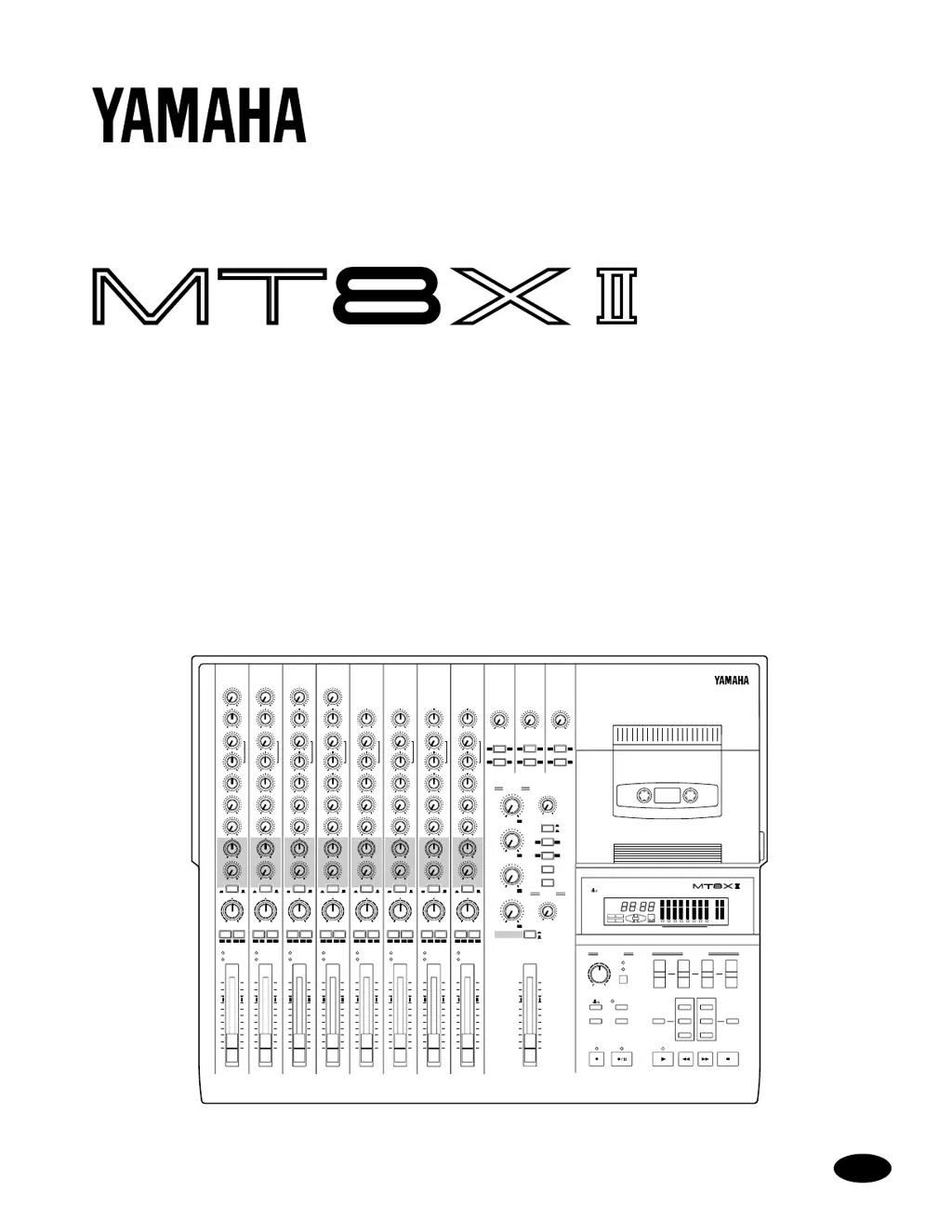
MULTITRACK CASSETTE RECORDER
Owner’s Manual
45678321
0
ST-INPUT
10
ST-INPUT
010
ST-INPUT
010
9-10 11-12 13-14
1
2
3
4
2
1
2
3
4
3
4
010
010
GROUP
MASTER
GROUP 1
GROUP 2
010
GROUP 3
010
GROUP 4
TAPE IN
MIX LEVEL
010
MONITOR LEVEL
MIN MAX
TAPE IN
GROUP
TO
MONITOR
TO
STEREO
STEREO
CUE
MONITOR
SELECT
1 3
2 4
ON
OFF
CUE MIX
TO STEREO
0
10
9
8
7
6
5
4
3
2
1
0
10
9
8
7
6
5
4
3
2
1
MULTITRACK CASSETTE RECORDER
L R
TRACK
STEREO
+9
+6
+3
0dB
–3
–6
–10
–20
+9
+6
+3
0dB
–3
–6
–10
–20
REC
1
2
TAPE
REPEAT
MEMO
IN
OUT
dbx
SYNC
123456 78
AUTO PUNCH
NOISE REDUCTION SYSTEM
0
+
TAPE SPEED REC SELECT
VARI
FIX
GROUP
AUTO
PUNCH I/O
CLEARSYNC
CHECK REPEAT
RESET
MEMO 1
MEMO 2
RTZ
LOC 1
LOC 2
FF STOPREWPLAYREHE
PHONES PUNCH I/O
REC/PAUSE
1
1
5
2
2
6
3
3
7
4
4
8
STEREO
12345678
GAIN
LINE MIC
HIGH
–12 +12
FREQ
250 5k
MID
–12 +12
LOW
–12 +12
AUX
1
010
AUX
2
010
CUE
LR
010
PAN
L
ODD
R
EVEN
GROUP ASSIGN
12 34
PEAK
SIGNAL
0
10
9
8
7
6
5
4
3
2
1
P
A
N
L
E
V
E
L
GAIN
LINE MIC
HIGH
–12 +12
FREQ
250 5k
MID
–12 +12
LOW
–12 +12
AUX
1
010
AUX
2
010
CUE
LR
010
PAN
L
ODD
R
EVEN
GROUP ASSIGN
12 34
PEAK
SIGNAL
0
10
9
8
7
6
5
4
3
2
1
P
A
N
L
E
V
E
L
GAIN
LINE MIC
HIGH
–12 +12
FREQ
250 5k
MID
–12 +12
LOW
–12 +12
AUX
1
010
AUX
2
010
CUE
LR
010
PAN
L
ODD
R
EVEN
GROUP ASSIGN
12 34
PEAK
SIGNAL
0
10
9
8
7
6
5
4
3
2
1
P
A
N
L
E
V
E
L
GAIN
LINE MIC
HIGH
–12 +12
FREQ
250 5k
MID
–12 +12
LOW
–12 +12
AUX
1
010
AUX
2
010
CUE
LR
010
PAN
L
ODD
R
EVEN
GROUP ASSIGN
12 34
PEAK
SIGNAL
0
10
9
8
7
6
5
4
3
2
1
P
A
N
L
E
V
E
L
HIGH
–12 +12
FREQ
250 5k
MID
–12 +12
LOW
–12 +12
AUX
1
010
AUX
2
010
CUE
LR
010
PAN
L
ODD
R
EVEN
GROUP ASSIGN
12 34
PEAK
SIGNAL
0
10
9
8
7
6
5
4
3
2
1
P
A
N
L
E
V
E
L
HIGH
–12 +12
FREQ
250 5k
MID
–12 +12
LOW
–12 +12
AUX
1
010
AUX
2
010
CUE
LR
010
PAN
L
ODD
R
EVEN
GROUP ASSIGN
12 34
PEAK
SIGNAL
0
10
9
8
7
6
5
4
3
2
1
P
A
N
L
E
V
E
L
HIGH
–12 +12
FREQ
250 5k
MID
–12 +12
LOW
–12 +12
AUX
1
010
AUX
2
010
CUE
LR
010
PAN
L
ODD
R
EVEN
GROUP ASSIGN
12 34
PEAK
SIGNAL
0
10
9
8
7
6
5
4
3
2
1
P
A
N
L
E
V
E
L
HIGH
–12 +12
FREQ
250 5k
MID
–12 +12
LOW
–12 +12
AUX
1
010
AUX
2
010
CUE
LR
010
PAN
L
ODD
R
EVEN
GROUP ASSIGN
12 34
PEAK
SIGNAL
0
10
9
8
7
6
5
4
3
2
1
P
A
N
L
E
V
E
L
1
TAPE
MIC/
LINE
TAPE FLIP
MIC/
LINE
TAPE
MIC/
LINE
TAPE FLIP
MIC/
LINE
TAPE
MIC/
LINE
TAPE FLIP
FLIP FLIP FLIP FLIP
MIC/
LINE
TAPE
MIC/
LINE
TAPE FLIP
MIC/
LINE
TAPELINE
TAPE LINE
TAPELINE
TAPE LINE
TAPELINE
TAPE LINE
TAPELINE
TAPE LINE
E

Table of Contents

Questions and Answers

  • A
    amoranJul 29, 2025
    Why are my Yamaha Cassette Player recordings so noisy?
    • R
      Ronald LeeJul 29, 2025
      To address noisy recordings on your Yamaha Cassette Player, first, use the dbx noise reduction feature. Also, ensure that the recording level is correctly set. A signal level that's too low can make tape hiss more noticeable.
  • R
    Regina FitzgeraldAug 2, 2025
    What to do if my Yamaha MT8XII Cassette Player recordings are distorted?
    • T
      Teresa JacksonAug 2, 2025
      To fix distorted recordings on your Yamaha Cassette Player, ensure that the recording level is set correctly. If the signal level is too high, it will cause distortion.
  • K
    Karen PerezAug 6, 2025
    Why can't I record on my Yamaha MT8XII Cassette Player?
    • H
      holmeschristineAug 6, 2025
      If you cannot record with your Yamaha Cassette Player, check that the tape’s write protect tabs are intact. Be sure to press a [REC SELECT] button to select a track for recording. Also, ensure that you have assigned the signal you want to record to the track and use the CUE monitor controls to see if the signal is actually being sent to the track.
  • E
    edwardsterranceAug 11, 2025
    Why don't the level meters show signal on my Yamaha MT8XII?
    • J
      Justin ThompsonAug 11, 2025
      If the level meters on your Yamaha Cassette Player do not indicate signal levels, normally, the level meters indicate tape signal levels. To see the level of a group signal you must press the corresponding [REC SELECT] button.
  • C
    Christine RodriguezAug 15, 2025
    Why do recordings play at the wrong pitch on my Yamaha Cassette Player?
    • M
      Mr. John BaileyAug 15, 2025
      If recordings play back at the wrong pitch on your Yamaha Cassette Player, you may have adjusted the pitch prior to recording a track. Reset the pitch as required.
  • J
    Jill MillsAug 19, 2025
    What to do if I cannot hear the music source on my Yamaha MT8XII Cassette Player?
    • R
      Richard BradshawAug 19, 2025
      If you cannot listen to a connected music source on your Yamaha Cassette Player, make sure that the input selector switch is set to MIC/LINE. Raise the input channel fader. Assign the input channel to a track using the GROUP ASSIGN switches. Press the corresponding MONITOR SELECT GROUP switch and turn up the MONITOR LEVEL control.
  • R
    Richard JonesAug 23, 2025
    How to fix dull-sounding recordings on my Yamaha MT8XII?
    • Y
      yandersonAug 23, 2025
      If your recordings sound dull on your Yamaha Cassette Player, clean the record–play head and other parts of the tape transport. You may also need to demagnetize the record–play head.

Summary

SAFETY INSTRUCTIONS

Explanation of Graphical Symbols

Explains the meaning of safety-related graphical symbols used in the manual.

Read the Following Before Operating MT8 XII

Warnings

Important safety precautions to prevent hazards like fire or electric shock.

Cautions

Advisories for careful handling to prevent damage or operational issues.

Interference

Copyright

Trademarks

Packing List

1 Welcome to the MT8 XII

MT8 XII Features

Overview of the product's main components and capabilities.

Buying Cassette Tapes for the MT8 XII

Guidance on selecting compatible cassette tapes for optimal performance.

MT8 XII Recording Format

Explanation of the unique recording format and tape usage.

About dbx Noise Reduction

Details on the dbx noise reduction system and its benefits.

MT8 XII Maintenance

Information on essential maintenance for keeping the unit in top condition.

2 Touring the MT8 XII

Topside View

Visual guide to the layout and controls on the top panel of the MT8XII.

Input Channels

Detailed explanation of the controls and functions for each input channel.

Stereo Inputs

Description of the stereo input connections and their controls.

Master Section

Explanation of the master section controls for overall output and monitoring.

Display

Overview of the MT8XII's display indicators and their meanings.

Transport Section

Explanation of the tape transport controls and functions.

Rear Panel Connectors

Description of all rear panel connectors and their functions.

Front Connectors

Description of the front panel connectors and their uses.

3 The First Session

Connecting the Power Cord

Steps to properly connect the power cord to the MT8XII and power outlet.

Turning On the MT8 XII

Instructions for powering the MT8XII unit on and off.

Loading a Tape

Procedure for inserting and preparing a cassette tape for recording.

Quick-Start System

Illustrates basic equipment setup for starting recording with the MT8XII.

Recording the First Track

Step-by-step guide to recording the initial track on the MT8XII.

Listening to the First Track

How to play back and monitor the first recorded track.

Overdubbing

Technique for recording new sounds onto empty tracks while listening to existing ones.

Mixdown

The final process of blending all tracks into a stereo mix.

Multi-Source Mixing

Techniques for mixing multiple sound sources beyond tape tracks.

An Overview of Multitrack Recording

Basic Multitracking

Fundamentals of monitoring, recording first track, overdubbing, and mixdown.

Advanced Multitracking

Techniques like one-take, punch in/out, ping-pong, and synchronization.

About Monitoring

4 Punch In;Out Recording

Punch In;Out

Explanation of techniques for rerecording specific sections of a track.

Manual Punch In;Out

How to perform punch in/out manually using buttons or a footswitch.

Using the REC SELECT buttons

Step-by-step guide for punch in/out using REC SELECT buttons.

Using a Footswitch

Procedure for performing punch in/out using an optional footswitch.

Auto Punch In;Out

Setting the Punch In;Out Points

How to define the pre-roll, punch-in, and punch-out points for automatic recording.

Rehearsing Auto Punch

Practicing the Auto Punch In/Out sequence before actual recording.

Performing Auto Punch for Real

Executing the Auto Punch In/Out sequence for final recording.

5 Ping-Pong Recording

Ping-Pong Recording

Technique for mixing and rerecording tracks to free up space.

Preparing for Ping-Pong

Steps to set up the MT8XII for ping-pong recording.

Rehearsing the Ping-Pong

Practicing the ping-pong operation before final recording.

Performing the Ping-Pong for Real

Executing the ping-pong recording technique.

Checking the Ping-Pong Operation

Verifying the results of the ping-pong recording.

Ping-Pong Notes

Important considerations and tips for using ping-pong recording.

Ping-Pong with Overdub

Combining ping-pong technique with overdub recording.

6 Using Effects

Applying Effects at Mixdown

How to apply effects during the mixdown stage.

Applying Effects when Recording

How to apply effects while recording tracks.

Applying Effects with Ping-Pong

How to apply effects when using the ping-pong technique.

Patching In Signal Processors

7 Tape Speed & Mixing Tips

Using the Tape Speed Function

How to adjust tape speed for creative pitch and tempo effects.

Mixing Tips

8 Quick Locate & Repeat Playback

RTZ (Return To Zero)

Function to quickly rewind or fast forward tape to the 00:00 position.

Memo Points

Marking and managing specific points on tape for location or repeat playback.

Repeat Playback

Playing back a specific section between two memo points repeatedly.

9 The MT8 XII & MIDI

Using the MT8 XII in a MIDI System

Integrating the MT8XII into a MIDI system for synchronized recording.

SYNC Signal Formats

Explanation of SMPTE timecode and FSK signal formats for synchronization.

Connecting the MT8 XII to a MIDI System

Specific instructions for setting up an FSK/MIDI synchronization system.

SMPTE;MIDI System

Instructions for setting up a SMPTE/MIDI synchronization system.

Striping the Tape

Process of recording a sync signal onto tape for synchronization.

Synchronized Operation

How to achieve synchronized playback between MT8XII and MIDI devices.

10 MT8 XII Applications

One-Take Recording

Technique for recording multiple tracks simultaneously in a single take.

MIDI Home Studio

Example setup for a MIDI home studio using the MT8XII.

Multi-Source Mixing

How to mix multiple sound sources with MT8XII tracks.

Using the TAPE OUT;GROUP OUTs

How to utilize tape and group output connectors for external routing.

Troubleshooting

Appendix

Maintaining the MT8 XII

Essential maintenance procedures for optimal performance.

Cleaning the Record-Play Head and Other Parts

Guide to cleaning tape heads, capstan, and pinch roller.

Demagnetizing the Record-Play Head

How to demagnetize the record-play head to prevent magnetism buildup.

Specifications

Block Diagram

Dimensions

Glossary

Yamaha MT8XII Specifications

General IconGeneral
TypeCassette Deck
Wow and Flutter0.08% WRMS
InputsLine In, Mic In
OutputsLine Out, Headphones
Track System4-track, 2-channel
Power SupplyAC 120V, 60Hz
Number of Heads2 (Record/Playback, Erase)

Related product manuals