EasyManua.ls Logo

Yamaha NX-S60S - User Manual

Yamaha NX-S60S
31 pages
Print Icon
To Next Page IconTo Next Page
Loading...
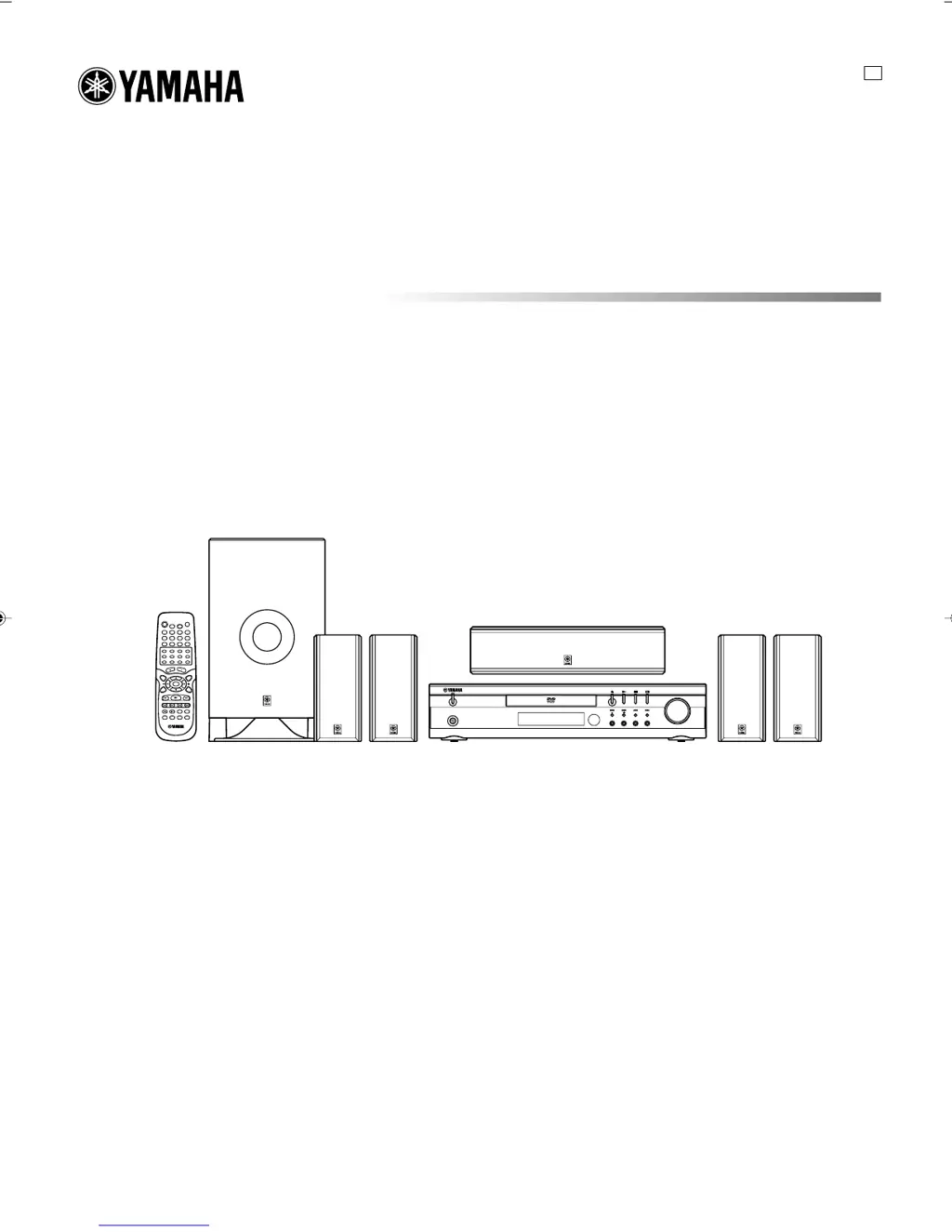
DVD HOME THEATER SOUND SYSTEM
DVX-S60
DVX-S60: DVR-S60 + NX-S60S + NX-S60C + SW-S60
U
PHONES
STANDBY/ON
FM MODE
TUNING
SURROUND BASS MUSIC INPUT
PRESET MEMORY
VOLUME
OWNER’S MANUAL
A1-60U-1 02.8.8, 3:37 PM1

Table of Contents

Questions and Answers

  • S
    Scott JamesAug 13, 2025
    Why is there no picture on my Yamaha Home Theater System?
    • R
      Rebecca EllisonAug 13, 2025
      There are several reasons why your Yamaha Home Theater System might not be displaying a picture. First, ensure that the correct source is selected. Also, check that a disc is loaded, and that it is a playable disc, verifying its logo, type, color system, and regional code. Finally, confirm that your TV is set to receive the signal from the unit by selecting the appropriate input function.
  • C
    Christopher MurphyAug 17, 2025
    How to fix Yamaha Home Theater System remote control that is not working?
    • S
      sheilawilliamsAug 17, 2025
      If your Yamaha Home Theater System's remote control isn't working correctly, start by checking the batteries. Ensure they are not weak and are installed with the correct polarity (+ or –). Replace them if necessary. Also, make sure you are aiming the remote control directly at the remote control sensor on the unit.
  • J
    joshua84Aug 21, 2025
    What to do if my Yamaha Home Theater System DVD player does not start play?
    • S
      spenceraliciaAug 21, 2025
      If your Yamaha Home Theater System's DVD player isn't starting, consider these potential causes: * Ensure a disc is loaded. * Verify that the loaded disc is playable, checking its logo, type, color system, and regional code. * Make sure the disc is loaded correctly, with the label side up. * Check if the disc is dirty; if so, clean or replace it. * If “PARENTAL” control is enabled, disable the parental lock function or adjust the rating level, remembering to reset it after playback.
  • S
    sbondAug 25, 2025
    Why is there no sound from my Yamaha Home Theater System?
    • J
      john06Aug 25, 2025
      If you're not getting any sound from your Yamaha Home Theater System, the issue could be that the incorrect source is selected; make sure to select the correct source. Also, check the volume control and ensure it isn't set to the minimum; increase the volume.
  • S
    Samantha DennisAug 28, 2025
    What to do if the operation or display is not normal on my Yamaha Home Theater System?
    • R
      Robert FullerAug 28, 2025
      If the operation or display of your Yamaha Home Theater System is not normal, the memory may need to be reset. To do this: 1. Disconnect the power cable of the unit. 2. While pressing both the BASS and MUSIC buttons simultaneously, connect the power cable. 3. Resume operation.
  • B
    Brenda PetersSep 1, 2025
    What to do if the playback picture on my Yamaha Home Theater System is poor?
    • A
      Adam BoltonSep 1, 2025
      If the playback picture quality on your Yamaha Home Theater System is poor, it might be due to loading an unplayable disc. Ensure you load a playable disc, and verify its compatibility by checking the disc logo, type, color system, and regional code.
  • E
    edwardsdavidSep 5, 2025
    What does it mean when “ ” appears on the TV screen connected to my Yamaha Home Theater System?
    • E
      Erik HicksSep 5, 2025
      If you see “ ” on your TV screen while using your Yamaha Home Theater System, it indicates that the selected function is not available for the current disc. This could be because the feature is unavailable at the moment, restricted by the DVD software, or not supported by the DVD software (e.g., angles).
  • J
    James SmallSep 9, 2025
    How to fix no picture displayed on the TV when using COMPONENT OUTPUT: PROGRESSIVE on my Yamaha Home Theater System?
    • A
      Austin JacksonSep 9, 2025
      To resolve the issue of no picture displayed on the TV when using COMPONENT OUTPUT: PROGRESSIVE on your Yamaha Home Theater System, set the VIDEO OUT SELECT switch to INTERLACE, then turn the system off and on again.

Summary

IMPORTANT SAFETY INSTRUCTIONS

General Safety Precautions

Detailed safety and operating instructions, warnings, and precautions for safe use of the appliance.

OPERATING PRECAUTIONS

REMOTE CONTROL

REMOTE CONTROL OPERATION

SPEAKER PLACEMENT

SPEAKER MOUNTING

BASIC CONNECTIONS

Speaker Cable Connections

Guide to connecting speaker cables to the unit and speakers, emphasizing correct polarity.

BASIC CONNECTIONS - ANTENNAS

ADDITIONAL CONNECTION EXAMPLES - ADVANCED

Progressive Scan TV Connections

Detailed setup for connecting to TVs supporting progressive scan for enhanced picture detail.

BASIC OPERATION

Powering On;Off and Source Selection

How to turn the unit on/off, use the direct start function, and select audio/video sources.

Volume, Bass, and Sound Mode Adjustment

Guide to adjusting volume, enhancing bass, and selecting different sound modes for optimal listening.

SURROUND MODE SELECTION

Surround Mode Selection

How to choose between various surround sound modes like Dolby Pro Logic, DTS, Theater, and Hall.

Dolby Pro Logic Mode Setup

Step-by-step instructions for setting up Dolby Pro Logic mode, including test tone adjustment.

DISC PLAY

Loading, Starting, and Stopping Discs

Instructions on how to load, play, and stop DVD, Video CD, and Music CD discs.

SETTINGS ON THE SET UP MENU

Language and Display Settings

How to configure language options (audio, subtitle, menu) and display settings (TV type, output).

Speaker and Parental Settings

Guide to adjusting speaker settings and configuring parental control levels and passwords.

SETTINGS ON THE SET UP MENU - DETAILS

Parental Control Setup

Instructions for setting up parental locks, changing passwords, and managing content restrictions.

VARIOUS DISC PLAYING FUNCTIONS

VARIOUS DISC PLAYING FUNCTIONS - ADVANCED

VARIOUS DISC PLAYING FUNCTIONS - LANGUAGES

Subtitle and Audio Language Selection

How to select subtitle languages and audio soundtracks on multi-language discs.

LISTENING TO THE RADIO

Radio Tuning and Station Presets

Guide to tuning FM/AM stations, automatic/manual tuning, and saving preset stations.

TIMER OPERATION

Setting the Timer for Auto Power On;Off

Step-by-step instructions to set the timer for automatic power on/off with a selected source.

TROUBLESHOOTING GUIDE

Common Operation and Picture;Sound Issues

Solutions for common problems like no picture, no sound, poor picture quality, and operation errors.

SPECIFICATIONS

Yamaha NX-S60S Specifications

General IconGeneral
BrandYamaha
ModelNX-S60S
CategoryHome Theater System
LanguageEnglish

Related product manuals