14
Controlling your Home Theater
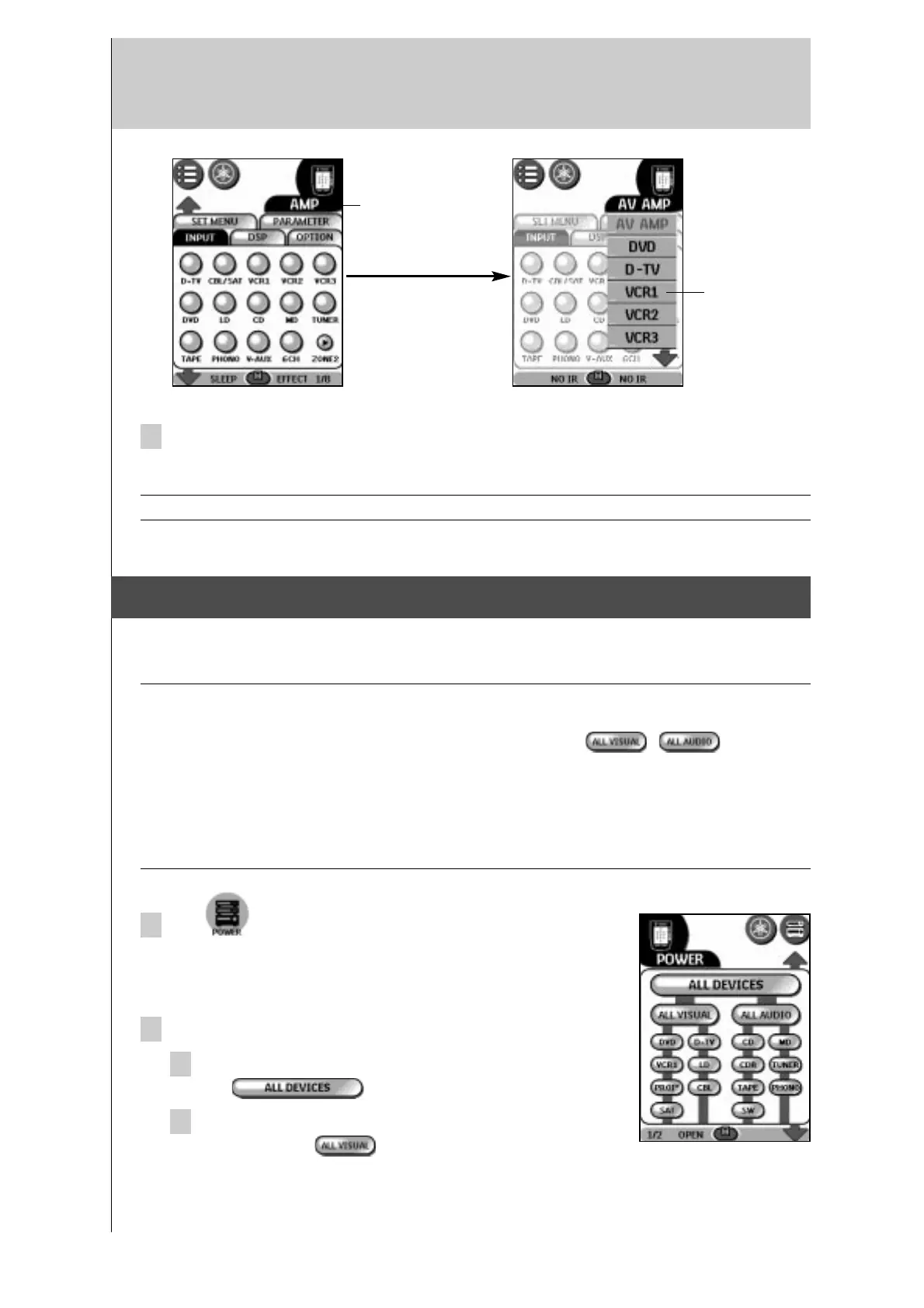
2 In the Device menu, tap the device you want to operate.
The control panel that was last accessed for the device appears.
Note You can also activate the Device menu from Home by tapping the device tab icon.
4. Controlling Power on/off of your A/V devices
Using the Power control panel, you can simultaneously turn on or off (standby) multiple
devices without switching the control panel for each device.
Notes · This function is effective only with devices that have a power on/off button on their original
remote control.
· Most of the device buttons listed below power groups (e.g., , ) are not
assigned commands by default. If the remote control of your device has a power on/off button,
you can assign a command by defining the brand of the corresponding device. See page 5 to
define the brand of your devices.
· You cannot turn your A/V amplifier on or off using the buttons on the power control panel. Use
direct-access buttons to turn the A/V amplifier on or off (standby).
1 Tap on the home menu panel.
- or -
Open the Macro menu and tap POWER.
2 Tap a power group button.
To turn on /off the power for all devices at once,
tap .
To turn on/off the power for the video devices one
at a time, tap .
device tab
device
menu



 To Next Page