3
Introduction
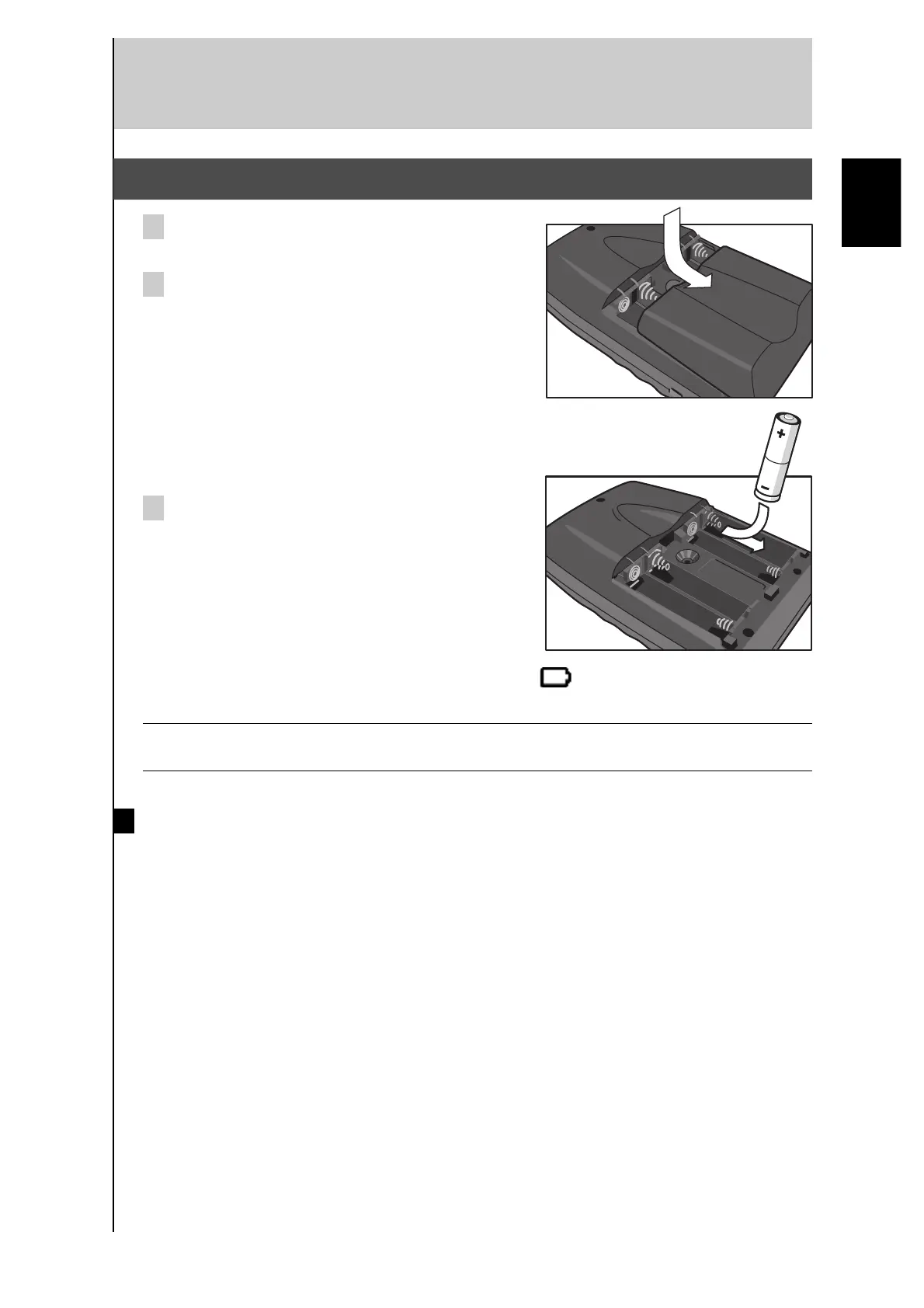
2. Installing the Batteries
1 Slide the battery door off the back of the Remote
Control.
2 Insert 4 AA batteries (included with the Remote
Control) as indicated on the bottom of the
battery compartment.
3 Slide the battery door back on.
After a few seconds, the Remote Control starts
up automatically and beeps twice to indicate
that it is ready to use.
When batteries are running low, the Low Battery icon flashes at the center top of the
display. Replace the batteries as soon as possible to ensure perfect performance.
Note The Remote Control retains all settings when the batteries have discharged or when you
remove and replace them. You will need only to reset the clock.
Notes on batteries
• Do not use old batteries together with new ones.
• Do not use different types of batteries (such as alkaline and manganese batteries)
together.
Read the packaging carefully as these different types of batteries may have the same
shape and color.
• Do not use rechargeable batteries.
• If the batteries have leaked, dispose of them immediately. Avoid touching the leaked
material or letting it come into contact with clothing, etc. Clean the battery compartment
thoroughly before installing new batteries.
English



 To Next Page