29
Getting the most out of it
Editing macros
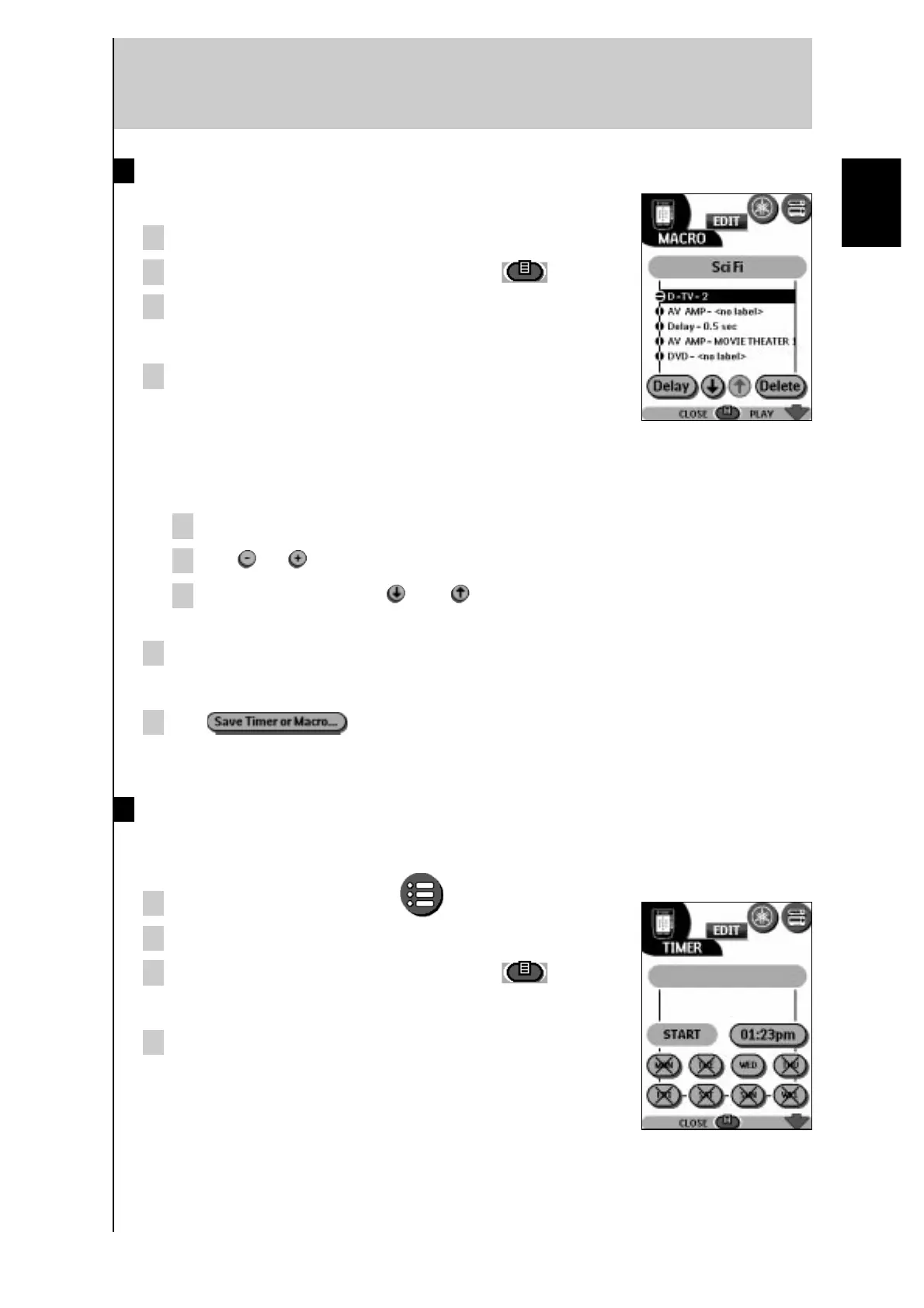
You can edit any macro you have recorded.
1 Open the macro group that contains the macro.
2 Switch to Edit mode via the Mode button
.
3 Tap the macro you want to edit.
The contents of the macro appear.
4 Edit the macro.
You can move or delete listed commands or record new
commands.
You can also add delays to the macro (for example, to insert a short pause between
turning on a device and sending commands to it, allowing the device to warm up).
1 Tap Delay.
2 Tap or to decrease or increase the length of the delay.
3 Use the arrow buttons and to move the delay to the right position in
the sequence.
5 Press the Left button to close the macro.
A confirmation screen appears that enables you to save or cancel the macro.
6 Tap .
The macro is ready for use.
Setting timers
To activate a device at a desired time, you can use the timer.
1 Tap the Macro menu button .
2 Open the macro menu and select a timer group.
3 Switch to Edit mode via the Mode button
.
Empty timer buttons appear in the timer control panel.
4 Tap the button for which you want to set a timer.
The first timer control panel appears, enabling you to set
the start time.
English



 To Next Page