10
RM-TT Installation Manual
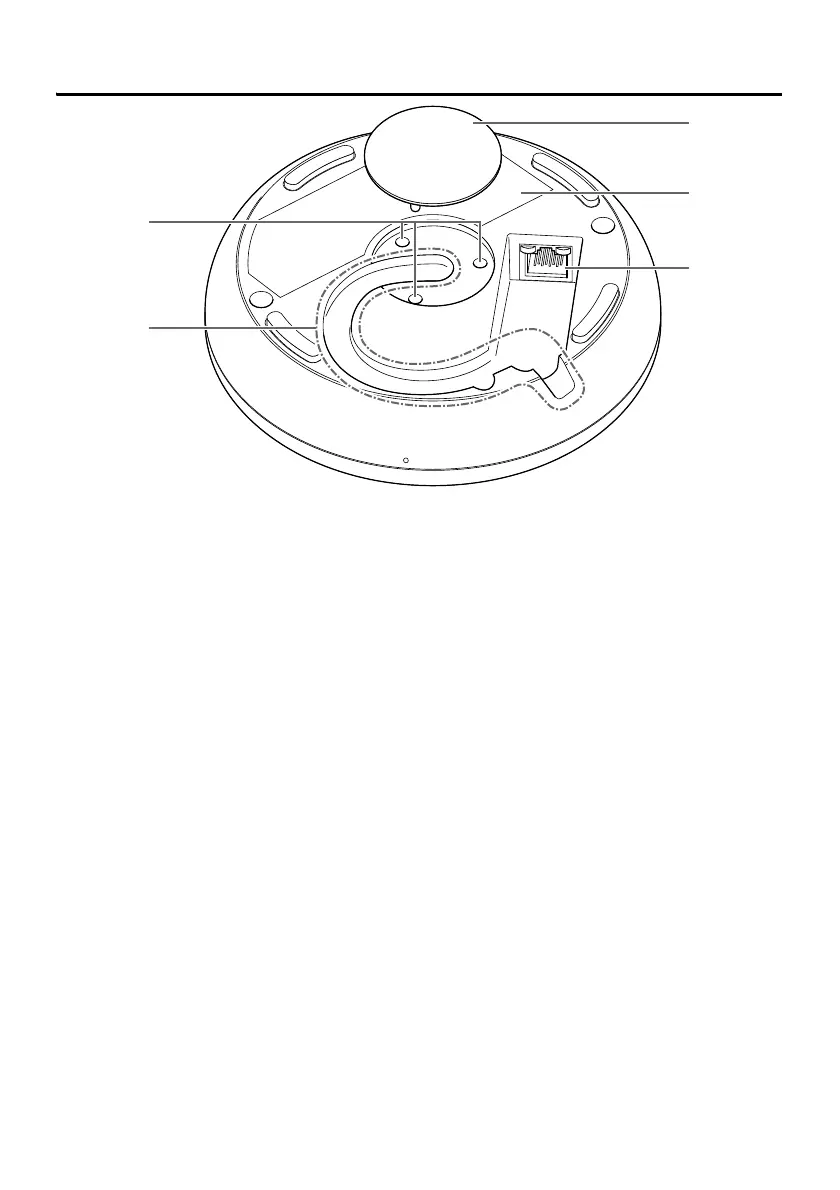
Bottom panel
1 Mounting screw holes
Use for installing the mounting screws.
2 Cable slot
Use for routing the LAN cable.
3 Cap
Remove when mounting this unit onto a table.
4 Product label
Provides information about this unit and marks of conformity with various standards.
5 Dante/PoE port
This is an RJ-45 port to which you can connect an LAN cable (CAT5e or higher) via an
IEEE802.3af compliant a PoE injector or the PoE network switch to a Dante unit. For
details on injectors, refer to the RM-TT Reference Manual.
NOTICE
: Do not connect this product to a public Wi-Fi and/or Internet service directly. Only
connect this product to the Internet through a router with strong password
protections. Consult your router manufacturer for information on optimum security
practices.
: Do not connect any device here other than a Dante-compatible device or a
device (including a computer) that supports gigabit Ethernet.



 To Next Page