English
9
RM-TT Installation Manual
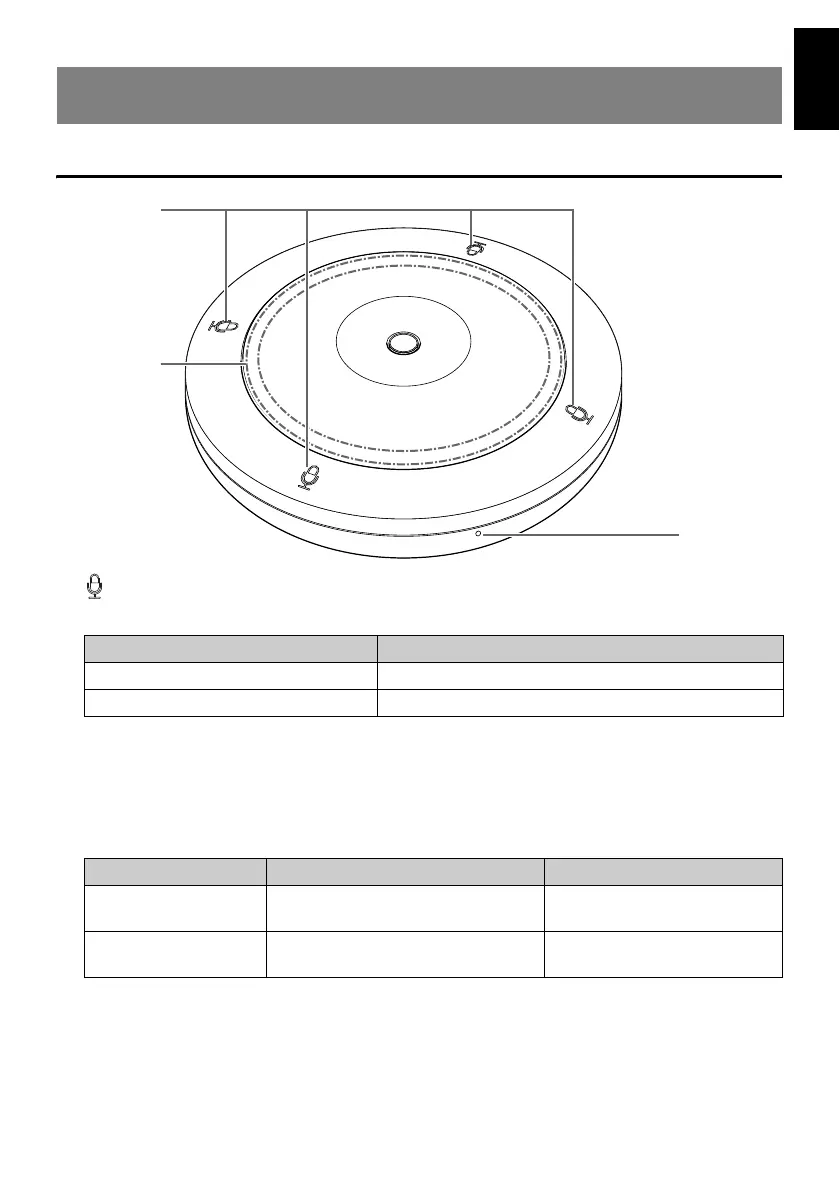
Top panel/side panel
1 (Mic) buttons/indicators
Touch a button to turn on/off the microphone. All four buttons/indicators work together.
2 STATUS indicator
Indicates the status of this unit using a color and flashing pattern. For details, refer to
the RM-TT Reference Manual.
3 RESET button
Use to reset the settings by long-pressing with a fine-tipped object, then releasing it.
CONTROLS AND FUNCTIONS
Mic indicator Microphone status
Green ON
Red OFF
Long press STATUS indicator Reset target
4 seconds to less than
8 seconds
Flashes blue twice per second
(during long-pressing/resetting)
Network-related settings
8 seconds to less than
12 seconds
Flashes blue three times per second
(during long-pressing/resetting)
All settings (automatically
restarts after reset)


 To Next Page