PREPARATIONS ➤ Connecting a TV En 40
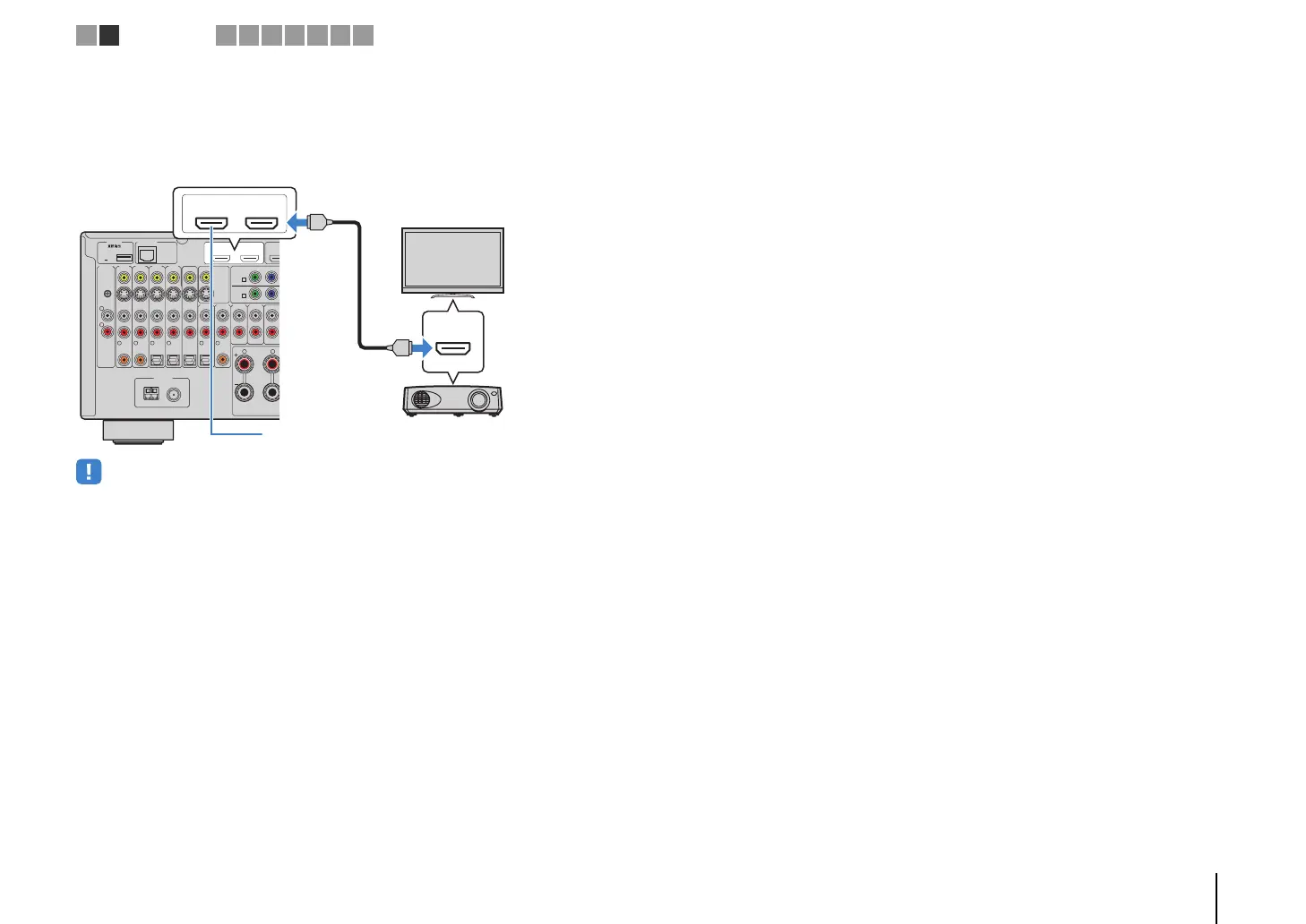
■ Connecting another TV or a projector
The unit has two HDMI output jacks. If you connect another TV or a projector to the unit
with an HDMI cable, you can switch the TV (or projector) to be used for watching
videos with the remote control (p.60).
• HDMI Control is not available on the HDMI OUT 2 jack.
• (RX-V3073 only)
If you set “HDMI OUT2 Assign” (p.123) in the “Setup” menu to “Zone2” or “Zone4”, you can connect a video
monitor for Zone2 or Zone4 to the HDMI OUT 2 jack and enjoy videos and audio using the video monitor
(p.89).
NETWORKDC OUT
5V
0.5A
( 3
NET
)
MONITOR OUT/
ZONE OUT
HDMI OUT
ARC
(ZONE OUT)
12
(1 BD/
AV 1
YPB
AV 1
A
AV 2
B
AV OUT
R
L
AV 3 AV 4AV 2AV 1
(1 BD/DVD)
OPTICAL
4
OPTICAL
3
COAXIAL
2
COAXIAL
1
PHONO
GND
OPTICAL
AUDI O 4AUDI O 3AUDI O 2AUDI O 1
(2 TV)
FRONT
SURROUND
R
5
COAXIAL
6
L
FM
75Ω
ANTENNA
AM
(4 RADIO)
HDMI
HDMI OUT
ARC (ZONE OUT)
12
HDMI
HDMI
The unit (rear)
HDMI OUT 2 jack
HDMI input
Projector
TV (already connected)
TV
1 2
TV connection
3 4 5 6 7 8 9


 To Next Page