EasyManua.ls Logo

Yamaha RX-V3800 - Service Manual

Yamaha RX-V3800
99 pages
Print Icon
To Next Page IconTo Next Page
Loading...
91
RX-V3800/DSP-AX3800
RX-V3800/
DSP-AX3800
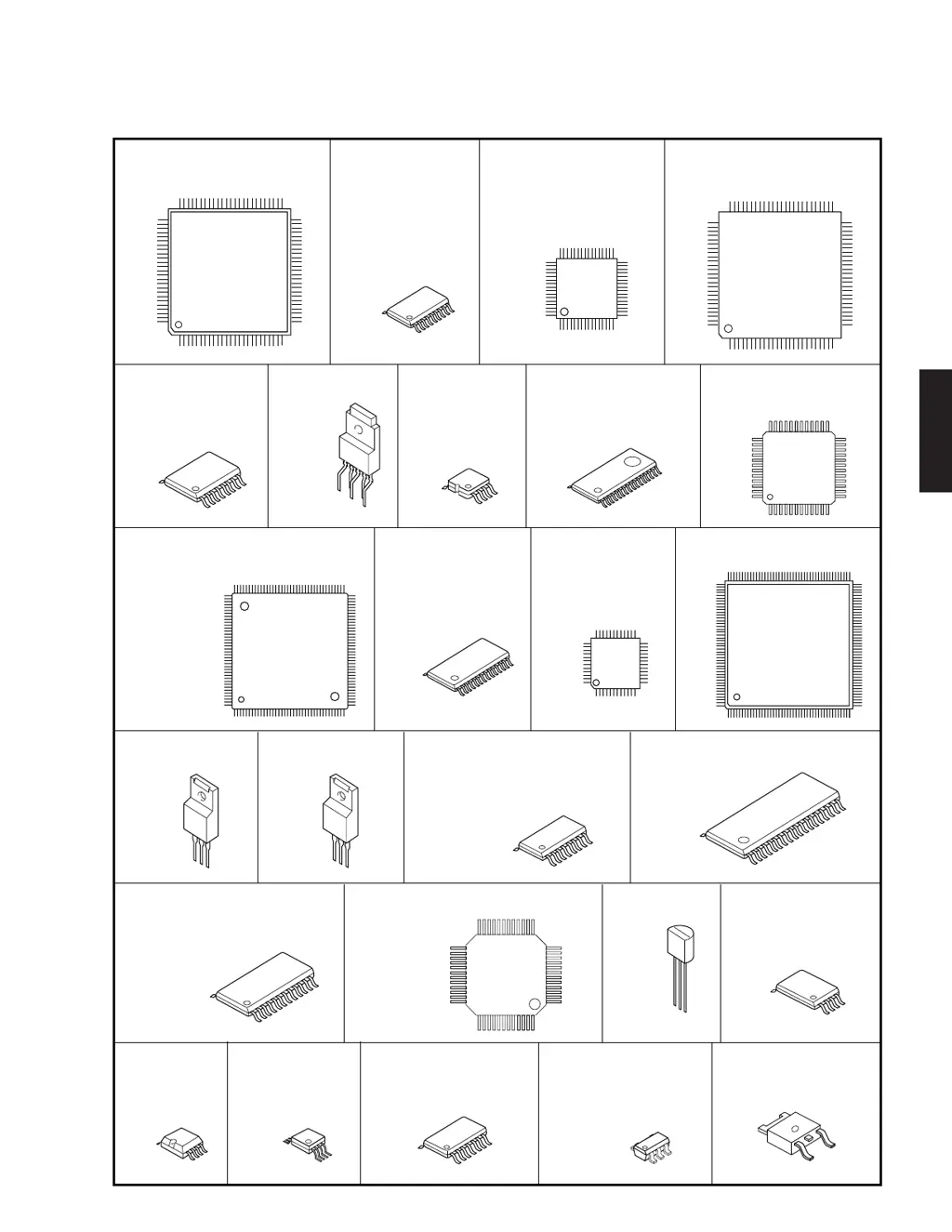
PIN CONNECTION DIAGRAMS
• ICs
1
12
1324
25
36
37 48
1
24
36
37
12
25
13
48
3:VOUT
1:VIN
2:GND
28
14
1
16
8
1
1
4
8
24
12
1
32
16
1
1
4
8
5
1
OUTPUT
INPUT
GND
OUT
COM
IN
+VS
GND
V
OUT
14
7
1
16
8
1
48
13
37
24
1
12
36
25
8
4
1
50
75
76
1
51
25
26
100
36
18
1
50
75
76
1
51
25
26
100
136
37
72
73108
109
144
1
3
4
5
18
9
1
1
4
8
144
45
89
88
132
133
176
116
17
32
3348
49
64
LC89057W-VF4AD-E
ABT1010PQ100A ADV7342BSTZ
SiI9134CTU
ADV7401BSTZ-80
F2621E-01-TR IP00C772DSD1791DBR
AK4384ET BD3841FS
YAC523-EVR2
BA00JC5WT-V5
CD4051BNSR
BA15218F CXB1442AR-T4
ADM222ARZ
D70YE101BRFP266
M3087BFKBGP
M30845MW-001-GP
KIA79M05PI-UKIA7809API-U/P LA7106M-TLM-E
MM74HC4051SJX
MM74HC4053SJX
SN74CBT3253CPWR
LA73054-TLM-E
LA73050-TLM-E
LA73053-TLM-E
LC72722PM
LC709004A-TLM-E
YAC526-EZE2
LC74782JM-8A16-
TLMC
NE5532DR
TC7SET32FU
NJM2885DL1-33NJM2068MD-TE2
LM61CIZ
NJM2581M
TC74VHCU04FT
M24C02-WDW6TP
NJM2867F3-05
TC7SET08FU
TC74VHCT08AFT
TC7SET125FU

Other manuals for Yamaha RX-V3800

Questions and Answers

  • S
    Stephanie EdwardsSep 18, 2025
    How do I get sound from surround back speakers on my Yamaha RX-V3800 Receiver?
    • D
      Derrick GrimesSep 18, 2025
      To get sound from the surround back speakers on your Yamaha Receiver, set “Surround Back” to a setting other than “None” in the speaker settings.
  • J
    Jason CooperAug 25, 2025
    Why does the sound suddenly go off on my Yamaha RX-V3800 Receiver?
    • C
      clarkjuliaAug 25, 2025
      If the sound suddenly goes off on your Yamaha Receiver, it might be due to the activation of the protection circuitry, possibly due to a short circuit. Check that the speaker impedance setting is correct.
  • A
    Amber JonesAug 25, 2025
    What to do if Yamaha RX-V3800 Receiver fails to turn on?
    • G
      Gina Brown PhDAug 26, 2025
      If your Yamaha Receiver fails to turn on or enters standby mode shortly after being powered on, ensure the power cable is firmly connected. Also, check that the speaker impedance setting matches your speakers. Secure all speaker wire connections, making sure the wires don't touch anything other than their respective connections. If the unit experienced a strong electric shock, put it in standby mode, disconnect the power cable, wait 30 seconds, and then plug it back in.
  • A
    angelawintersAug 27, 2025
    Why is my Yamaha Receiver remote control not working?
    • D
      Denise GreenAug 27, 2025
      If the remote control for your Yamaha Receiver isn't working properly, replace the batteries. Also, make sure the remote controls are placed at the proper distance from the unit.
  • H
    hilldennisSep 18, 2025
    What to do if my Yamaha RX-V3800 fails to turn on?
    • W
      William HubbardSep 18, 2025
      If your Yamaha Receiver fails to turn on or enters standby mode shortly after being powered on, it might be due to several reasons. First, ensure the power cable is firmly connected. If that's not the issue, check the speaker impedance setting and adjust it to match your speakers. Also, inspect all speaker wire connections to ensure they are secure and not touching anything other than their respective connections. Finally, if the unit has experienced a strong electric shock, try setting it to standby, disconnecting the power cable, waiting 30 seconds, and then plugging it back in.
  • C
    cgomezSep 23, 2025
    Why no sound from surround speakers on my Yamaha RX-V3800?
    • M
      Michael CarrilloSep 23, 2025
      If you're not hearing any sound from the surround speakers on your Yamaha Receiver, and the unit is in “STRAIGHT” mode while playing a monaural source, press PSTRAIGHT on the front panel to disable “STRAIGHT” mode. Also, verify that “Surround” in “Speaker Set” is not set to “None”; if it is, set it to “Small” or “Large”.
  • K
    Kayla HaleSep 9, 2025
    Why does my Yamaha RX-V3800 suddenly go into standby mode?
    • J
      Jennifer LivingstonSep 9, 2025
      If your Yamaha Receiver suddenly enters standby mode, it may be due to overheating. Wait about 1 hour for the unit to cool down, and then try turning it back on.
  • J
    James MillerSep 10, 2025
    How to fix 'CHECK SP WIRES' on Yamaha Receiver?
    • W
      waretiffanySep 10, 2025
      If your Yamaha Receiver displays 'CHECK SP WIRES' on the front panel, it indicates that the speaker cables are short-circuited. Ensure all speaker cables are correctly connected.
  • V
    Victor TorresSep 3, 2025
    What to do if my Yamaha RX-V3800 Receiver fails to turn on or enters standby mode?
    • A
      Alexis BartlettSep 3, 2025
      If your Yamaha Receiver fails to turn on or enters standby mode shortly after being powered on, consider the following: * Ensure the power cable is firmly connected. * Verify that the speaker impedance setting matches your speakers. * Check speaker wire connections to ensure they are secure and not touching anything other than their respective connections, as the protection circuitry may have been activated. * If the unit was exposed to a strong electric shock, set it to standby mode, disconnect the power cable, wait 30 seconds, and then plug it back in.
  • C
    Cody CoxSep 1, 2025
    How to stop a humming sound from my Yamaha RX-V3800 Receiver?
    • A
      Aaron MooreSep 1, 2025
      To address a humming sound coming from your Yamaha Receiver, ensure the audio cables are firmly connected. If the problem persists, the cables may be defective.

Summary

Pin Connection Diagrams

Printed Circuit Boards

DSP PCB (Side A)

Layout of the Digital Signal Processor Printed Circuit Board on Side A.

DSP PCB (Side B)

Power Systems

D-VIDEO 1;5

Replacement Parts List

Electrical Component Parts

List of electrical components with warnings and special characteristics.

P.C.B. DSP

P.C.B. FUNCTION

P.C.B. OPERATION

P.C.B. MAIN

P.C.B. POWER

P.C.B. A-VIDEO

P.C.B. D-VIDEO

P.C.B. FL

P.C.B. NET

Overall Assembly

Accessories

Front Panel and Sub Chassis Unit

Amp Unit

Remote Control

Advanced Setup Menu

System Settings

Settings for speaker impedance, remote sensor, and RS-232C.

Schematic Diagrams

DSP 2;3

DSP 3;3

FUNCTION 1;4

FL 1;2

FL 2;2

NET 1;2

NET 2;2

Key Layout

Source-ity Mode for Code

Schematic Diagrams & Remote Control

Yamaha RX-V3800 Specifications

General IconGeneral
Audio Channels7.1
Amplifier TypeDiscrete
THD (Total Harmonic Distortion)0.04%
Signal-to-Noise Ratio100 dB
HDMI Inputs4
HDMI Outputs2
HDMI Version1.3a
Dolby DigitalYes
DTSYes
Surround SoundYes
Component Video Input3
Component Video Output1
S-Video Input4
S-Video Output1
Composite Video Input5
Composite Video Output1
Digital Audio Input (Coaxial)3
Analog Audio Input6
Weight37.5 lbs
Input Sensitivity200 mV
Power Output140 Watts (8 ohms, 20 Hz - 20 kHz, 0.04% THD, 2 channels driven)
Frequency Response10 Hz - 100 kHz

Related product manuals