8
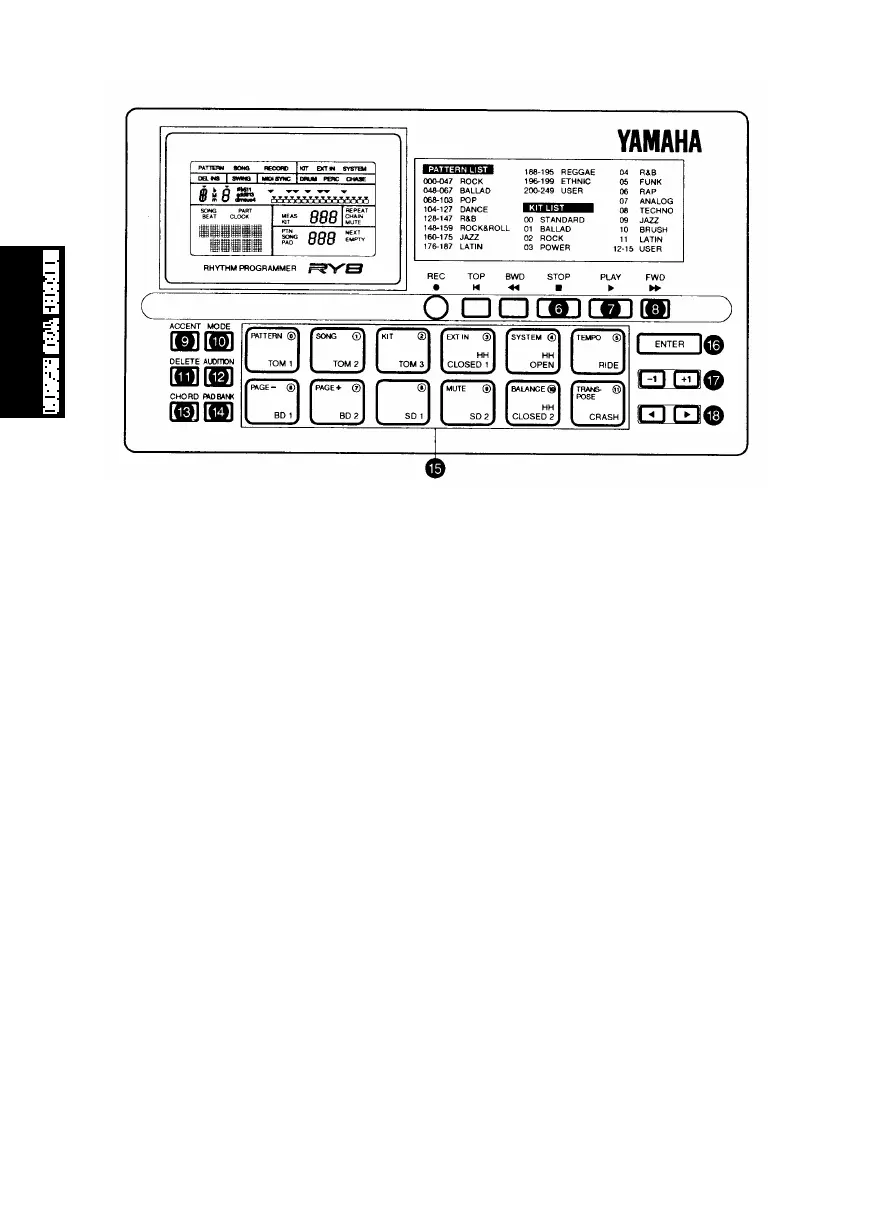
6 [STOP] BUTTON
For stopping the song or pattern playback or realtime recording.
7 [PLAY] BUTTON
For starting song or pattern playback or realtime recording from the current
measure location. Pressing [PLAY] immediately after pressing [STOP] will
continue the song or pattern playback from the stop location. To start the song
or pattern from the beginning, or the top, press [TOP] before pressing [PLAY].
8 [FWD] BUTTON
For fast-forwarding the song through a series of measures when the song
playback is stopped. Pressing [FWD] in Pattern Play Mode returns the pattern
measure location to the top, or the first measure. Pressing [FWD] in Pattern
Record Mode lets you select the clock position.
9 [ACCENT] BUTTON
For adding an accent to a drum beat, by pressing and holding [ACCENT] while
hitting a drum pad. In Pattern Step Record Mode, you can record an accent by
simply pressing [ACCENT] at the desired drum beat clock location. You can
assign the accent level for each drum pad of a User drum kit in Drum Kit Mode.
0 [MODE] BUTTON
For accessing the various modes, by pressing and holding down [MODE] while
pressing a mode button, and for accessing the various functions within each
mode, by holding down [MODE] while pressing [PAGE-] and [PAGE+].
PRECOTION.QX99.11.176:47PMページ8



 To Next Page