26
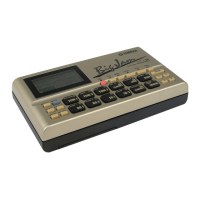
■ To exit Mute mode, hold [MODE] and press [PATTERN].
9. PLAYING THE PRESET SONGS
The Preset songs are intended as music style ideas to get you started, or to
play along with as is. There are 50 Preset songs (#00 ~ #49), covering many
different popular styles of music.
■ To select a Preset song, first enter Song Mode by holding [MODE] and
pressing [SONG]. Next, hold [MODE] and press [PAGE-] once or more to
access the Song Select function; Song Select is the first function in Song
Mode.
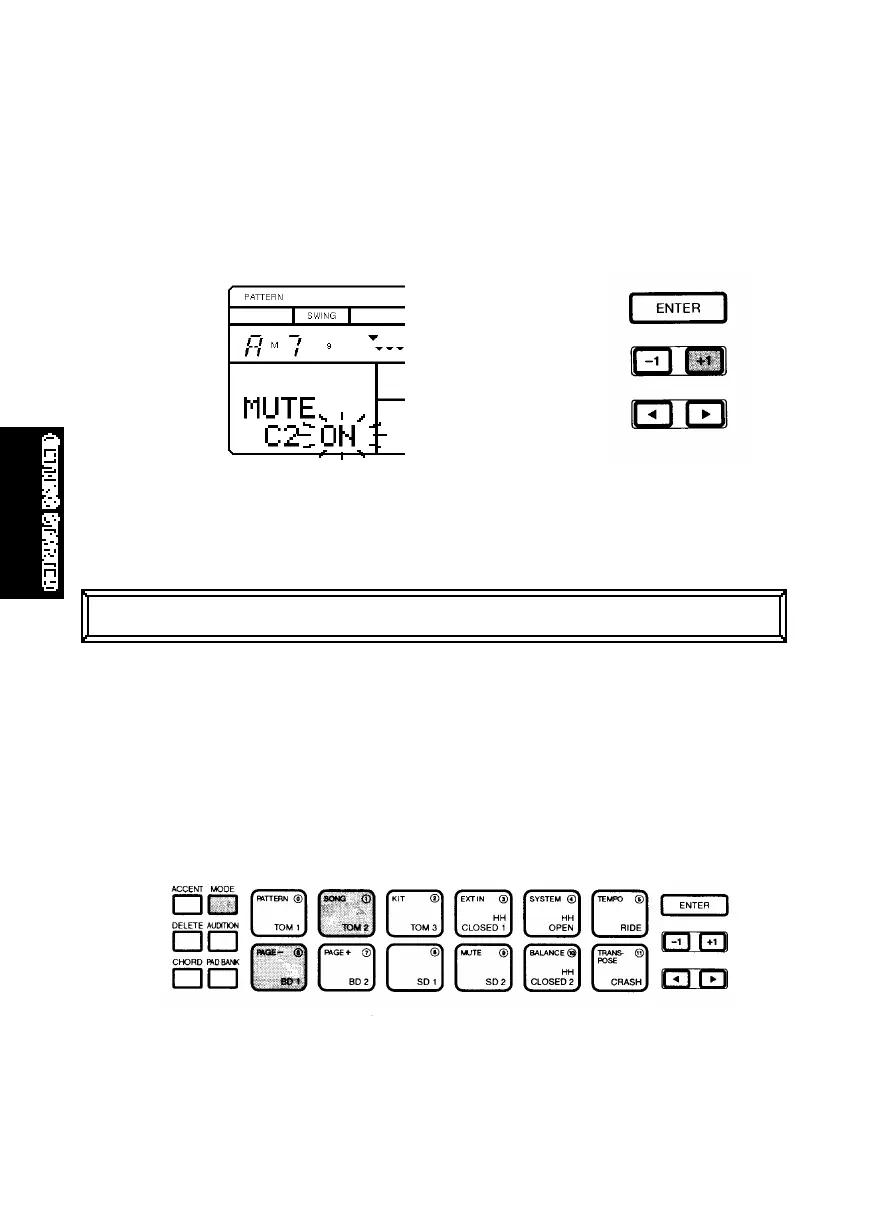
Bass Track Mute (“B”) is the first function, Chord 1 Track Mute (“C1”) is the
second function, and Chord 2 Track Mute (“C2”) is the third function in Mute
Mode. The words “MUTE B (or C1 or C2) OF” will appear on the LCD to indicate
that you have accessed the desired Track Mute function, and that it is turned
off. To turn it on, press [+1]. The word “ON” will appear in the LCD, and the track
will stop playing. (To turn the track Mute function off again, press [-1].)
■ The word “SONG” (located above a two-digit number in the lower left area of
the LCD) will be flashing, indicating that you can change the song number.
GETTINGSTARTED.QX99.11.175:38PMページ26



 To Next Page