36
Time Signature Quantization Factors
01/04 12, 16, 24, 32
02/04 12, 16, 24, 32
03/04 12, 16
04/04 12, 16
05/04 12
01/08 16, 24, 32
03/08 16, 24, 32
05/08 16, 24
07/08 16
01/16 16, 32
03/16 16, 32
05/16 16, 32
07/16 16, 32
09/16 16
11/16 16
13/16 16
15/16 16
ASSIGNING THE TIME SIGNATURE
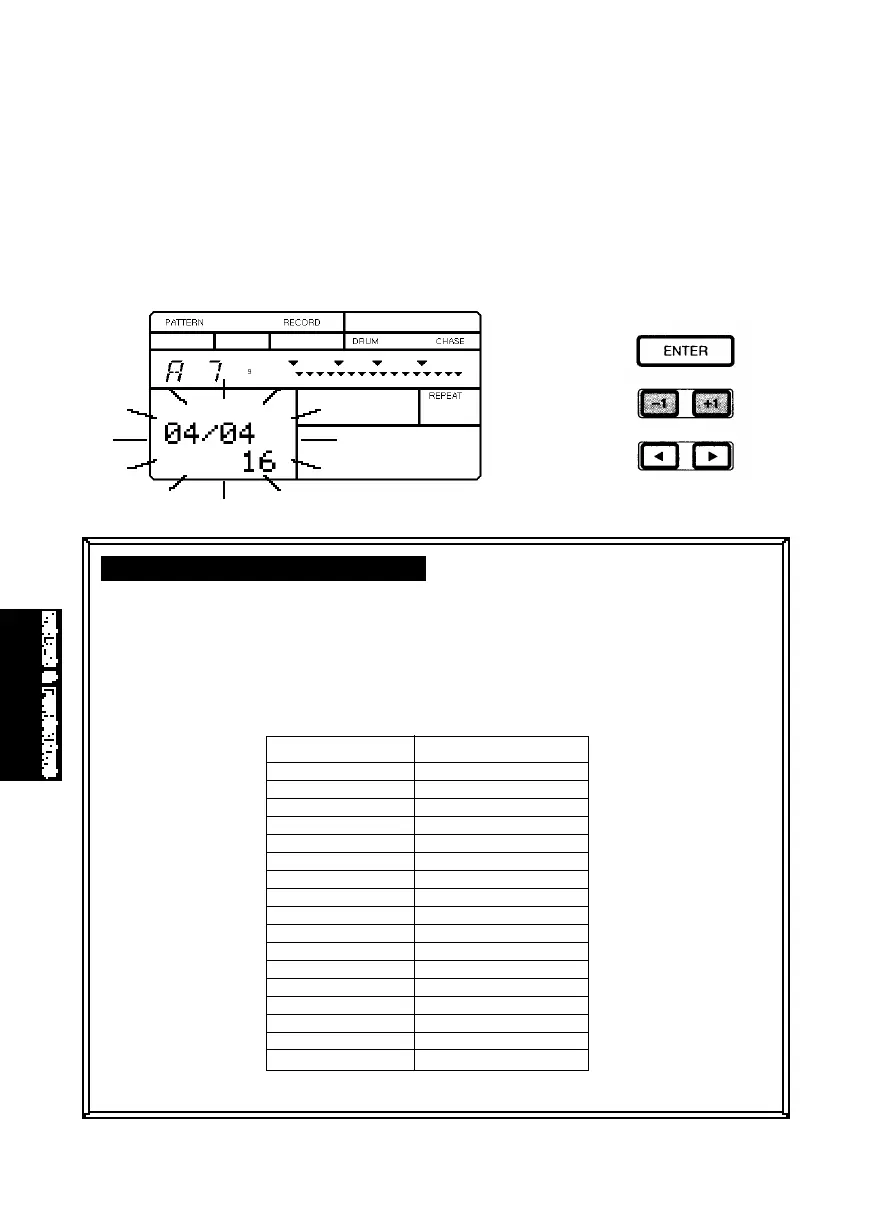
■ DESIGNATING THE METER - If you want to create a pattern from scratch with
a specific time signature, you must first designate the meter for an empty
User pattern while still in Pattern Record Standby Mode—i.e., before initiating the
Step or Realtime recording operation. Hold [MODE] and press [PAGE+].
The default meter setting will be flashing. To designate a different meter,
press [-1] and [+1]. To return to Record Standby Mode, hold [MODE] and
press [PAGE-].
You cannot change the time signature for an existing pattern. You can only
assign a time signature to an empty User pattern. You can designate both
time signature and quantization factors according to the following table:
MODES&FUN.QX99.11.176:01PMページ36



 To Next Page