39
ADDING ACCENTS TO THE RHYTHM
You can record and delete accents the same way as recording and
deleting drum beats—by using the [ACCENT] button. (You can assign
accent levels to the pads for User drum kits. For details, see page 59.)
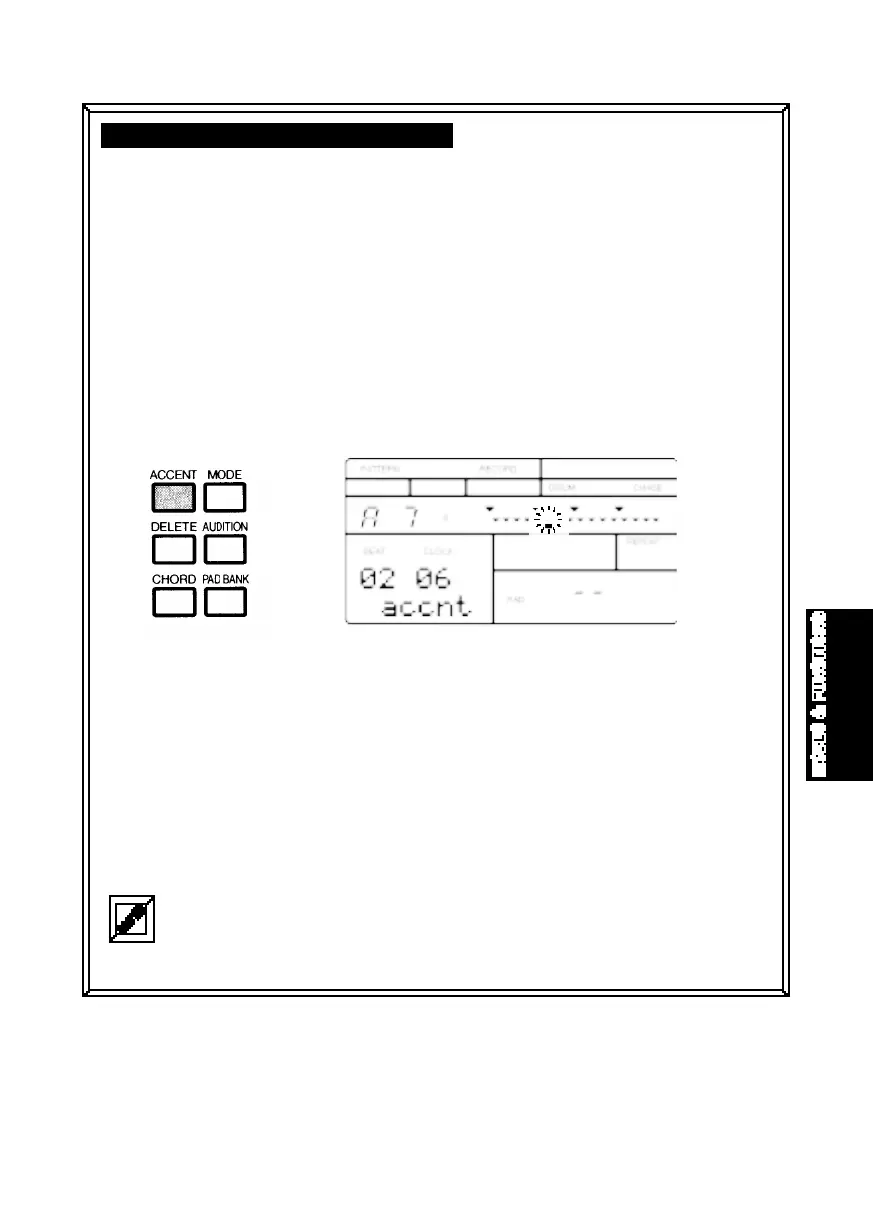
■ ADDING AN ACCENT - In Pattern Play Mode, you can add an accent as
you play the pads in realtime, by holding [ACCENT] and pressing a drum
pad. In Record Mode, pressing [ACCENT] will record an accent at the
current clock position. The word “accnt” will appear on the LCD, indicating that
you have accessed Accent Assign. (To exit Accent Assign, hold
[AUDITION] and press any
drum pad.)
■ AUDITIONING ACCENTS - In either Step or Realtime Record Mode, you
can audition the accents without entering accent data. Hold [AUDITION]
and press [ACCENT] to visibly confirm the accentuated voices.
■ DELETING ACCENT DATA - In either Step or Realtime Record Mode, you
can delete an unwanted accent by holding [DELETE] and pressing
[ACCENT] at the desired clock location.
In Step Record Mode, there’s also another way to delete an unwanted accent. First, audition the
accent by holding [AUDITION] and pressing [ACCENT]. The black data squares representing the
accent locations will appear beneath the clock position indicators in the LCD. Next, place the clock
position indicator at the desired location. Then, hold [DELETE] and press [ENTER].
MODES&FUN.QX99.11.176:02PMページ39



 To Next Page