PART NAMES AND FUNCTIONS
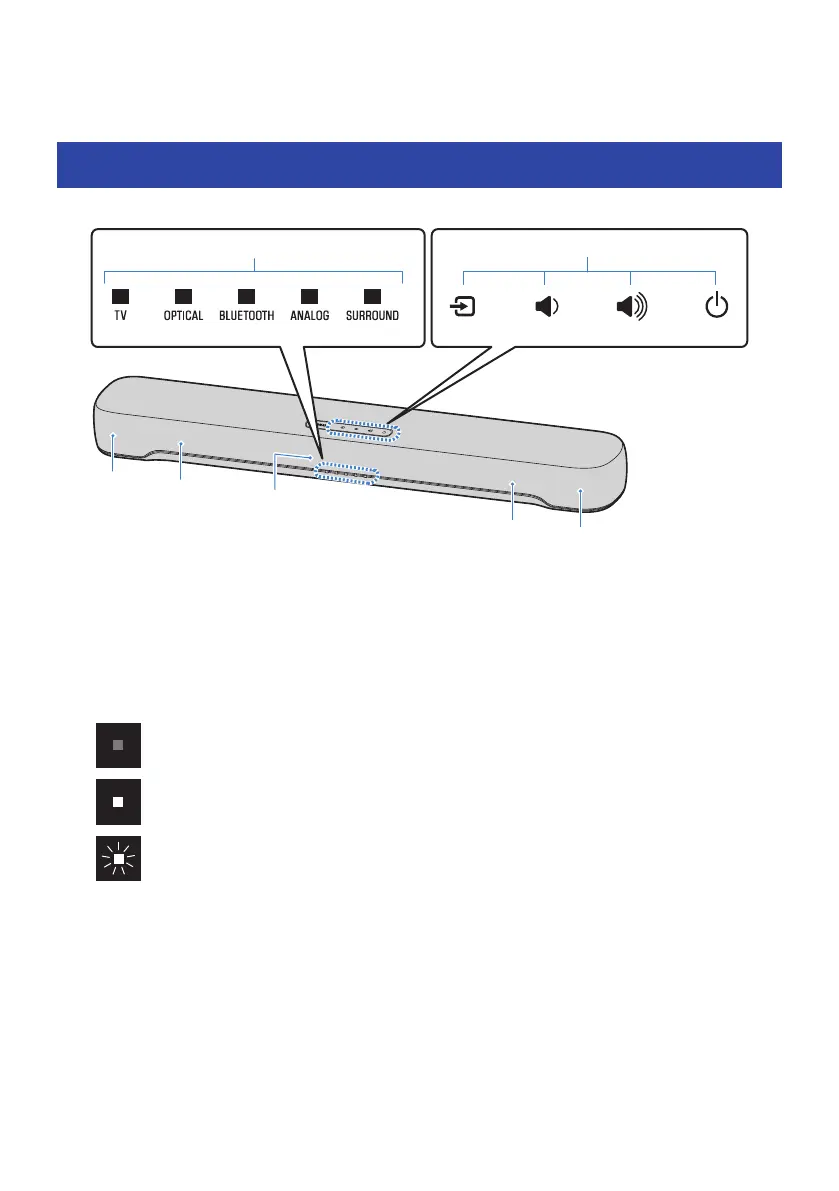
Part names of the sound bar (front/top)
This section describes the part names and functions of the front/top of the sound bar.
a
Indicators
The indicators on the top panel flash or glow to show the operation and setting status. During normal playback, the
setting status is indicated as follows:
TV/OPTICAL / BLUETOOTH / ANALOG: Selected input source
SURROUND: Surround playback (glowing) / Stereo playback (off)
NOTE
This document uses the following illustrations to show that indicators are off, glowing, or flashing.
b
Controls
Touch the symbols with your fingertip to control the sound bar.
y (Input): Select an input source (p.32).
} / { (Volume +/-): Adjust the volume (p.32).
z (Power): Turn the sound bar on and off.
c
Speakers
d
Built-in subwoofers
10
PART NAMES AND FUNCTIONS > Part names of the sound bar (front/top)


 To Next Page
 Loading...