23
Tyros3
30. Hard Disk Drive Unit
Turn the Tyros3’s power off, disconnect any cables including
AC power cord from the keyboard.
Also make sure to close the LCD panel and disconnect a
USB device from the USB TO DEVICE terminal.
Turn the Tyros3 face down on a blanket or some soft surface,
giving you direct access to the bottom of the instrument.
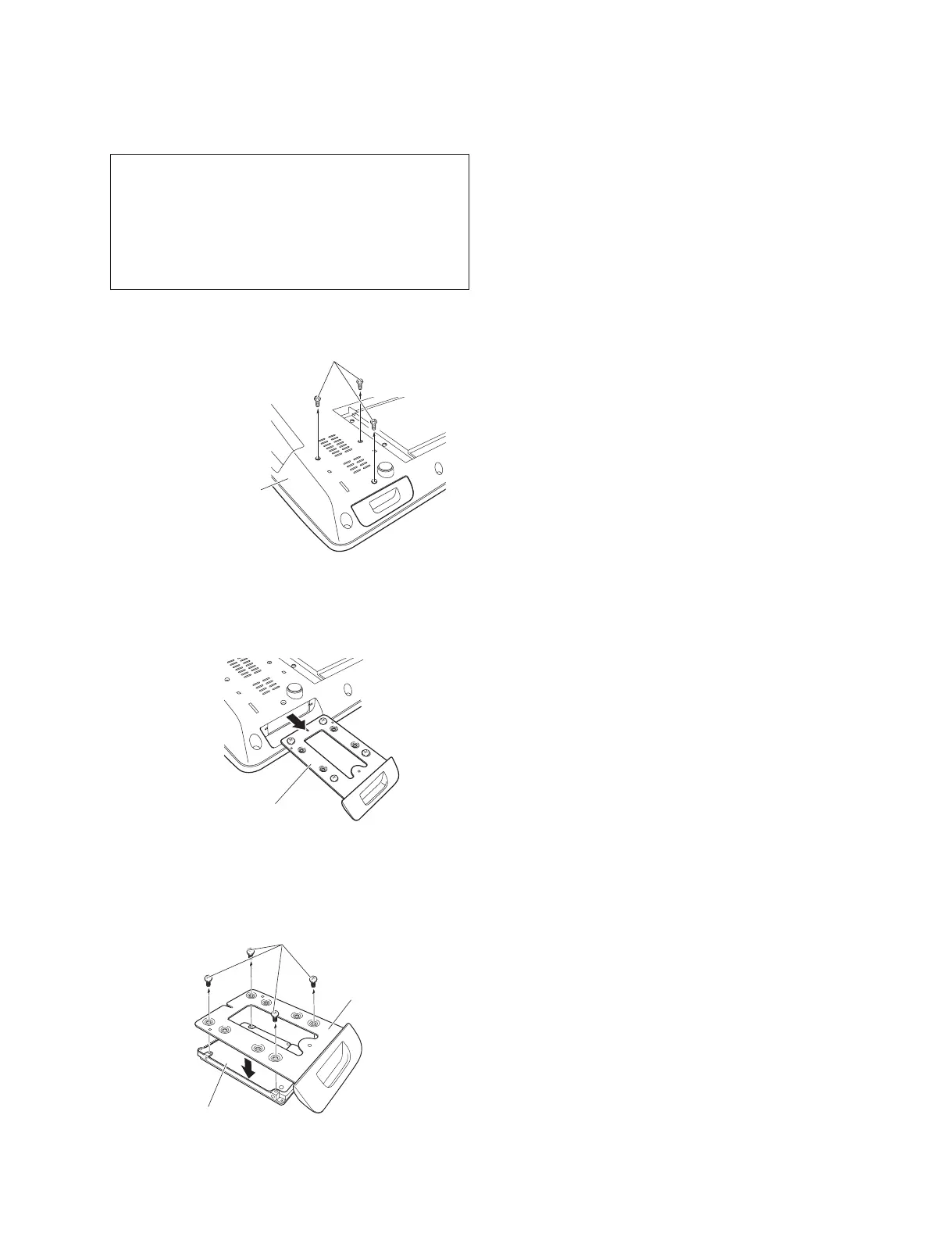
HDD BRACKET
[S02C]
LOWER CASE UNIT
30-1 Remove the three (3) screws marked [S02C].
(Fig. 1, Fig. 22)
30-2 Pull out the HDD bracket. (Fig. 23)
30-3 Remove the four (4) screws marked [S08]. The hard
disk drive unit can then be removed. (Fig. 24)
HDD BRACKET
[S08]
HARD DISK DRIVE UNIT
[S02C]: BIND HEAD SCREW 3.0X8 MFZN2B3 (WE983600)
Fig.22
Fig.23
[S08]: BIND HEAD SCREW 3.0X4 MFNI33 (VG048000)
Fig.24


 To Next Page