11
5.
Check the radio button to the left of “Search for the best driver for your device.
(Recommended).” Click [Next].
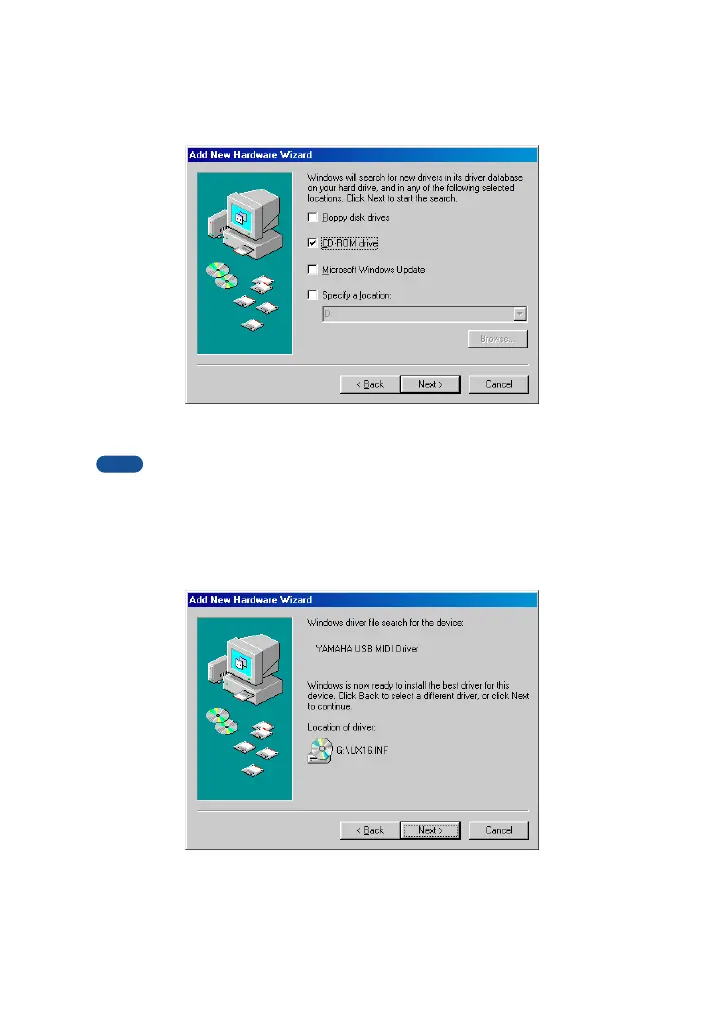
The system displays a screen that enables you to select a location in which to
install the driver.
6.
Check the “CD-ROM drive” box and uncheck all other items. Click [Next].
The system may ask you to insert a Windows CD-ROM while it checks for the driver.
Specify the root folder of the CD-ROM drive (such as D:\) and continue the installation.
7.
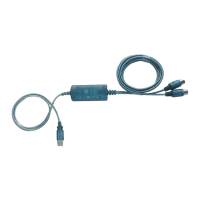
When the system detects the driver on the CD-ROM and is ready for installa-
tion, it displays the following screen.
Make sure that the “YAMAHA USB MIDI Driver” is listed, and click [Next]. The
system starts the installation.
NOTE


 To Next Page