7
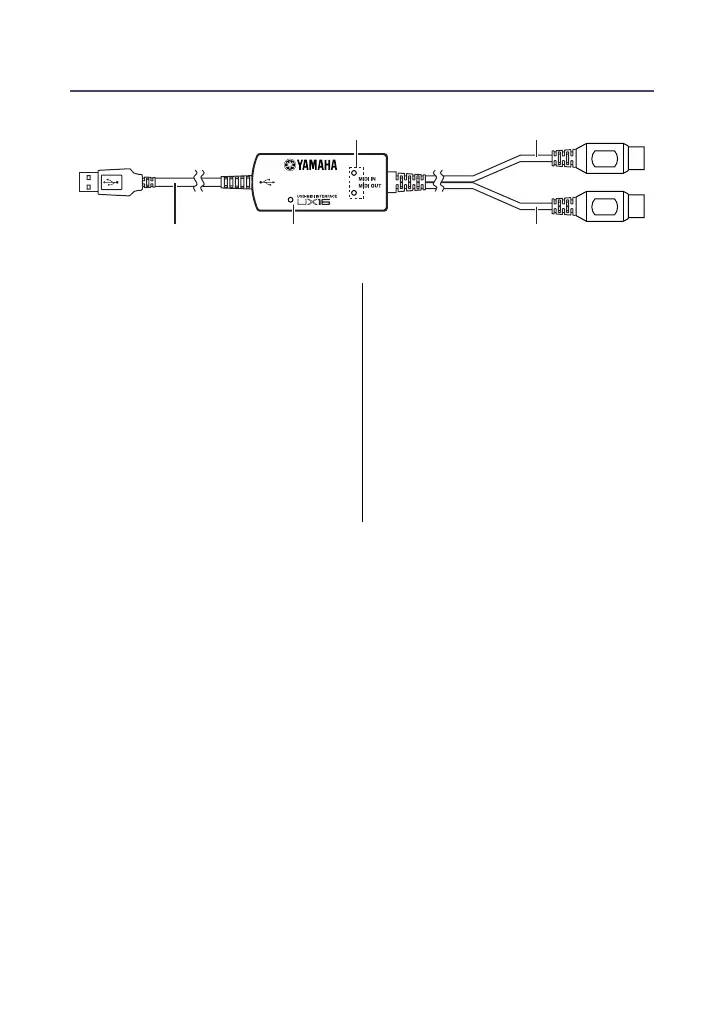
Parts and Functions
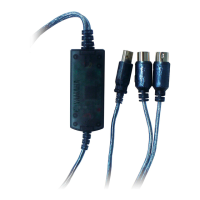
1
Power indicator
This will light when the USB
terminal is connected, supplying
power to the UX16.
2
MIDI IN/OUT indicators
These indicators will light when
MIDI messages pass through the
corresponding cable.
3
USB cable
Connect this to the USB terminal of
your computer or USB hub.
4
MIDI IN cable
This cable receives MIDI messages
from your keyboard or other MIDI
device. Connect it to the MIDI OUT
terminal of your MIDI device.
5
MIDI OUT cable
This cable transmits MIDI messages
to your tone generator or other
MIDI device. Connect it to the MIDI
IN terminal of your MIDI device.
IN
OUT
3 1 5
4
2


 To Next Page