Instrument and control functions
4-9
1
2
3
4
5
6
7
8
9
10
11
12
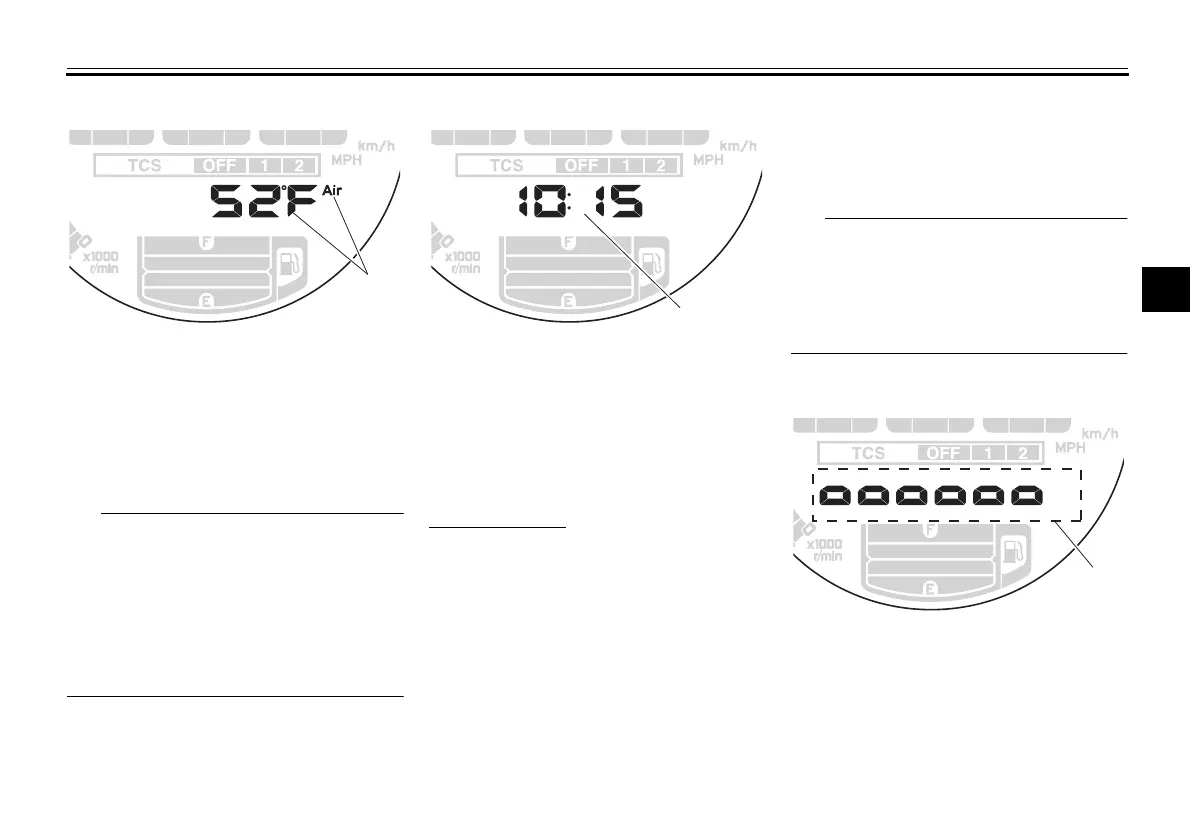
Air temperature
This display shows the air temperature
from 14 F to 210 F in 1 F increments.
The temperature displayed may vary
from the actual ambient temperature.
When the air temperature is below
14 F, “Lo” will be displayed.
The accuracy of the temperature
reading may be affected when rid-
ing slowly (under 20 km/h [12 mi/h])
or when stopped at traffic signals,
railroad crossings, etc.
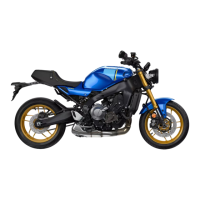
Clock
The clock uses a 12-hour time system.
When the vehicle is turned off, the clock
can be viewed by pushing the bottom
set button.
To set the clock
1. Turn the main switch on.
2. Switch the display to the clock.
3. Push the bottom set button and top
set button together for two sec-
onds and the hour digits will start
flashing.
4. Push the top set button to set the
hours.
5. Push the bottom set button and the
minute digits will start flashing.
6. Push the top set button to set the
minutes.
7. Push the bottom set button to con-
firm settings and start the clock.
When setting the hours and minutes,
push the top set button briefly to in-
crease the increment value one by one,
or push and hold the button to increase
the increment value continuously.
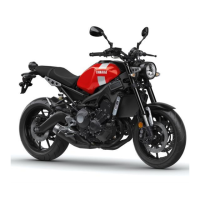
Display brightness
The brightness level of the multi-func-
tion meter unit panel can be adjusted to
six brightness level settings.
1. Air temperature display
1
1. Clock
1
1. Brightness level display
BAE-28199-12.book 9 ページ 2020年7月28日 火曜日 午前10時8分





 To Next Page