Instrument and control functions
4-10
1
2
3
4
5
6
7
8
9
10
11
12
To adjust the brightness
1. Turn the main switch off.
2. Push and hold the bottom set but-
ton.
3. Turn the main switch on and con-
tinue pushing the bottom set but-
ton until the display switches to the
brightness level display.
4. Push the top set button to set the
brightness level.
5. Push the bottom set button to con-
firm the selected brightness level
and exit the brightness level dis-
play.
EAU47636
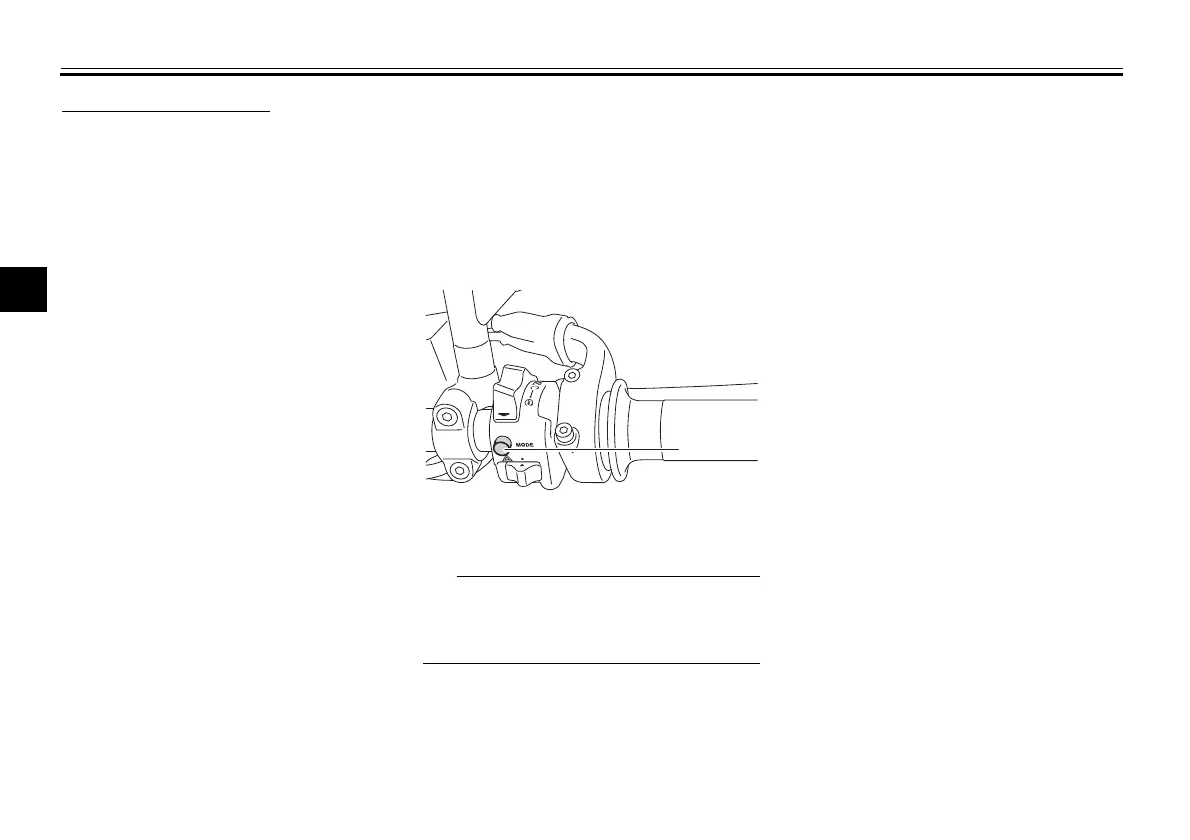
D-mode (drive mode)
D-mode is an electronically controlled
engine performance system with three
mode selections: “STD”, “A”, and “B”.
Push the drive mode switch “MODE” to
switch between modes. (See
page 4-12.)
Before using D-mode, make sure you
understand its operation along with the
operation of the drive mode switch.
Mode “STD”
Mode “STD” is suitable for various rid-
ing conditions.
This mode allows the rider to enjoy
smooth and sporty drivability from the
low-speed range to the high-speed
range.
Mode “A”
Mode “A” offers a sportier engine re-
sponse in the low- to mid-speed range
compared to mode “STD”.
Mode “B”
Mode “B” offers response that is some-
what less sharp compared to mode
“STD” for riding situations that require
especially sensitive throttle operation.
1. Drive mode switch “MODE”
BAE-28199-12.book 10 ページ 2020年7月28日 火曜日 午前10時8分





 To Next Page