EasyManua.ls Logo

Yamaha YID-W10 - User Manual

Yamaha YID-W10
13 pages
Print Icon
To Next Page IconTo Next Page
Loading...
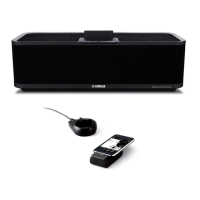
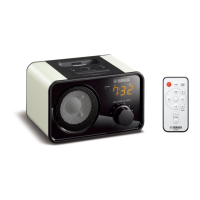
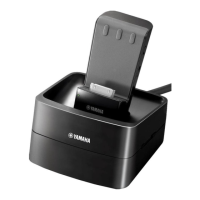
YID-W10
Wireless System for iPod
Système sans fil pour iPod
OWNER’S MANUAL
MODE D’EMPLOI
English
Français
UC

Questions and Answers

  • S
    Savannah VargasAug 18, 2025
    How to troubleshoot no sound from iPod/iPhone on Yamaha YID-W10 Docking Station?
    • C
      coffeymarcusAug 19, 2025
      If you're not getting any sound from your iPod/iPhone when using the Yamaha Docking Station, first, ensure that your iPod/iPhone is playing audio, or try running the YouTube or other applications. Check that your iPod/iPhone is firmly connected to the transmitter. Also, verify that the battery of your iPod/iPhone is not empty; if it is, charge it.
  • L
    Lisa LittleAug 21, 2025
    Why isn't the Yamaha YID-W10 volume control working with my iPod?
    • S
      Steven BlevinsAug 21, 2025
      If the volume of your iPod/iPhone does not change when you operate the volume on your Yamaha component, it might be because wireless communications are established between the transmitter and multiple “AirWired” devices simultaneously. To resolve this, set the group IDs of the other “AirWired” devices to a different value.
  • Y
    Yvonne FosterAug 26, 2025
    What to do if the sound on my Yamaha Microphone system is interrupted?
    • J
      Joe RobersonAug 26, 2025
      If the sound from your Yamaha Microphone system is interrupted, it could be due to interference from devices operating in the 2.4 GHz frequency band, such as microwave ovens, cordless phones, or Wi-Fi devices. Try moving the YID-W10 away from these devices. The interruption could also be caused by obstructions blocking the signal from the transmitter, like your body, metallic objects, or walls. Adjust the transmitter's position to avoid these obstructions. Finally, the transmitter might be too far from the receiver; in this case, move the transmitter closer to the receiver.
  • K
    Kyle ManningAug 28, 2025
    What to do if my Yamaha Microphone system has no sound because of a communication error?
    • F
      fjohnsonAug 28, 2025
      If there is no sound, it may be due to a communication error between your iPod/iPhone and the transmitter of your Yamaha Microphone system. Reconnect your iPod/iPhone to the transmitter firmly. If this problem occurs frequently, disconnect your iPod/iPhone from the transmitter, restart the device, and then reconnect it firmly.
  • R
    Rachel FrancoAug 30, 2025
    What to do if controlling volume on iPod with Yamaha Microphone system does not work?
    • D
      Daniel KelleyAug 30, 2025
      If controlling the volume on your iPod with the Yamaha Microphone system isn't working, your iPod might be recognized as an unsupported model. Use an iPod that is supported by YID-W10. If your iPod is a supported model, try reconnecting it firmly to the transmitter. If this issue persists, disconnect your iPod, restart it, and then reconnect it firmly.
  • T
    Tracy WongSep 1, 2025
    Why is my Yamaha YID-W10 Docking Station outputting my iPhone's ringtone?
    • M
      Mary HolmesSep 1, 2025
      If the Yamaha Docking Station outputs a ringtone when your iPhone receives a call, and you wish to disable this, simply set your iPhone to silent mode.
  • H
    harmonmatthewSep 3, 2025
    How to fix no sound on Yamaha YID-W10 Docking Station?
    • J
      jessica90Sep 4, 2025
      If you're not getting any sound from your Yamaha Docking Station, and your iPod/iPhone is connected, make sure the volume isn't set to the minimum. Adjust the volume to an audible level. Also, ensure that your Yamaha component is turned on and the input source is correctly selected. Finally, check that earphones or other devices are not connected to your iPod/iPhone, as this may redirect the audio output.
  • W
    wesley69Sep 6, 2025
    What to do if Yamaha Docking Station sound is interrupted?
    • D
      Daniel ZimmermanSep 6, 2025
      If you are experiencing interrupted sound from your Yamaha Docking Station, it could be due to interference from other devices operating on the 2.4 GHz frequency band, such as microwave ovens, cordless phones, or Wi-Fi devices. Try moving the YID-W10 away from these devices. The signal from the transmitter might also be blocked by your body, metallic objects, or a wall. Adjust the position of the transmitter to avoid obstructions. Finally, ensure that the transmitter is not too far from the receiver; try moving it closer.
  • M
    malikwarrenSep 8, 2025
    Why Yamaha YID-W10 Docking Station has no sound?
    • B
      bethlawsonSep 8, 2025
      If you're experiencing no sound from your Yamaha Docking Station, ensure that the dock cable is securely connected to your Yamaha component. Also, verify that the group IDs of the transmitter and receiver are set to the same value. If the receiver isn't getting power from your Yamaha component, you may need to adjust the settings on your Yamaha component, referring to its owner’s manual for instructions.
  • N
    Nicole GonzalezSep 12, 2025
    Why can't I control the volume on my iPod with the Yamaha YID-W10?
    • R
      Richard AndersonSep 12, 2025
      If your iPod's volume control isn't working with the Yamaha YID-W10 Docking Station, it might be because your iPod is being recognized as an unsupported model. Ensure that you are using an iPod supported by the YID-W10. If your iPod is a supported model, try reconnecting it to the transmitter firmly. If the issue persists, disconnect your iPod, restart it, and then reconnect it firmly.

Summary

FCC Information

NOTICE

Equipment tested for Class B digital device compliance, potential interference.

FCC WARNING

Warning against modifications and co-location of transmitters.

Connection

Group ID setting

How to match group IDs between transmitter and receiver.

Playback

Troubleshooting

No Sound Issues

Addresses scenarios where no sound is produced.

Sound Interruption

Deals with issues of intermittent or broken sound.

Volume Control Problems

Covers issues with controlling volume via iPod/iPhone.

Limited Warranty

Yamaha YID-W10 Specifications

General IconGeneral
BrandYamaha
ModelYID-W10
CategoryDocking Station
LanguageEnglish

Related product manuals