EasyManua.ls Logo

Yamato DVS402 - Operation Mode Function Setting Keys and Characters

Yamato DVS402
47 pages
Print Icon
To Next Page IconTo Next Page
To Previous Page IconTo Previous Page
Loading...
15
4. Operating procedures
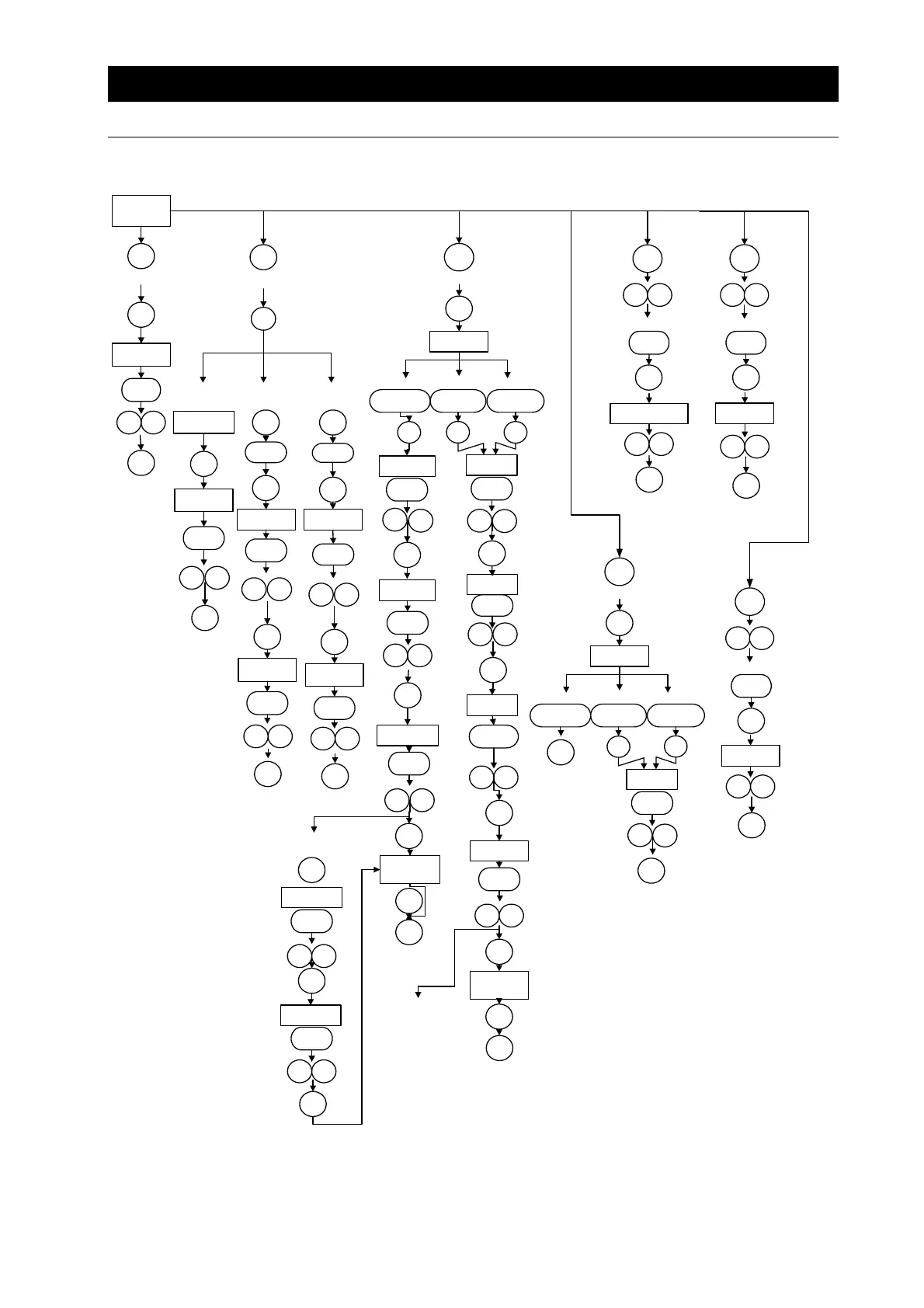
Operation modefunction setting keys and characters
Key operations and characters in the diagram below are used for operation mode and function
settings.
ELBON
Fixedtemp.
operation
FIXED
TEMP
Sv
RUN/
STOP
Temp.setting
Timer
operation
Settingoverheat
preventiondevice
Calibrationoffsetfunction
TIMER
TIMER
Fixedtemp.
operation
Quick/autostop
Autostart
One
sec.
RUN/
STOP
Sv
Temp.setting
tim
Timesetting
ENTER
One
sec.
Operation
start
Autostartof
operation
Settingoverheat
preventiondevice
temp.
Setting
compensation
temp.
PlusMinus
SUB
MENU
Operation
start
TIMER
TIMER
Timerstart
SUB
MENU
FIXED
TEMP.
Autostop
tim
Timesetting
AStP
ENTER
Sv
Temp.setting
tim
Timesetting
One
sec.
TIMER
AStr
Automatic
stopof
operation
oH
ENTER
cAL
PRO-
GRAM
Programming
PRO-
GRAM
Program1
Program2 Program3
ENTER
PrG1
30stepsx1pattern
PrG3
10stepsx3patterns
PrG2
15stepsx2patterns
Settingno.of
programsteps
End
Sv-1
Programmode
setting
Step1
Temp.setting
t-1
Step1
Timesetting
Presstoswitch
Temp.andtime
aresetinturn
foreachstep
ENTER
Programoperation
start
SUB
MENU
SUB
MENU
PS-n
SettingstepNo.
toreturn
SUB
MENU
Pc-n
Settingno.of
steprepetitions
Programrepeat
operation
PAt
Programpattern
select
Settingno.of
programsteps
End
Sv-1
Step1
Temp.setting
t-1
Step1
Timesetting
Temp.andtime
aresetinturn
foreachstep
Programrepeat
operation
(sameasleft)
Lockfunction
Locksetting
ENTER
OFF
ON
SUB
MENU
Lock
Operation
start
One
sec.
RUN/
STOP
RUN/
STOP
RUN/
STOP
RUN/
STOP
PRO-
GRAM
Program
operation
PRO-
GRAM
Program1
Program2 Program3
PrG1
30stepsx1pattern
PrG3
10stepsx3patterns
PrG2
15stepsx2patterns
Programmode
select
Presstoswitch
ENTER
PAt
Programpattern
select
RUN/
STOP
Operation
start
RUN/
STOP
Operation
start
ENTER
ENTER
ENTER
ENTER
ENTER
ENTER
ENTER
ENTER
ENTER
ENTER
ENTER
ENTER
ENTER
ENTER
ENTER
ENTER
ENTER

Related product manuals