17
Adjusting additional handle
1. Lift the quick-action clamp lever to release the additional handle .
2. Slide additional handle along the length of connecting rod to desired position and rotate
to the desired angle.
3. Fix the additional handle in place by pressing the quick-action clamp lever down .
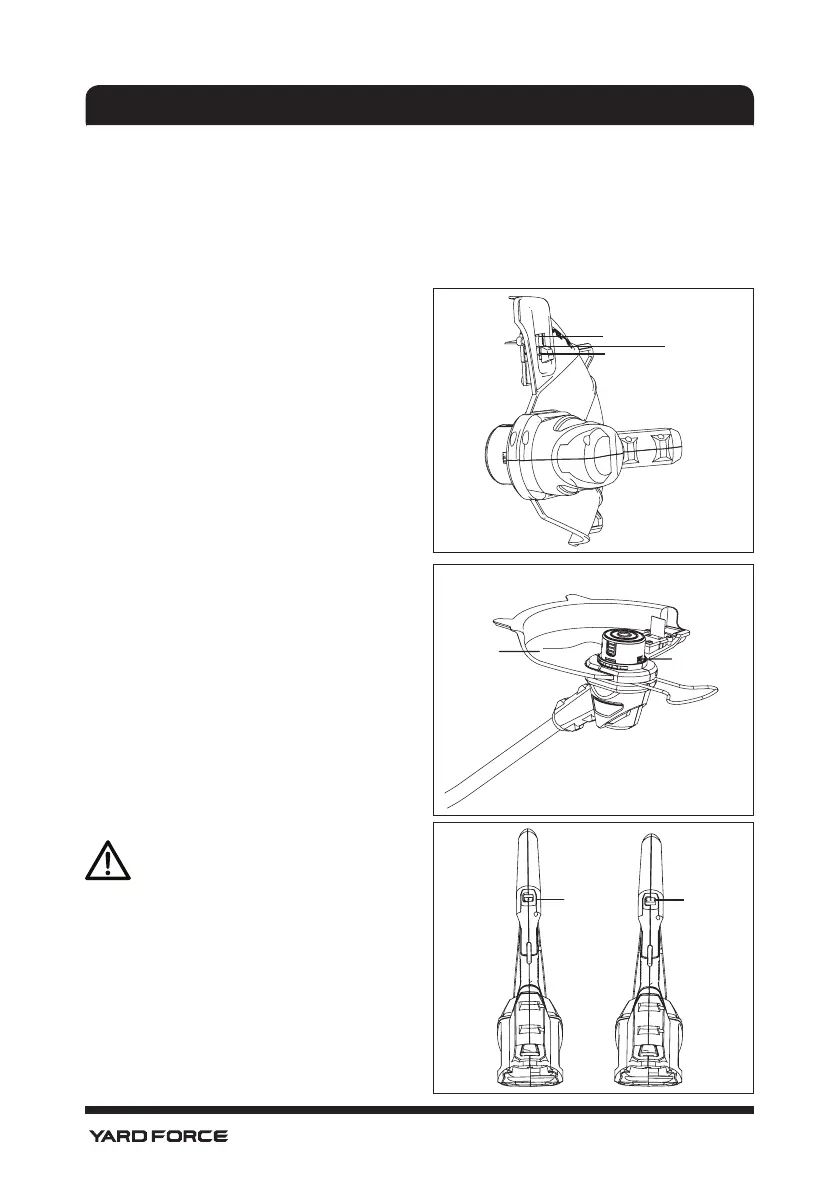
Fig 7
280 mm
300 mm
330 mm
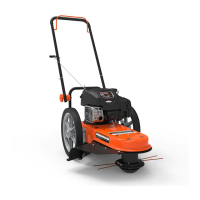
Fig 8
Nylon
line
Release
button
Adjusting cutting width
As shown in Fig7
This unit have three cutting diameter ,from
inside to outside, they are 280/300/330 mm .
To select one of them, just simply move the
select knob to required position.
Check Length Of Nylon Cutting
Line
As shown in Fig8
1. Pull line to inner edge of outer guard. If the
line is too short ,i.e. more than 50mm, from
inside edge of guard, press the release
button with one hand and pull out the nylon
line a few centimeters past the edge of the
guard with other hand at the same time .
2. Remove trimming blade guard.
NOTE! Only remove trimming blade
guard when all operation checks have
been carried out. Store trimming blade
guard after replacing new nylon cutting
line. When the trimmer starts, the line
will automatically be cut to the correct
length.
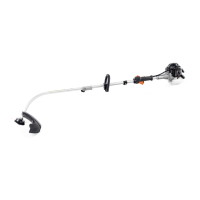
Dual Speed
As shown in Fig 9
“ 1” refers to low speed
“ 2” refers to high speed
Fig 9
Low
speed
High
speed
ADJUSTMENT


 To Next Page