EasyManua.ls Logo

Yard force LUV600Ri - User Manual

Yard force LUV600Ri
55 pages
Print Icon
To Next Page IconTo Next Page
Loading...
Nov. 2019
V2.0
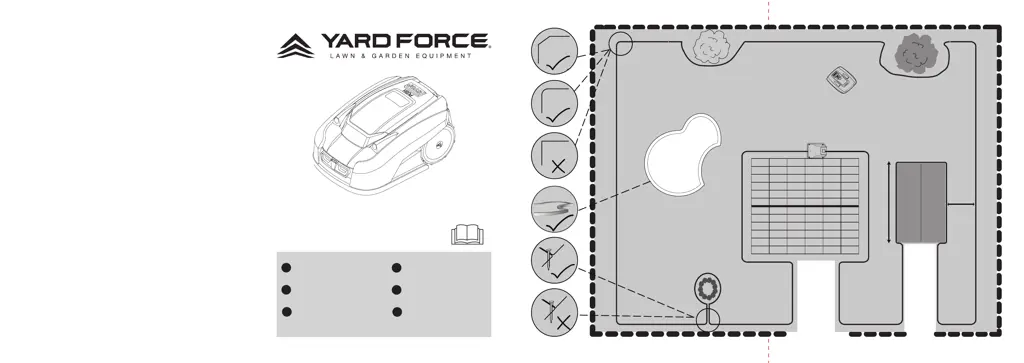
20-30cm
>2m
<8m
20-30cm
20-30cm
20-30cm
> 10 cm
ROBOTIC MOWER
Installation Guide
MÄHROBOTER
Installationsanleitung
ROBOT-TONDEUSE
Guide d’installation
ROBOTMAAIER
Gebruiksaanwijzing
ROBOSEKAČKA
Průvodce instalací
ROBOT KOSZĄCY
Instrukcja instalacji
GB
DE
FR
NL
CZ
PL
LUV600Ri
LUV1000Ri

Questions and Answers

  • S
    Sara BriggsAug 6, 2025
    What to do if my Yard force LUV600Ri is noisy?
    • E
      Emily HahnAug 6, 2025
      If your Yard force Lawn Mower is making unusual noises, first, check the blade fixing screws and tighten them if needed. Next, inspect the blades for any signs of damage and replace them if necessary. Also, the grass might be too high. Try increasing the cutting height, or mow the lawn with a regular lawnmower first. If the cutting motor has failed, please call our customer support team.
  • E
    elizabethmurphyAug 13, 2025
    Why Yard force LUV600Ri Lawn Mower returns to docking station when pressing START?
    • K
      Kendra MartinAug 13, 2025
      Your Yard force Lawn Mower might return to or remain at the docking station when you press the START button if it has already completed its programmed working time for the day. Also, if the battery is low, allow the Robotic Mower time to charge and then try again.
  • L
    Laura JohnsonAug 20, 2025
    Why my Yard force LUV600Ri Lawn Mower runs in circles?
    • L
      Luis AyalaAug 21, 2025
      If your Yard force Lawn Mower runs in circles, while mowing or following the boundary wire, it could be due to several reasons. First, verify that no power cable runs parallel and in close proximity to the boundary wire; if needed, reposition the boundary wire. Next, check if a front wheel is stuck. If a neighbor has a similar Robotic Mower, the signals may interfere; try setting your docking station and Robotic Mower to the alternative boundary signal. If the driving motor may be damaged, please contact our customer support team.
  • T
    Todd CarrilloAug 28, 2025
    How to fix Yard force LUV600Ri not docking?
    • W
      wgarrettAug 28, 2025
      If your Yard force Lawn Mower is unable to dock with the docking station, check that the boundary wire in front and underneath the charger is in a straight line. Also, ensure that the docking station's position is suitable as explained in this manual.

Summary

Description of Product

Installation

Before You Begin Installation

Plan the installation by sketching the lawn, noting obstacles, and gathering necessary tools.

Avoiding Obstacles

Ultrasonic sensors detect rigid obstacles over 100mm; ensure correct boundary wire placement.

Handling Trees

Exclude trees with exposed roots below 100mm from the mowing area using boundary wire.

Dealing with Stones

Clear small rocks and stones to prevent the mower from getting stuck or damaging blades.

Managing Slopes

The mower can navigate slopes up to a maximum of 40% incline or decline.

Paths, Driveways, and Roads

Exclude elevated pathways using boundary wire with a 40cm safety distance.

Uneven Lawn Surfaces

Fortify the docking station area on soft or uneven ground with a grass protection mesh.

Placing the Docking Station

Position the docking station considering power, temperature, surface, and protection from elements.

Pegging the Boundary Wire

Lay boundary wire correctly, maintaining specified distances from edges and obstacles.

Excluding Flowerbeds

Use boundary wire to exclude flowerbeds, choosing between parallel wires or placing an obstacle.

Excluding Ponds and Pools

Exclude all open water sources from the cutting area to prevent severe damage.

Creating Boundary Corridors

Corridors should be at least 2m wide and a max length of 8m for proper navigation.

Connecting Docking Station to Boundary Wire

Connect the boundary wire ends to the appropriate 'F' (front) and 'B' (back) connectors.

Signal Selection

Select and ensure matching signal settings (S1/S2) for mower and docking station to avoid interference.

Operation

Control Panel Overview

Details on control panel buttons, indicators, their meanings, and status lights.

Starting and Returning

Instructions on how to start mowing and command the mower to return to the docking station.

Emergency Stop Function

How to use the STOP button to immediately halt the mower's operation at any time.

PIN Code Management

Procedure for halting and resetting the mower's PIN code if forgotten.

Technical Data

Maintenance and Storage

General Maintenance

Regular cleaning using a dry brush or damp cloth; avoid high pressure water.

Winter Storage Preparation

Steps for winter storage: recharge battery, clean mower, disconnect power and wire.

Preparing for Spring

Clean charging contacts on mower and docking station for optimal charging efficiency.

Cleaning Mower Body

Use a soft brush or mild detergent for intensive cleaning, then wipe with a damp cloth.

Cleaning Underside and Blades

Clean blade disc and frame, ensure blades move freely and are not obstructed.

Cleaning Contact Pins

Clean contact pins and charging strips with wire wool or fine emery paper for efficient charging.

Replacing the Blades

Replace all three blades simultaneously using recommended spare parts for optimal performance.

Troubleshooting

Mower Cannot Dock

Check boundary wire alignment and docking station position for proper docking.

Mower Runs in Circles

Verify wire proximity, wheel function, signal interference, or contact support for motor issues.

Noisy Mower

Inspect blade screws, check for blade damage, or address high grass and motor failures.

Mower Stays in Dock

Check if working time is complete or if the battery is low; allow time for charging.

Yard force LUV600Ri Specifications

General IconGeneral
BrandYard force
ModelLUV600Ri
CategoryLawn Mower
LanguageEnglish

Related product manuals