EasyManua.ls Logo

Yard force MowBest 805 - User Manual

Yard force MowBest 805
92 pages
Print Icon
To Next Page IconTo Next Page
Loading...
MowBest 805
MowBest 3EC
ROBOTIC MOWER
Original Installation Guide
MÄHROBOTER
Original Installationsanleitung
ROBOTSKA KOSILNICA
Izvirni vodnik za namestitev
ROBOT FUNYÍRÓ
Eredeti telepítési útmutató
ROBOSEKACKA
Originální instalační průvodce
ROBOKOSACKA
Originálna inštalačná príručka
ROBOT-TONDEUSE
Guide d’installation d’origine
ROBOSEKAČKA
Guida all’installazione originale
ROBOTMAAIER
Originele handleiding
ROBOT KOSZĄCY
Oryginalna instrukcja
GB
DE
SI
HU
SK
FR
IT
NL
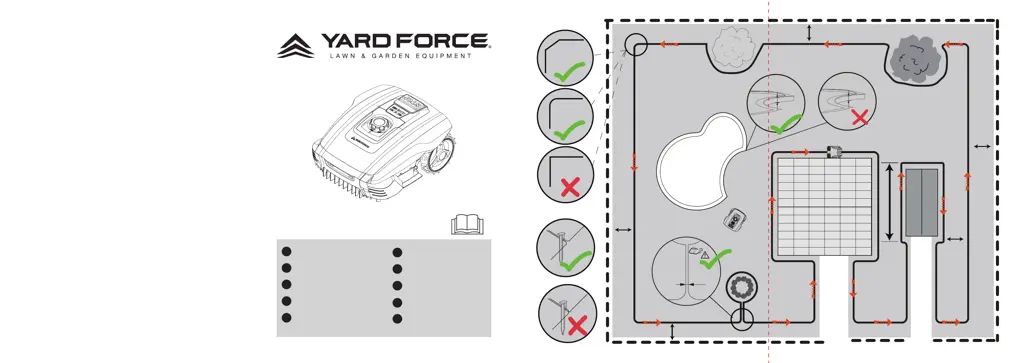
max.
8 m
min.
2 m
30 cm
30 cm
30 cm
30 cm
<
5 cm
A
< 10 cm
> 10 cm
CZ
PL

Questions and Answers

  • B
    Brandon PadillaAug 18, 2025
    What to do if my Yard force MowBest 805 fails to START?
    • D
      Douglas HughesAug 18, 2025
      If your Yard force Lawn Mower fails to start, there are several potential causes: * The time setting may not be activated. To resolve this, select a time schedule (3 or 6 hours) by pressing the appropriate buttons. * There may be grass buildup under the deck. Clean under the deck with a brush. * The battery power may be low. Place the machine in the charge base to charge. * The grass may be too long. Mow the lawn to 45mm. * The cutting height may be too low. Mow the lawn to 45mm and raise the cutting height. * The battery temperature may be too cold or hot. Ensure the working condition is between 5 and 45 degrees Celsius. * The boundary wire may be cut. Repair the broken boundary wire.
  • M
    mlindseyAug 20, 2025
    Why is my Yard force MowBest 805 not charging?
    • S
      Sierra HudsonAug 20, 2025
      Your Yard force Lawn Mower might not be charging due to a few reasons: * The machine may not be correctly docked in the charge base. Ensure the machine is fully docked. * The charge base might not be on a flat surface. Check that the charge base is on a flat surface. * The charger pins could be corroded. Clean the charger pins.
  • S
    stephen49Aug 22, 2025
    Why is my Yard force MowBest 805 noisy?
    • K
      Kimberly ScottAug 23, 2025
      If your Yard force Lawn Mower is making excessive noise, consider the following: * The blade fixing screws might be loose. Inspect the blade fixing screws and tighten them if necessary. * The blades could be damaged. Inspect the blades for damage and replace them if needed. * The grass might be too high. Try increasing the cutting height or mow the lawn with an ordinary lawnmower first.
  • A
    Anthony CalderonAug 25, 2025
    How to fix excessive vibration or noise in my Yard force MowBest 805?
    • H
      hesskelliAug 26, 2025
      To address excessive vibration or noise in your Yard force Lawn Mower: * Check if the blade is loose and tighten the screw bolt. * Inspect the blades for damage or jamming and replace damaged blades. * If the grass is too high, increase the cutting height gradually or mow the lawn with an ordinary lawnmower first.
  • C
    Cheryl JosephAug 27, 2025
    What to do if there is no light on charge base of my Yard force MowBest 805?
    • E
      Edwin BennettAug 28, 2025
      If there is no light on the charge base of your Yard force Lawn Mower: * The signal may be interfering with the robot. Change to an alternative boundary. * Check the wire connections "F and B". * The AC power may not be switched on. Switch on the AC power.
  • R
    Robert RamosAug 30, 2025
    What to do if there is no power to my Yard force Lawn Mower?
    • K
      karen02Aug 30, 2025
      If there is no power to your Yard force Lawn Mower: * Ensure the ON/OFF key has been activated/turned correctly. Recheck and turn the ON/OFF key knob to 1. * The robot mower may have a low charge. Place the machine in the charge base.
  • S
    sara38Sep 1, 2025
    What to do if my Yard force Lawn Mower gets stuck in lawn area?
    • D
      davispeterSep 1, 2025
      If your Yard force Lawn Mower is getting stuck in the lawn area, it could be due to: * Obstacles on the lawn. Remove any obstacles from the lawn. * The boundary wire not being correctly laid. Modify the boundary wire to zone out obstacles. * The wire in front of the docking station being incorrectly installed. Ensure there are 2m of straight cable to the front of the docking station.
  • C
    Christina BautistaSep 4, 2025
    What to do if my Yard force Lawn Mower runs in circles?
    • M
      Michael KingSep 4, 2025
      If your Yard force Lawn Mower is running in circles, here are some possible causes and solutions: * A power cable may be running parallel and in close proximity to the boundary wire. If necessary, reposition the boundary wire. * A front wheel may be stuck. Check if a front wheel is stuck. * Signals may be interfering with a neighbor's similar Robotic Mower. Try setting your docking station and Robotic Mower to the alternative boundary signal. * Repair or check connections on the charge base and boundary wire, looking for breaks or cuts.
  • D
    daniel58Sep 6, 2025
    What to do if my Yard force Lawn Mower remains at docking station?
    • C
      catherinephillipsSep 7, 2025
      If your Yard force Lawn Mower remains at or returns to the docking station when you press the START button: * Check if the mower has already completed the programmed working time for that day. * The battery may be low. Allow the Robotic Mower time to charge and try again.
  • E
    Elizabeth GlassSep 9, 2025
    Why are parts of the lawn uncut by my Yard force MowBest 805?
    • M
      Michael MirandaSep 9, 2025
      If parts of your lawn are uncut by the Yard force Lawn Mower: * The mower may need more cutting time. Increase the scheduled cutting time to 6 hours. * The grass might be too long. Mow the lawn to 45mm.

Summary

Installation

Cutting limitations

Details collision sensors detecting obstacles over 100mm, backing up and changing direction.

Slopes

Mower handles up to 30% incline. Boundary wire placement near inclines is critical to prevent crossing.

Paths, Driveways and Roads

Keep elevated driveways outside boundary wire, allowing a 40 cm safety distance.

Placing the docking station

Uneven lawn surfaces

Leveling the lawn or excluding uneven areas with boundary wire is recommended.

Docking Station Placement

Locate near power, on an even surface, away from ponds, with 1.5m front and 30cm side clearance.

Pegging your boundary wire

Lay wire 45mm or less from ground, with 30cm distance to obstacles. Pegs spaced approx 80cm.

Flowerbeds

Excluding flowerbeds

Two options: wires >5cm apart (mower avoids) or wires <5cm apart (mower crosses, needs obstacle).

Operation

Control panel

Overview of buttons for Start, Stop, Home, and Working Time selection.

Cutting height adjustment

Adjustable range from 20 mm to 55 mm. Pre-cut lawn to 45 mm.

Technical Data

Specifications

Details on cutting area, battery, power, speed, width, height, charging time, and protection.

Maintenance and storage

Winter Storage

Store mower, docking station, and power supply in a dry place after recharging and cleaning.

Preparing for spring

Clean charging contacts on mower and docking station using fine abrasive paper or brass brush.

Cleaning the mower body

Use a soft brush for dry dirt and a mild detergent spray with a moist rag for residue.

Troubleshooting

Cannot dock with docking station

Check boundary wire alignment, docking station position, and ensure no parallel power cables.

Mower runs in circles

Verify boundary wire is not parallel to power cables, check front wheel, or try alternative signals.

Mower is noisy

Inspect blade fixing screws, blades for damage, or if grass is too high. Contact service for motor failure.

Mower remains at or returns to docking station when pressing START

Check if programmed working time is complete or if the battery is low.

Yard force MowBest 805 Specifications

General IconGeneral
BrandYard force
ModelMowBest 805
CategoryLawn Mower
LanguageEnglish

Related product manuals