EasyManua.ls Logo

Yard force MB 400 - User Manual

Yard force MB 400
68 pages
Print Icon
To Next Page IconTo Next Page
Loading...
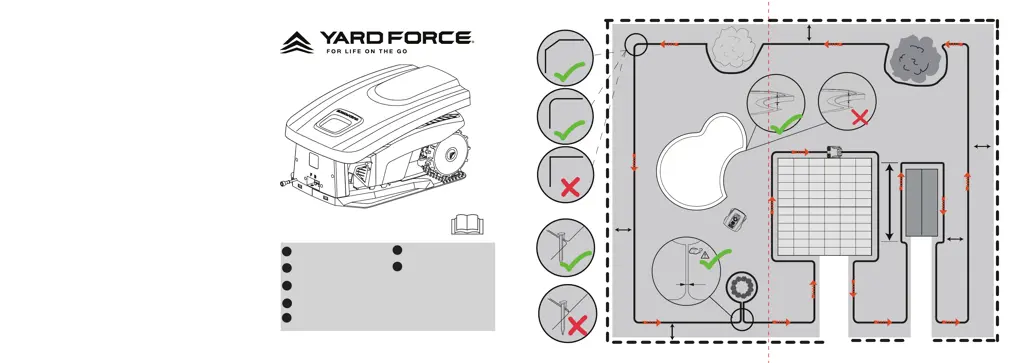
MB 400
GB
ROBOTIC MOWER
Original Installation Guide
DE
MÄHROBOTER
Original Installationsanleitung
ROBOT-TONDEUSE
Guide d’installation d’origine
ROBOT RASAERBA
Guida all’installazione originale
ROBOSEKACKA
Originální instalační průvodce
ROBOTMAAIER
Originele handleiding
ROBOT KOSZĄCY
Oryginalna instrukcja
FR
IT
NL
PL
max
. 8 m
min.
2 m
30 cm
30 cm
30 cm
30 cm
<
5 cm
A
< 10 cm
> 10 cm
CZ

Other manuals for Yard force MB 400

Questions and Answers

  • R
    Richard MontgomeryAug 5, 2025
    How to fix Yard force MB 400 Lawn Mower not docking?
    • L
      lisafranklinAug 5, 2025
      To resolve docking issues with your Yard force Lawn Mower, verify that the boundary wire in front of and underneath the charger is straight. Also, ensure the docking station is positioned correctly as described in the manual.
  • R
    royrebeccaAug 10, 2025
    What to do if my Yard force Lawn Mower is not charging?
    • C
      christopher67Aug 11, 2025
      If your Yard force Lawn Mower doesn't charge, ensure it's correctly docked in the charge base and that the base is on a flat surface. Also, inspect the charger pins for corrosion and clean them if necessary.
  • D
    Dennis Moody DDSAug 15, 2025
    Why is my Yard force Lawn Mower so noisy?
    • A
      anthonyjordanAug 15, 2025
      If the Yard force Lawn Mower is noisy, check the following: * Inspect the blade fixing screws and tighten them if they are loose. * Inspect the blades for any damage and replace them if needed. * If the grass is too high, increase the cutting height or mow the lawn with an ordinary lawnmower first.
  • B
    Brent ReedAug 20, 2025
    Why does my Yard force MB 400 run in circles?
    • J
      Joshua WilliamsAug 20, 2025
      If your Yard force Lawn Mower is running in circles, it could be due to several reasons: * A power cable running parallel and close to the boundary wire. Ensure no power cables are near the boundary wire, and reposition the wire if needed. * The front wheel may be stuck. Check the front wheel. * If a neighbor uses a similar robotic mower, their signals might interfere. Try setting your docking station and mower to an alternative boundary signal. * The driving motor may be damaged, in this case please contact customer support.
  • J
    Jennifer DiazAug 26, 2025
    What to do if Yard force MB 400 returns to docking station after pressing START?
    • R
      Robert MorenoAug 26, 2025
      If your Yard force Lawn Mower remains at or returns to the docking station when you press the START button, it might be because the mower has already completed its programmed working time for the day. Another possible reason is that the battery is low; allow the mower time to charge and then try again.
  • R
    Regina SparksAug 30, 2025
    What does it mean when S1/S2 indicator flashes on Yard force MB 400 Lawn Mower?
    • K
      Kimberly MorganAug 30, 2025
      If the S1/S2 indicator on your Yard force Lawn Mower is flashing, it indicates that the boundary wire is broken. Repair the broken cable using the provided connectors.

Summary

Installation Guide

Introduction

Explains the overall process and tools needed for installation.

Pre Cut your lawn

Instructions on how to prepare the lawn before robot lawnmower installation.

Cutting limitations

Details obstacles and distances that affect the mower's operation.

Stones

Advice on clearing small rocks and stones from the lawn.

Slopes

Guidelines for navigating slopes and boundary wire placement.

Paths, Driveways and Roads

How to manage driveways and roads relative to the boundary wire.

Trees

How to protect trees with exposed roots from the mower.

Uneven lawn surfaces

How uneven surfaces can affect the mower and preparation steps.

Placing the docking station

Guidance on selecting an optimal location for the docking station.

Pegging your boundary wire

Instructions on how to lay and secure the boundary wire.

Flowerbeds

Methods to exclude flowerbeds using boundary wire.

Corridor

Requirements for creating a safe passage corridor for the mower.

Connect the docking station to the boundary wire

How to connect the boundary wire to the docking station.

Ponds and Pools

How to exclude pools and protect the mower from water damage.

Signal selection

How to select boundary wire signals to avoid interference.

Garage installation

Instructions for installing an optional garage for the docking station.

Operation

Control panel

Overview and functions of the robotic mower's control panel buttons.

Boundary signal select button

How to select and sync the docking station's boundary signal.

Start button

Steps to start the robotic mower for mowing.

Start mowing

Sequence for initiating the mowing operation.

Working time select button

How to select the working time for the mower.

Home button

How to command the mower to return to the docking station.

Technical Data

Model

Identifier for the robotic mower.

Max cutting area

The maximum area the mower can cover.

Battery pack

Specifications of the mower's battery.

Switch power supply

Details of the power supply unit.

Rated voltage

The operational voltage of the mower.

Rated power

The power consumption of the mower.

Cutting width

The width of the mowing path.

Cutting height

The adjustable cutting height range.

Charging time

Time required to fully charge the battery.

Weight

The total weight of the robotic mower.

Degree of protection

IP rating for water and dust resistance.

Maintenance and Storage

Maintenance

General advice for checking and cleaning the mower.

Battery Life

Information on the expected lifespan of the Li-ion battery.

Winter Storage

Steps for storing the mower and docking station during winter.

Preparing for spring

Actions to take before using the mower after winter storage.

Cleaning the mower body

Instructions for cleaning the mower's exterior.

Disposal

Guidance on environmentally friendly disposal of the product.

Cleaning the underside

How to clean the underside of the mower, including the blades.

Clean the contact pins and the charging strips

Steps to clean charging contacts for efficient charging.

Reversing or replacing the blades

Instructions for reversing or replacing the mower blades.

Spare parts list

Information on available spare parts and how to obtain them.

Software Update

How to check for and install software updates for the mower.

Troubleshooting

Robotic Mower cannot dock with docking station

Solutions for when the mower fails to dock correctly.

Robotic Mower runs in circles

Troubleshooting steps for the mower running in circles.

The Robotic Mower is noisy

Causes and fixes for excessive noise from the mower.

Mower remains at or returns to docking station when pressing START button

Troubleshooting why the mower returns to the dock when trying to start.

LED signal indicator on docking station

Explains the meaning of different LED signals on the docking station.

Related to before;during;after charging

Problems and solutions related to charging the mower.

Related to mowing

Problems and solutions related to the mowing function.

Mower powered off and later powered on, and it does not mow as scheduled time

How to resume scheduled mowing after power interruptions.

Specific Operations

Return to Docking station

How the mower returns to the docking station.

Emergency Stop

How to halt the mower immediately.

Cutting height adjustment

How to adjust the cutting height.

Yard force MB 400 Specifications

General IconGeneral
BrandYard force
ModelMB 400
CategoryLawn Mower
LanguageEnglish

Related product manuals