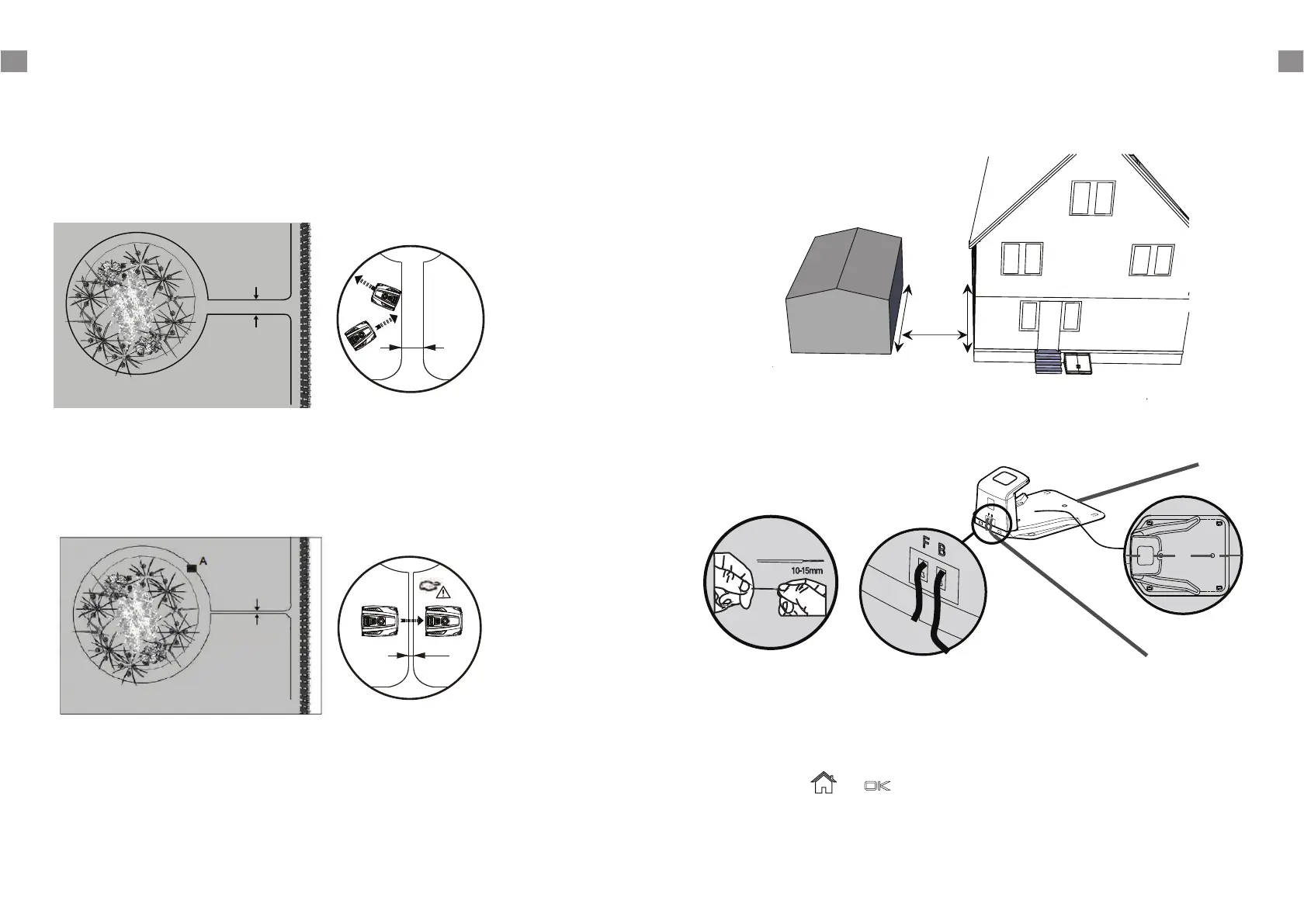
correct distance from lawn edges (30 cm) and obstacles.
Flowerbeds
Use the boundary wire to exclude any flowerbeds from the cutting area. There are two options for
the two lengths of boundary wire running between the flowerbed and the outer boundary:
1) Keep the distance between the parallel wires above 5 cm. This way, the Robotic M
ower will
recognise the boundary wire as an ordinary obstacle. When cutting, it will "bounce" off it as usual.
When following the boundary wire back to the docking station, it will take the detour around the
flower bed.
2) Alternatively, keep the distance between the two parallel wires below 5 cm. Do not cross the wires
- see below. This way, the Robotic Mower will not recognise the wires and travel across them
unhindered. This option requires placing an obstacle on the boundary wire around the flowerbed.
Place the obstacle, e. g. a large rock or pole, near position A indicated on the below illustration. The
obstacle must be surrounded by a flat area of about 1 m x 1 m, without any slopes. This obstacle
will allow the machine to exit the circle.
Ponds and Pools
While the Robotic Mower is protected against rain and spray water, being submerged is likely to
cause severe damage to the electronic parts.
Therefore, it is imperative to exclude any pools from the cutting area. For added safety, we
recommend placing a fence around the pool.
If a corridor is too narrow or too long, the Robotic Mower might not be able to navigate it from one
Corridor
If you have created a boundary corridor inside your working area, the corridor should be at least 2 m
wide and a max length of 8 m.
end to the other.
Connect the docking station to the boundary wire
Run the boundary wire underneath the front of the docking station and connect the end of the
wire to the left (black) connector marked 'F' (front). After you have placed the wire around the
garden then place the other end into right (red) connector marked "B" (back).
Insert the mains plug into a properly installed socket. Once the blue LED confirms all is OK, test the
Robotic Mower's function. Check the LED regularly to ensure fixing the boundary wire has not
affected the connection and signal shows S1 on the charging satation. Then place the Robotic
Mower in the working area, a few metres beside the docking station. Set the main power switch to
"ON".
Press the buttons and , a few seconds later, the Robotic Mower should automatically
return to the docking station by locating and following the boundary wire in anti-clockwise
direction. If Robotic Mower fails to dock correctly, move the docking station to a more suitable
position.
GB GB
6 7
GB GB
> 5 cm
>5 cm
< 5 cm
<5cm
A
< 8 m
> 2 m






 To Next Page