10 11
GB GB
Operation
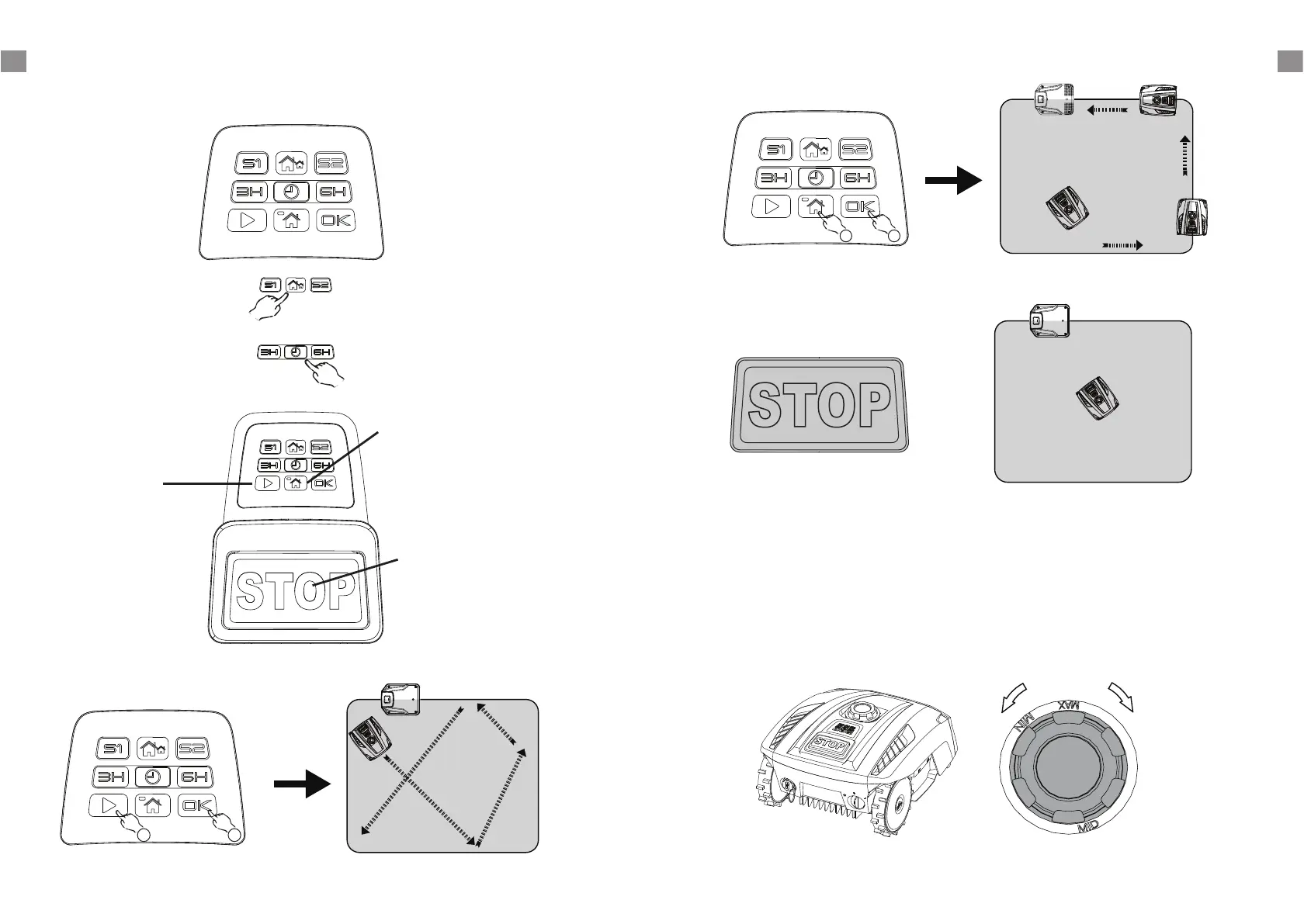
Control panel
Working time select button:
Select work time, the LED will be
lightened on when the time is
selected.
Boundary signal select button:
Select and also sync docking station
boundary signal, the LED will be
lightened on when the signal is
selected.
Home button:
First press the Home button
and then press the OK button,
robotic Mower will return to
docking station. And the
LED will indicate the
battery status.
Start button:
First press the Start
button and then press
the OK button, robotic
Mower will start to
work.
STOP button:
Press this button,
Robotic Mower will
stop immediately.
Start mowing
1
2
Press STOP button to halt the mower at any time.
Return to Docking station
Cutting height adjustment
The cutting height can be adjusted by rotating the height adjustment dial located on the top of
the machine. Cutting height range from 20 mm - 55 mm.
NOTE!
We recommend using an ordinary lawn mower or trimmer to cut the lawn below 45 mm
before using the Robotic Mower. This will ensure you get the optimum performance.
Emergency Stop
1
2






 To Next Page