MAINTENANCE
HOWTO ADJUST THE SPEED CONTROL PEDAL
Ifthe unit will not go into REVERSE or ifthe unit moves very slowly
in REVERSE, adjust the speed control pedal as follows.
1. Stop the engine.
2. Setthe parking brake.
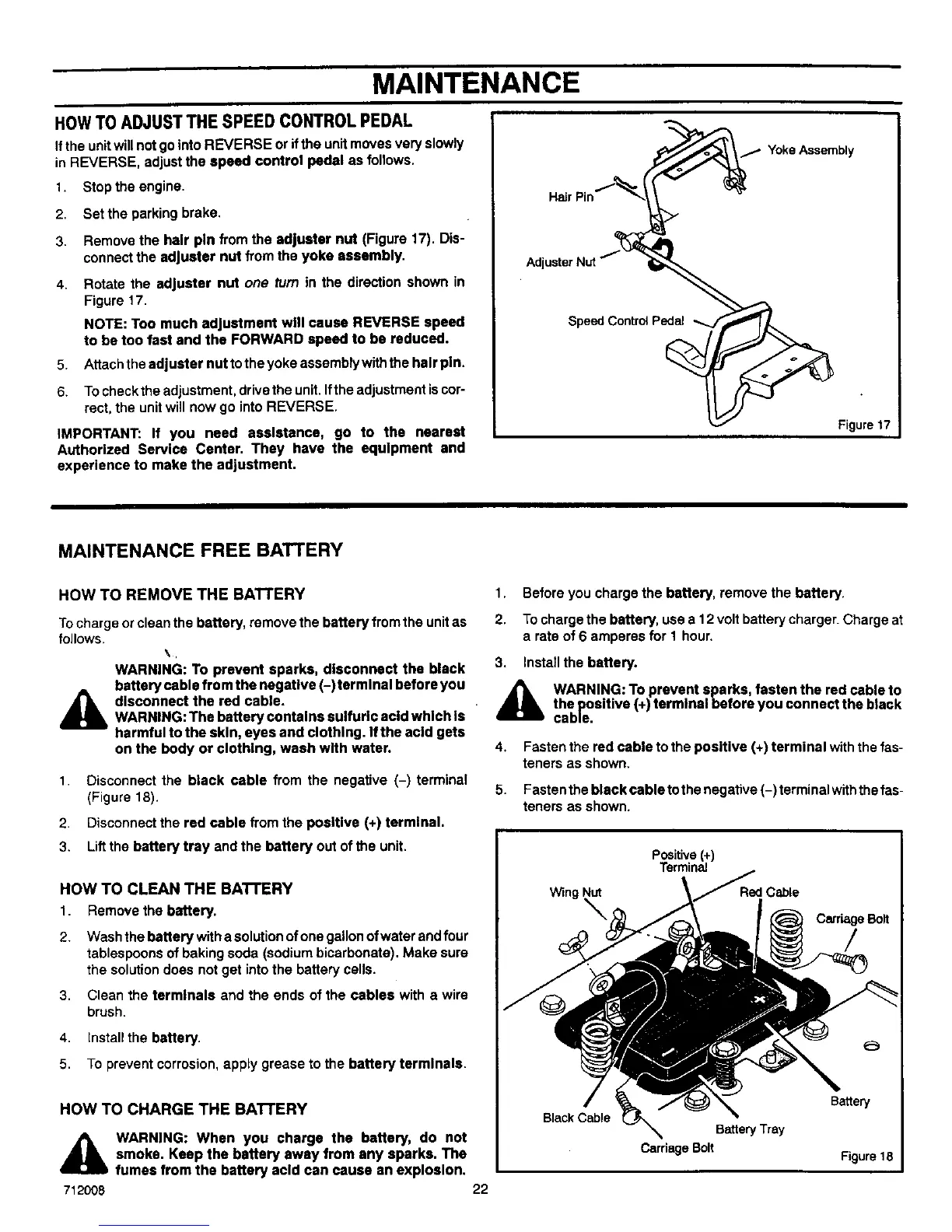
3. Remove the hair pin from the adjuster nut (Figure 17). Dis-
connect the adjuster nut from the yoke assembly.
4. Rotate the adjuster nut one turn in the direction shown in
Figure 17.
NOTE: Too much adjustment will cause REVERSE speed
to be too fast and the FORWARD speed to be reduced.
5. Attach the adjuster nut to the yoke assembly with the hair pin.
6. To check the adjustment, drive the unit. Ifthe adjustment is cor-
rect, the unit will now go into REVERSE.
IMPORTANT: If you need assistance, go to the nearest
Authorized Service Center. They have the equipment and
experience to make the adjustment.
Adj
Speed Control Pedal
7 Yoke Assembly
Figure 17
MAINTENANCE FREE BATTERY
HOW TO REMOVE THE BATTERY
Tocharge or clean the battery, remove the battery from the unitas
follows.
\,
WARNING: To prevent sparks, disconnect the black
battery cable from the usgstlve (-)farmlnal before you
A disconnect the red cable.
WARNING: The battery contains sulfuric add which Is
harmful to the skin, eyes and clothing. Ifthe acid gets
on the body or clothing, wash with water.
1. Disconnect the black cable from the negative (-) terminal
(Figure 18).
2. Disconnect the red cable from the positive (+) terminal.
3. Lift the battery tray and the battery out of the unit.
1. Before you charge the battery, remove the battery.
2. To charge the battery, use a 12 volt battery charger. Charge at
a rate of 6 amperes for 1 hour.
3. Install the battery.
A WARNING: To prevent sparks, fasten the red cable to
the positive (+) terminal before you connect the black
cable.
4.
5.
Fasten the red cable to the positive (+) terminal with the fas-
teners as shown.
Fasten the black cable to the negative (-) terminal withthe fas-
teners as shown.
HOW TO CLEAN THE BATTERY
1 Remove the battery.
2. Wash the battery with a solution ofone gallon ofwater and four
tablespoons of baking soda (sodium bicarbonate). Make sure
the solution does not get into the battery cells.
3, Clean the terminals and the ends of the cables with a wire
brush.
4, Install the battery.
5, To prevent corrosion, apply grease to the battery terminals.
HOW TO CHARGE THE BATTERY
A
712008
WARNING: When you charge the battery, do not
smoke. Keep the battery away from any sparks. The
fumes from the battery acid can cause an explosion.
22


 To Next Page