www.ydlidar.com Copyright 2015-2019 YDLIDAR
WINDOWS USAGE GUIDE
Device connection
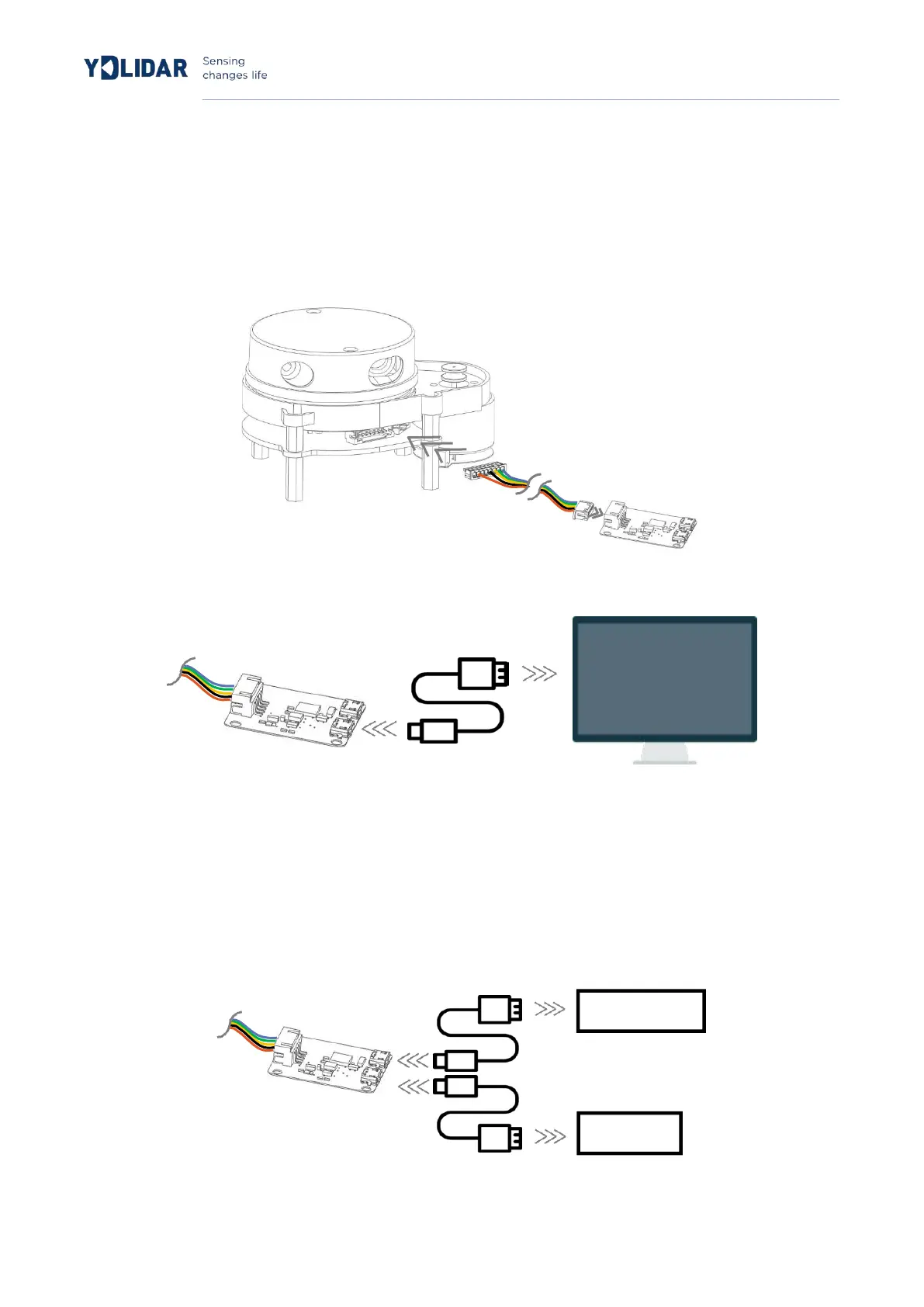
When evaluating and developing X4 under windows, you need to interconnect X4 and PC. The
specific process is as follows:
FIG 2 YDLIDAR X4 CONNECTION STEP 1
FIG 3 YDLIDAR X4 CONNECTION STEP 2
Connect the adapter board and X4 first, and then connect the USB cable to the USB port on the
adapter board and the PC. Note that the USB interface's Micro interface is connected to the USB
adapter's USB_DATA. After the X4 is powered on, it is in idle mode and the motor does not turn.
The drive current of the USB interface of some development platforms or PCs is weak, and the X4
needs to access the +5V auxiliary power supply, otherwise the radar will work abnormally.
FIG 4 YDLIDAR X4 AUXILIARY POWER SUPPLY


 To Next Page