Need help?
Do you have a question about the Yealink T54 and is the answer not in the manual?
Steps to place a call using the handset, including picking up and dialing.
Steps to place a call using the speakerphone, including pressing the speaker button and dialing.
Procedure for answering an incoming call using the handset.
Procedure for answering an incoming call using the speakerphone.
Method to end a call by hanging up or pressing the End Call soft key.
Method to end a call using the speakerphone by pressing End Call.
Steps to transfer a call directly to another number without speaking to the recipient.
Process for transferring a call after hearing the ring-back tone.
Procedure to transfer a call after the second party answers.
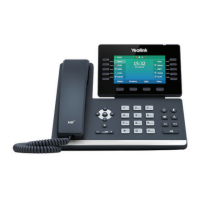
This document provides a quick user guide for the Yealink T54 phone, detailing its core functionalities for call management, conferencing, forwarding, and voicemail.
To place a call using the handset, simply pick up the handset, enter the desired number, and then press the "Send" soft key. For speakerphone use, press the speakerphone button, enter the number, and then press "Send."
When a call comes in, you can answer it by picking up the handset or by pressing the speakerphone button. If you wish to decline an incoming call, press the "Reject" soft key.
To end a call using the handset, either hang up the handset or press the "End Call" soft key. If you are on speakerphone, press the speakerphone button or the "End Call" soft key.
To redial a number, press the redial button to access the Placed Calls list, then tap the desired entry. Alternatively, when the phone is idle, press the redial button twice to dial the last dialed number.
To view missed calls, press the "view" soft key, then use the up or down arrow keys to select the desired entry, and finally press the "Send" key to call back.
During an active call, press the mute button to mute your microphone. To un-mute, press the mute button again.
To place an active call on hold, press the "Hold" soft key or tap the hold icon. To resume a call, press the "Resume" soft key. If multiple calls are on hold, tap the specific call you wish to resume, and then press the resume icon or the "Resume" soft key.
The Yealink T54 supports three types of call transfers:
To initiate a 3-way conference call:
To set up call forwarding:
To customize your ring tone:
The Message Waiting Indicator light will illuminate when new messages are available in your message center. The default voicemail password is 362673#. To access your voicemail, press the voicemail button and follow the voice prompts.
When listening to voicemail, you have several options:
 General
| Opus Codec | Yes |
|---|---|
| Network | Dual Gigabit Ethernet ports |
| PoE | IEEE 802.3af compliant |
| Expansion Module Support | Yes (supports Yealink EXP modules) |
| SIP Accounts | 16 SIP accounts |
| Lines | 16 |
| Supported Protocols | SIP |
| Supported Codecs | G.711, G.722, G.729, Opus |

 To Next Page