Yeastar 4G LTE Module User Guide
9
Managing Cellular Data
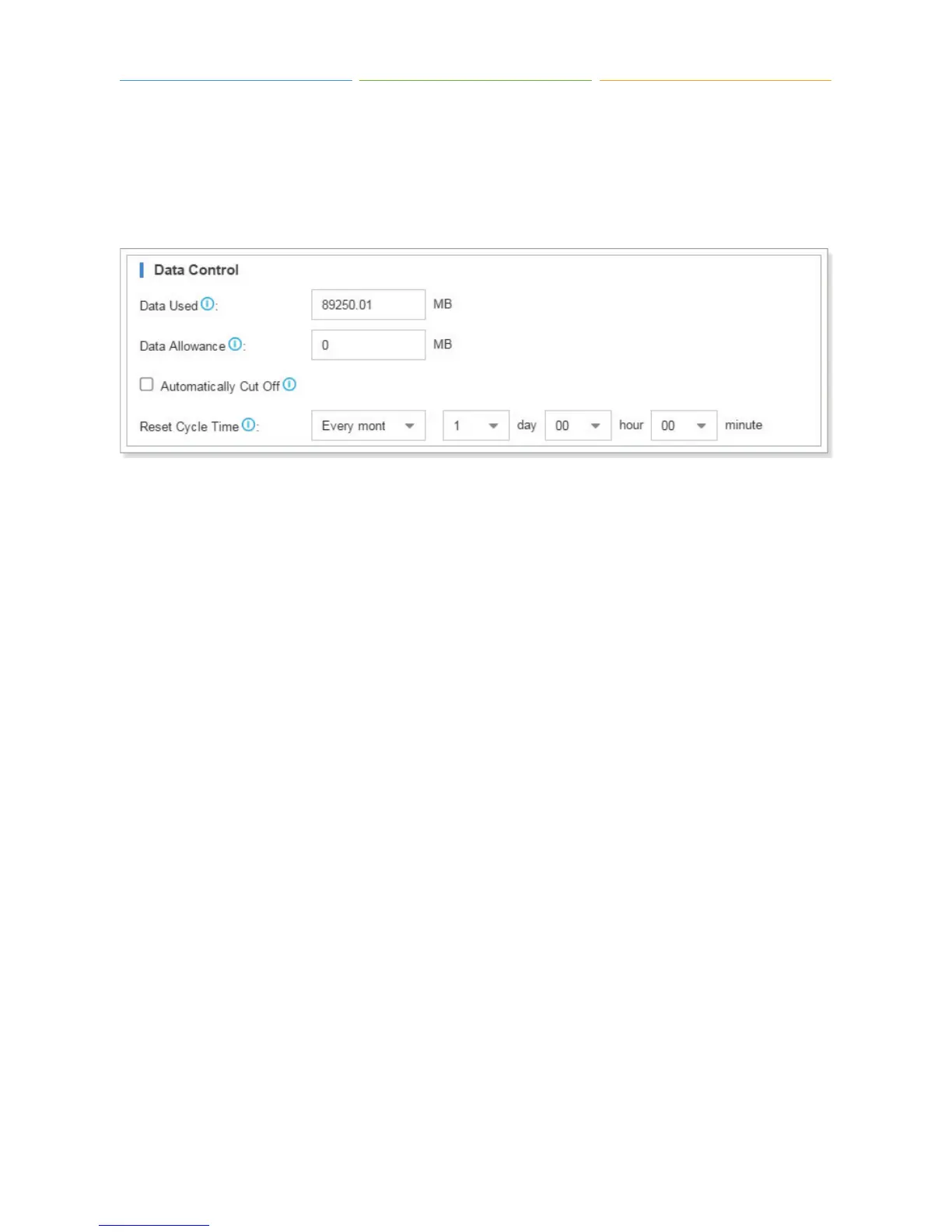
Step 1. Navigate to “Settings > System > Network > Cellular Network”, and set Data Control
settings to manage the cellular data.
Generally, the cellular data is paid by month. Below we give an example of how to manage cellular
data by month. Assume that we have 2GB of cellular data allowance every month for the 4G card.
1) “Data Used” shows total used data on the PBX, you can change it to an actual value. If you set
reset data monthly, then the “Data Used” shows monthly used data.
2) Set “Data Allowance” to 2048 MB (2*1024).
3) If “Automatically Cut Off” is enabled, when data usage exceeds 2GB, the PBX will disconnect
cellular network.
4) Set “Reset Cycle Time”, here we will reset the data monthly, choose “Every Month”, and set the
time, the data will reset to zero at the time every month.
5) Click “Save” and “Apply”.
Step 2. Navigate to “Settings > Event Center > Event Settings”, enable “About to Reach Data
Allowance” event, and set the notification contact. When the data usage reaches 90% of the
allowance data, the system will send alert SMS/Email/Call to the notification contacts.



 To Next Page