
 Need help?
Do you have a question about the Yeelight S1 and is the answer not in the manual?
Enables the user to select specific colors for the lightstrip.
Supports displaying a variety of colors simultaneously on the lightstrip.
Allows the brightness of the lightstrip to be adjusted.
Enables control via smart devices and mobile applications.
Allows lightstrip colors and patterns to synchronize with audio.
The lightstrip can be connected to extensions for greater length.
Users can create and save custom lighting effects.
Allows scheduling of the lightstrip's operation.
Steps for plugging in the adapter, connecting the lightstrip, and initial power-on.
Instructions on how to connect additional lightstrip extensions for increased length.
Steps to find and download the required mobile application.
Instructions on pairing the lightstrip with the Yeelight app.
Detailed steps to reset the lightstrip to factory settings.
Guide for integrating the lightstrip with Apple HomeKit.
Important safety and operational advice for using the lightstrip.
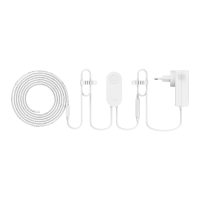
The Yeelight Lightstrip S1 is a smart LED lightstrip designed for ambient and decorative lighting, offering a range of features for personalized control and integration into smart home ecosystems.
The Yeelight Lightstrip S1 serves as a versatile lighting solution that can be controlled intelligently through an app. It allows users to pick colors, adjust brightness (dimmable), and create personalized scenes. A notable feature is its ability to sync with music, providing dynamic lighting effects that respond to audio. The lightstrip is extendable, allowing users to lengthen it with additional Yeelight Lightstrip Plus Extension segments for broader coverage. It also includes a smart timer function for scheduled lighting.
The Yeelight Lightstrip S1 offers straightforward setup and intelligent control. Setup Instructions:
Intelligent Control:
How to Reset: To reset the lightstrip, disconnect the power. Press and hold the power button while reconnecting to the power supply. Continue holding the button for five seconds until the lightstrip cycles through red, green, and blue, and then turns yellow. Release the button, and the reset is complete. It is recommended to reset the lamp before using it in a new network environment.
Warnings and Safety:
FCC Compliance Statement: Any changes or modifications not expressly approved by the party responsible for compliance could void the user's authority to operate the equipment. This device complies with part 15 of the FCC Rules. Operation is subject to two conditions: (1) this device may not cause harmful interference, and (2) this device must accept any interference received, including interference that may cause undesired operation. This equipment has been tested and found to comply with the limits for a Class B digital device, designed to provide reasonable protection against harmful interference in a residential installation. This equipment generates, uses, and can radiate radio frequency energy. If not installed and used according to instructions, it may cause harmful interference to radio communications. There is no guarantee that interference will not occur in a particular installation. If this equipment causes harmful interference to radio or television reception (which can be determined by turning the equipment off and on), the user is encouraged to try to correct the interference by one or more of the following measures: reorient or relocate the receiving antenna, increase the separation between the equipment and receiver.
WEEE Disposal and Recycling: This product should not be disposed of with other household waste within the EU. To prevent potential harm to the environment or human health from uncontrolled waste disposal, recycle it responsibly to promote the sustainable reuse of material resources. To return your used device, utilize the return and collection systems or contact the retailer where the product was purchased. They can facilitate environmentally safe recycling.
 General
| Brand | Yeelight |
|---|---|
| Model | S1 |
| Category | Light Fixture |
| Language | English |

 To Next Page