13
Maintenance—Compressor Oil
The oil should be checked for contamination and proper
oil level when the compressor oil maintenance reminder
is displayed. Select RESET to turn reminder off until the
next time you start the unit. Select ENTER to reset the
reminder until the next scheduled maintenance.
Instructions for Oil Maintenance
Oil Level Check
1.
Place unit on a level surface and run
a recovery
cycle with th
e unit.
2. Unplug
unit.
3.
Remove fron
t cover of unit.
4.
SLOWLY re
move oil port cap on co
mpressor.
Note: High pressure may be present, remove ca
p
slowly.
5.
Place rear wheels of unit
on a 2 x 4.
6.
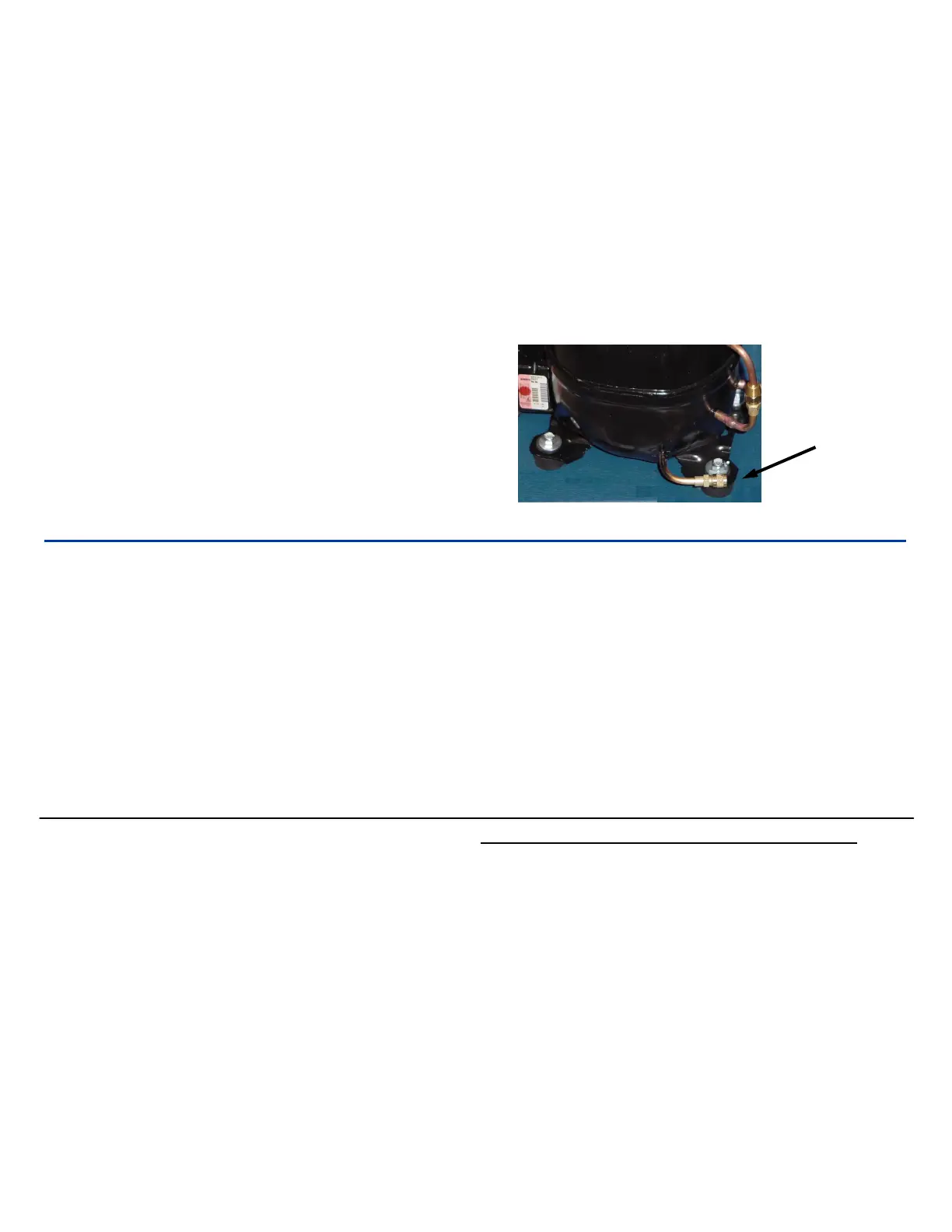
Oil should drip out of oil drain port.
7.
If oil runs ou
t of port rapidly, allow to drain.
8.
Replace oil port cap and
cover.
9.
Dispose of o
il properly.
Oil Replace
ment Procedure
1.
Follow steps 1 thru 4 in the oil level check.
2.
Tilt unit at 45° angle towards oil drain. port until
all
oil has been
drained.
3.
Refill with proper amount and type of oil. The pro
per
oil charge is 8.0 ounces 150 VISCOSITY(SUS)
POE oil.
4.
Replace oil port cap and
front cover.
5.
Dispose of o
il properly.
Note: Failure to perform oil mainten
ance can cause the
compressor to overfill with oil and severely damage the
compressor.
Oil
Drain
Port
Maintenance— Vacuum Pump Oil
Select ENTER to turn the reminder off until the next
time you start the unit. Select RESET to reset the re-
minder until the next scheduled maintenance.
Check oil level when pump is running.
When pump is running, oil level should be 1/2 to 5/8 up
in the sight glass. This level is necessary for proper op-
eration.
This maintenance is best performed when the oil
is warm.
1.
Remove thumb screws under vacuum pump.
2.
Rotate the front of the vacuum pump
towards the
rear of the unit.
3.
Place a container under the oil drain
plug and
remove the
oil drain plug
.
4.
Drain oil into the containe
r.
5.
Dispose of the oil proper
ly.
6.
Refill the vacuum pump
with YELLOW JACKET
(Quart Part no. 93192) vacuum pump oil to the
correct lev
el.
7.
Reverse Steps 1-2.
Calibration Check (1 lb weight)
1. Select SETUP in the main menu
2.
Select CALIBRATION CHECK
3.
Press “START” key to stabilize
4.
After stabilizing, machine will displa
y “PLACE THE
1lb TEST WEIGHT
ON
THE TANK” (1lb weight
supplied)
5. Press the “START” key
Exa
mple: 1 lb. 02 oz (Out of Calibration)
0 lb. 15.98 oz (Out of Calibration)
NOTE: If out of calibration follow the steps displayed on
the display to recalibrate scale
“WARNING SCALE CALIBRATION” MESSAGE
:
If the scale calibration changes, this message may
appear on the display. To reset the warning message
follow the on screen instructions or do the following:
1. Select SETUP in the main menu
2.
Select CALIBRATE SCALE
3.
The display will then read
“REMOVE WEIGHT
FROM SCA
L
E”
4.
Once the weight is removed press the START
key
5.
The display will then read
“CALIBRATING PLEASE
WAIT”
6.
When the display reads “POWER OFF AND RE-
START SYSTEM” turn the main power switch off
7.
Carefully place the tank back on the scale and tu
rn
the main power switch back on.



 To Next Page