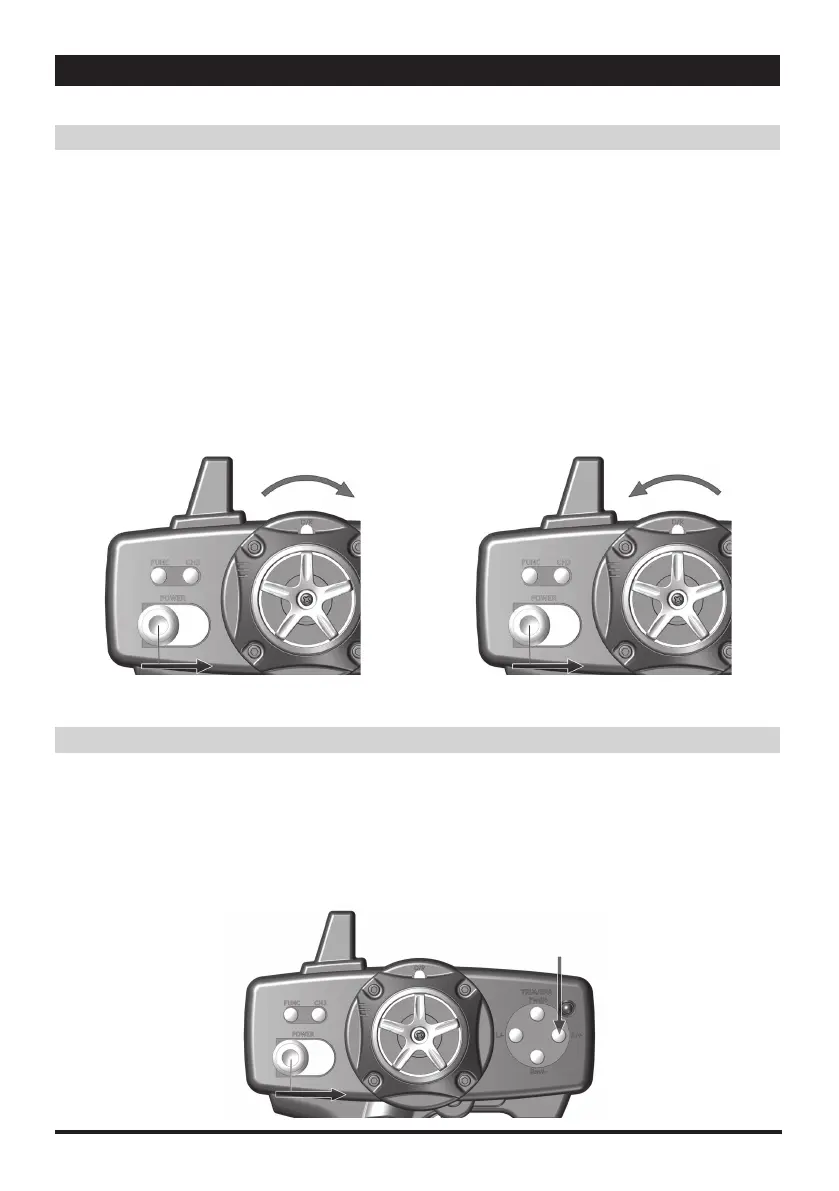
■ロックキーボタン
1.D/R スイッチキーを右に押します。
2.D/R スイッチを右に押しながら、送信機の電源を入れます。
3.短い " ピッ " という音が 2 回鳴れば、設定完了の合図です。
4.LED ライトが点滅します。
5.これで全ての操作ボタンがロックされます。
■ロック解除キーボタン
1.D/R スイッチキーを左に押します。
2.D/R スイッチを左に押しながら、送信機のボタンを入れます。
3.短い " ピッ " という音が 2 回鳴れば、設定完了の合図です。
4.これで全ての操作ボタンのロックが解除されます。
・
Lock key button
1. Push the "D/R" switch key toward to right
2. While holding the D/R switch to right, turn the
transmitter power switch to On
3. Two short "beep" sound indicate conformation
4. The LED light flashes
5. Now all key button function Locked.
・
Unlock Key button
1. Push the "D/R" switch key toward to left
2. While holding the D/R to left, turn the transmitter
power switch On
3. Two short "beep" sound indicate conformation
4. Now all key button function unlocked.
Lock/Unlock key button
ロック/ロック 解 除 キ ー ボタン5
5
Steering Adjustment
ステアリング調整
6
YOKOMO TX3S 2.4GHz FHSS 3-channel Radio Control System
■サーボのリバース設定
1."STR/+" キーボタンを押したままにします。
2."STR/+" キーボタンを押しながら、送信機の電源を入れ
ます。
3.短い " ピッ " という音が 2 回鳴れば、設定完了の合図です。
4.これでステアリングのリバース設定が完了です。
・
Servo Reverse
1. Press and hold "ST R/+" key button
2. While pressing "ST R/+" key button , turn on the
transmitter power switch
3. Two short "beep" sound indicate conformation
4. Now the steering has reversed.
①
①
①
②
②
②



 To Next Page