Throttle Adjustment
スロットル調整7
7
YOKOMO TX3S 2.4GHz FHSS 3-channel Radio Control System
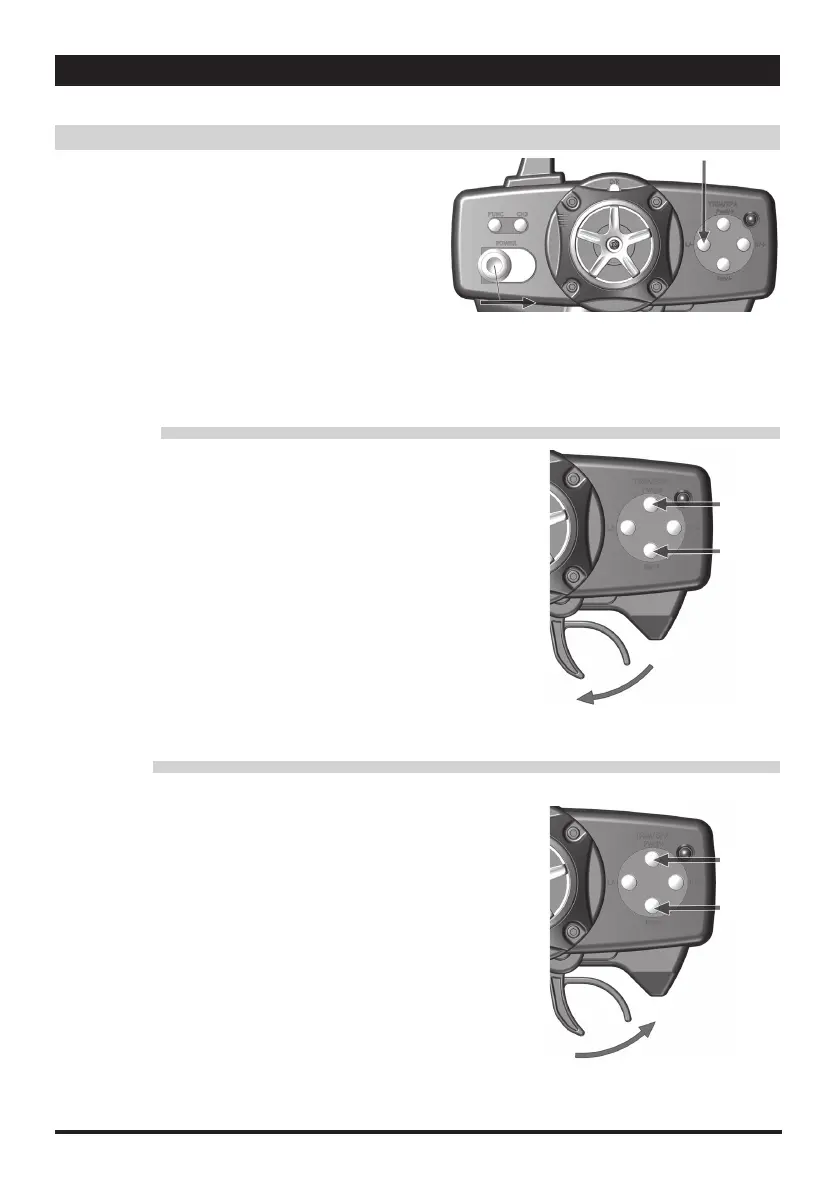
■スロットルリバース
1.ST/L- キーボタンを押したままにしてください。
2.ST/L- キーボタンを押しながら、送信機の電源を入れます。
3.短い " ピッ " という音が 2 回鳴れば、設定完了の合図です。
4.これでスロットルがリバース設定となります。
• Throttle Reverse
1. Press and hold ST L/- key button.
2. While holding ST L/- button key turn the transmitter power switch to On
3. Two short "beep" sound indicate conformation
4. Now the throttle trigger has reversed.
スロットル(加速)
1.スロットルトリガーを目一杯引いてください。
2.調整幅が最大値となった場合、長い "" ピーッ"" という音がなります。
★ポイントを増やす場合:スロットルトリガーを引いた状態で THRev/- キーボタン
を押してください。
★ポイントを減らす場合:スロットルトリガーを引いた状態で THFwd/+ キーボタン
を押してください。
3.THRev/-または THFwd/+ キーを使用して、調整を行ってください。
4.この機能は、受信機の電源が入っていなくても設定することが可能です。
ブレーキ(減速)
1.スロットルトリガーを目一杯ブレーキ側に倒してください。
2.調整幅が最大値となった場合、長い "" ピーッ"" という音がなります。
★ポイントを増やす場合:スロットルトリガーをブレーキ側に倒した状態で
THRev/- キーボタンを押してください。
★ポイントを減らす場合:スロットルトリガーをブレーキ側に倒した状態で
THFwd/+ キーボタンを押してください。
3.THRev/-または THFwd/+ キーを使用して、調整を行ってください。
4.この機能は、受信機の電源が入っていなくても設定することが可能です。
Brake (Deaccelerate)
1. Push the throttle trigger fully to the brake-side
2. Once the value reaches the limit, a long steady "beep" will sound
Decrease: While holding the brake trigger, press TH Rev/- key button
Increase: While holding the brake trigger, press TH Fwd/+ key button
3. Use the TH Rev/- or TH Fwd/+ key buttons adjust the brake to desired
throw
4. This can also be performing when the receiver power is off.
Throttle (Accelerate)
1. Pull and hold the throttle trigger fully to the high-side
2. Once the value reaches the limit, a long steady "beep" will sound
Decrease: While holding the throttle trigger, press TH Rev/- key button
Increase: While holding the throttle trigger, press TH Fwd/+ key button
3. Use the TH Rev/- or TH Fwd/+ key buttons to adjust the throttle to desired throw
4. This can also be performing when the receiver power is off.
• Throttle End Point Adjustment
■スロットルエンドポイント調整
①
②
TH Fwd/+
TH Rev/-
TH Fwd/+
TH Rev/-
①
①


 To Next Page
 Loading...