This document is the owner's manual for the York Fitness R101 Rower, Item #56022, dated May 16, 2013. It provides comprehensive information regarding the assembly, operation, maintenance, and safety of the rowing machine.
The York Fitness R101 Rower is a piece of exercise equipment designed for home use, aimed at providing a high-quality, safe, and innovative training partner to help users achieve their personal fitness goals. Its primary function is to simulate the action of rowing, offering an effective full-body workout that strengthens the heart, improves circulation, and exercises major muscle groups including the back, waist, arms, shoulders, hips, and legs.
Important Technical Specifications:
- Product Name: R101 Rower
- Item Number: #56022
- Maximum User Weight: 100 kg
- Safety Standards: EN957 Part 1 & 7 - Class HC
- Electrical Information: CR2032 3V*1 (for the console battery)
- Console Display: LCD with functions for TIME, COUNT, CALORIES, and TOTAL CNT.
- Resistance Adjustment: The rower features an adjustable resistance mechanism.
Usage Features:
The manual details how to operate the rower effectively, including:
- Rowing Technique:
- Initial Position: Leaning forward, knees bent, arms straight.
- Backward Movement: Pushing backward, straightening the back and legs simultaneously.
- Completion: Continuing movement until leaning slightly backward, then returning to the initial position.
- Safety Note: Users are advised to ensure fingers are not placed inside the runner assembly and to grasp the underside of the seat upholstery when steadying themselves.
- Alternative Exercise - Leg Only Rowing: This variation focuses on toning and strengthening leg and back muscles. It involves keeping the back straight and arms outstretched, bending legs to the starting position, and then using the legs to push the body back while maintaining straight arms and back.
- Console Functions: The LCD console offers several modes to track workout progress:
- SCAN: Automatically cycles through TIME, COUNT, CALORIES, and TOTAL CNT displays every 6 seconds.
- TIME: Displays workout duration (0:00 ~ 99:59). Can count up or count down from a set target value, triggering an alarm at 0.
- COUNT: Displays the number of strokes (0~9999). Can count up or count down from a set target value, triggering an alarm at 0.
- CALORIES: Displays estimated calories burned (0~9999). Can count up or count down from a set target value, triggering an alarm at 0.
- TOTAL CNT: Displays the total cumulative count, which clears only after battery removal.
- Console Operation (SET, MODE, RESET keys):
- SET: Used to set target values for TIME, CALORIES, and COUNT.
- TIME setting range: 0:00~99:00 (1:00 increments).
- CALORIES setting range: 0~9990 (10 increments).
- COUNT setting range: 0~9990 (10 increments).
- MODE: Selects functions, locks the current function in SCAN mode, and can reset all function figures when held for 3 seconds.
- RESET: Resets current function figures (in setting condition) or all function figures (except Total CNT) when held for 3 seconds.
- Power On/Stand-by Mode: The LCD displays all segments with a "Bi" sound upon power-on and enters SCAN mode. The monitor enters stand-by mode after 4 minutes of no signal transmission and can be woken by pressing any key.
- Fitness Guide: The manual includes guidance on exercise duration, heart rate training (good health, weight loss, fitness levels), and calculating target heart rates based on age (220 - age). It also provides suggested stretches for hamstrings, calves/Achilles, quadriceps, and inner thighs.
Maintenance Features:
The manual emphasizes regular care and maintenance to ensure safety and longevity of the equipment:
- Placement: Equipment should be placed indoors in a dry environment with minimal temperature variation, preferably on a mat to protect flooring.
- Cleaning: Use a warm, damp cloth for cleaning. Avoid wet cleaning of electrical components.
- Regular Inspection: The equipment's safety level depends on regular examination for wear and tear (ropes, pulleys, nuts, bolts, moving parts, bushes, chains, wheels, bearings, connection points). Inspection is recommended at least once a week.
- Fixings: Ensure all fixings are tight before use.
- Component Replacement: Replace damaged or worn components immediately with original manufacturer parts.
- Adjustment Devices: Never leave adjustment devices projecting from the equipment.
- Battery Replacement: Instructions are provided for replacing the CR2032 battery in the console when the display becomes weak. This involves removing the console, detaching cables, unscrewing the back cover, prying out the old battery, installing a new one, and reassembling.
- Troubleshooting: Addresses common issues like weak LCD display (battery replacement) and no signal during rowing (check cable connection).
The manual outlines critical safety precautions:
- Read the instruction manual thoroughly before assembly and use.
- Assemble and operate the equipment on a level, stable surface with adequate space.
- Consult a doctor before starting any exercise program.
- Wear suitable clothing and footwear; remove all personal jewelry.
- Warm-up before exercising to prevent muscle strain.
- Allow 1-2 hours after eating before exercising.
- Never overload the equipment (adhere to maximum user weight).
- Use the equipment only as described in the instructions.
- Injuries can result from incorrect or excessive training.
- Children Safety: The equipment is not a toy. Children should be supervised and instructed if allowed to use it, and should not be allowed on or around the equipment when not in use.
- The appliance is not intended for use by persons with reduced physical, sensory, or mental capabilities unless supervised.
- Not suitable for therapeutic purposes.
- Tested for home, personal, family, or household use.
- York Fitness reserves the right to change specifications due to continuous product development.
- The warranty does not cover damage due to negligence of assembly, adjustment, and maintenance.

 Need help?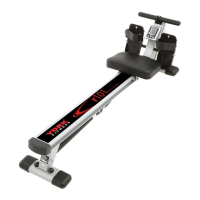

 To Next Page
 General