EasyManua.ls Logo

York YCWS0313SC - User Manual

York YCWS0313SC
104 pages
Print Icon
To Next Page IconTo Next Page
Loading...
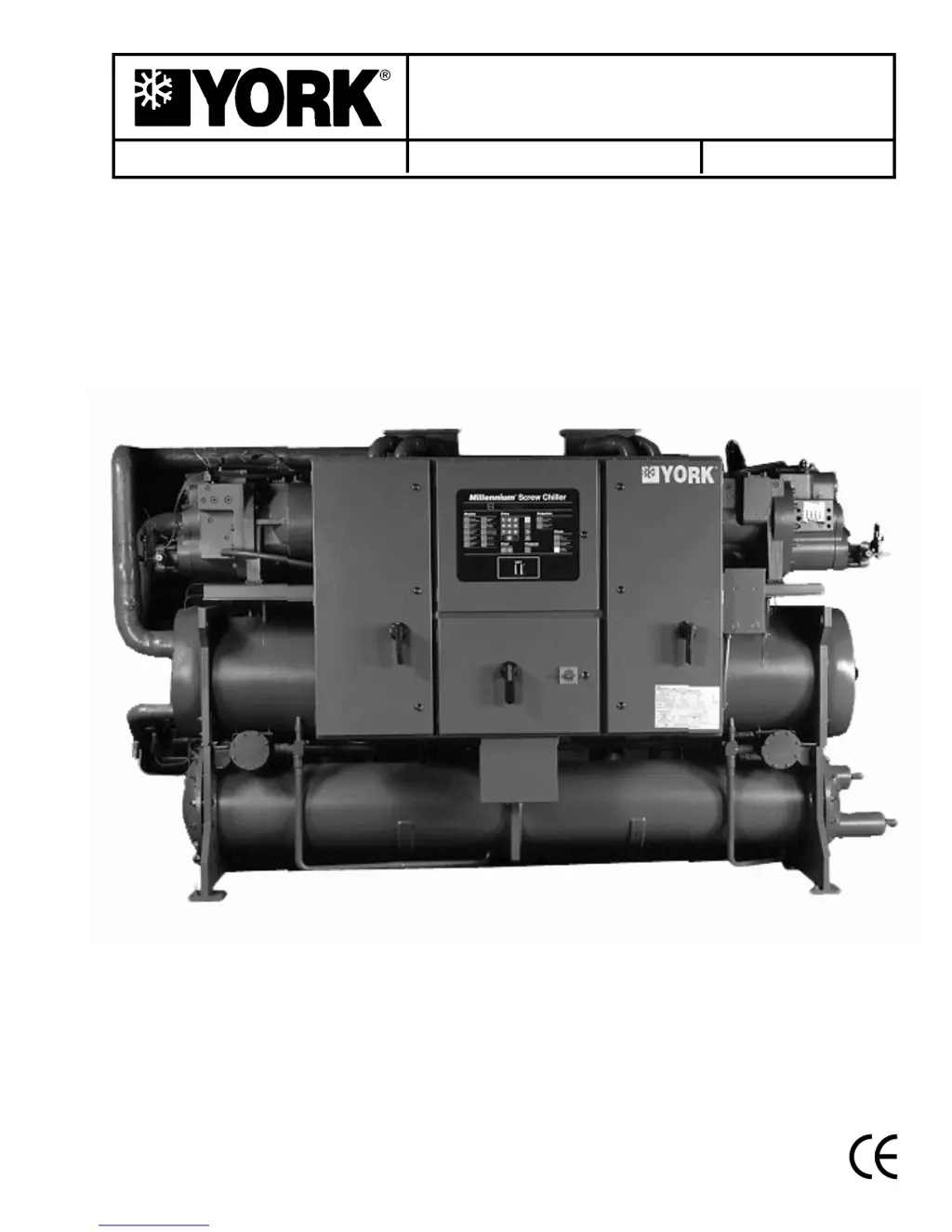
INSTALLATION, OPERATION AND
MAINTENANCE
YCWS
WATER COOLED LIQUID CHILLERS
New Release
Form 201.24-NM2 (601)
50 HERTZ
STYLE B
REFRIGERANT TYPE: R-22
00546VIP
YCWS WATER COOLED LIQUID CHILLERS
YCWS0313SC – 0663SC

Table of Contents

Questions and Answers

  • K
    Keith MarshallAug 15, 2025
    What to do if my York YCWS0313SC Chiller displays 'NO RUN PERM'?
    • D
      Donna PattersonAug 15, 2025
      If the York Chiller displays 'NO RUN PERM,' ensure that the liquid pumps are running, the valves are correctly set, and liquid flow is established. Also, check that the flow switch is functional and installed according to the manufacturer's instructions.
  • G
    Gary AdamsAug 18, 2025
    How to troubleshoot a York YCWS0313SC with no display on the panel?
    • O
      opetersonAug 18, 2025
      If your York Chiller panel has no display and won't operate, first ensure the main supply to the control system is switched on if it is safe to do so. Then, check if the control panel emergency stop switch and any remote emergency stop devices are in the ‘OFF’ position; if so, turn them to the ‘ON’ position if safe. Also, check the emergency stop switch fuses, the wiring from -T3 to the power board, and fuse -F3. If there is no +12V output from the power board, replace the power board or isolate any excessive load on the board.
  • S
    sharon34Aug 21, 2025
    How to fix 'SYS # HIGH DSCH TEMP' on a York Chiller?
    • T
      Todd FordAug 22, 2025
      If your York Chiller shows 'SYS # HIGH DSCH TEMP', check that the suction superheat is within the correct range and inspect for restricted cooling liquid flow. You should also check the sensor calibration, location, and wiring.
  • Y
    ythomasAug 25, 2025
    What to do if York YCWS0313SC Chiller displays 'Chiller FAULT: LOW WATER TEMP'?
    • K
      Kelsey ClarkAug 26, 2025
      If the York Chiller displays 'Chiller FAULT: LOW WATER TEMP', check for any restrictions in the liquid flow line and ensure that the liquid flow is stable. Also, check the supply to the unloader valve solenoid and ensure the compressor unloads correctly. Finally, check the sensor calibration, location, and wiring.
  • M
    marygrahamAug 28, 2025
    How do I troubleshoot 'SYS # LOW CURR/ MP/HP' on my York YCWS0313SC Chiller?
    • J
      Jacob BishopAug 28, 2025
      If your York Chiller displays 'SYS # LOW CURR/ MP/HP displayed', check the compressor mains supply, fuses, contactors, and wiring, ensuring the mains supply voltage is within tolerance. Also, check for a defective current transformer, verify the calibration resistor is correctly fitted, and inspect the motor protector and wiring. Further, examine the compressor motor, ensure the compressor discharge valve is open, check the cutout setting and wiring, verify the motor cooling service valve is open, and check the operation of motor cooling, TEVs, and the liquid solenoid valve.
  • P
    Paige TerryAug 31, 2025
    How to troubleshoot 'SYS # HIGH OIL TEMP' on a York Chiller?
    • S
      Shaun WalkerAug 31, 2025
      If your York Chiller displays 'SYS # HIGH OIL TEMP displayed', check for blockages in the condenser coils and inspect the oil cooler. Also, check the sensor calibration, location, and wiring.
  • D
    David FranklinSep 4, 2025
    What does 'Chiller FAULT: HIGH AMBIENT TEMP' mean on my York Chiller?
    • Y
      yhartSep 4, 2025
      If your York Chiller displays 'Chiller FAULT: HIGH AMBIENT TEMP displayed' and the ambient air temperature is higher than the programmed operating limit, use the ‘ambient temp.’ key to display the temperature and confirm that the displayed value is approximately correct. The warning message should clear when the ambient air temperature falls below the programmed operating limit. Also, check the programmed settings are correct for the options fitted to the unit and check sensor calibration, location, and wiring.
  • I
    ilopezSep 7, 2025
    Why does my York YCWS0313SC Chiller show 'Chiller FAULT: LOW AMBIENT TEMP'?
    • R
      ryanhendrixSep 7, 2025
      If your York Chiller displays 'Chiller FAULT: LOW AMBIENT TEMP', use the ‘ambient temp.’ key to display the temperature and confirm that the displayed value is approximately correct. The warning message should clear when the ambient air temperature reaches the programmed operating limit. Also, check that the programmed settings are correct for the options fitted to the unit, and check the sensor calibration, location, and wiring.
  • J
    James OlsonSep 12, 2025
    What to check when York YCWS0313SC Chiller displays 'Chiller FAULT: VAC UNDERVOLTAGE'?
    • M
      michelle31Sep 12, 2025
      If your York Chiller displays 'Chiller FAULT: VAC UNDERVOLTAGE displayed', check that the mains supply is stable and within allowable limits. Also, check for voltage dip on compressor start.

Summary

SECTION 1 SUPPLIER INFORMATION

Safety

Critical safety information and compliance standards.

Product Components and Controls

Microprocessor Controls

Features and functions of the main control system.

Control Features

Motor Protector Module

Details on overload, phase loss, and phase rotation protection.

SECTION 4 INSTALLATION

Installation Details (Cont.)

ELECTRICAL CONNECTION

Recommendations for safe electrical hookup.

Installation Details (Cont.)

POWER WIRING

Details on power supply requirements and connections.

SECTION 5 COMMISSIONING

Preparation

Initial checks before starting the unit.

FIRST TIME START-UP

Step-by-step procedure for initial unit startup.

SECTION 6 UNIT OPERATION

START-UP

Steps for starting the chiller unit.

Micropanel Controls

1.9 MOTOR PROTECTOR MODULES

Role of motor protector modules in system protection.

Micropanel Status Messages

Micropanel Status Messages (Cont.)

3.3 UNIT WARNINGS

Conditions requiring operator intervention or indicating extreme operating conditions.

3.6 SYSTEM FAULT STATUS MESSAGES

Faults affecting individual refrigerant systems.

3.5 UNIT FAULT STATUS MESSAGES

Fault conditions that shut down the entire chiller.

High Discharge Pressure Cutout

Prevents system pressure from exceeding safe limits.

Display Key Functions

4.5 MOTOR CURRENT KEY

Shows compressor current and limits.

Option Settings

SWITCH 3: Refrigerant

Selecting the correct refrigerant type (R-22).

7. SETPOINT KEYS AND CHILLED LIQUID CONTROL

7.2 CHILLED LIQUID TEMPERATURE CONTROL

Programming setpoints and ranges.

Control Logic and Operation

7.3 SLIDE VALVE CONTROL

How the slide valve adjusts compressor capacity.

7.6 COMPRESSOR STARTING AND LOADING SEQUENCE

The process of starting and loading compressors.

Control Logic and Operation (Cont.)

7.7 COMPRESSOR LOADING

How compressors are loaded based on demand.

7.11 REMOTE COOLING SETPOINTS KEY

Adjusting setpoints remotely.

7.10 LOCAL COOLING SETPOINTS KEY

Programming local chilled liquid temperature setpoints.

Clock Key Functions

8.3 SET SCHEDULE;HOLIDAY KEY

Programming daily and holiday schedules.

9. PROGRAM KEYS

9.2 USER PROGRAMMABLE VALUES

Setting safety cutouts and parameters.

Program Key Functions

Low Suction Pressure Cutout

Protecting the evaporator from ice.

High Motor Current Unload Point

Unloading compressor to prevent overcurrent.

Program Key Functions (Cont.)

Low Ambient Temperature Cutout

Protection against low ambient conditions.

Anti-Recycle Time

Setting minimum time between compressor starts.

Automatic;Manual Lead;Lag

Setting lead/lag compressor control.

10. EMS; BAS INTERFACE CARD KITS

10.1 EMS-PWM REMOTE TEMPERATURE RESET

How EMS/BAS adjusts setpoints via PWM.

SECTION 8 MAINTENANCE

SCHEDULED MAINTENANCE

COMPETENT PERSONS TROUBLESHOOTING GUIDE

TABLE 8 - COMPETENT PERSONS TROUBLESHOOTING GUIDE

Common problems and their solutions.

ELECTRICAL DATA

SECTION 11 DECOMMISSIONING, DISMANTLING AND DISPOSAL

York YCWS0313SC Specifications

General IconGeneral
BrandYork
ModelYCWS0313SC
CategoryChiller
LanguageEnglish

Related product manuals