Home
YUME
Scooter
Y11+
Page 15 (Display Button)
YUME Y11+ - Display Button; Display Interface
29 pages
Manual
Save Page as PDF
To Next Page
To Next Page
To Previous Page
To Previous Page
Loading...
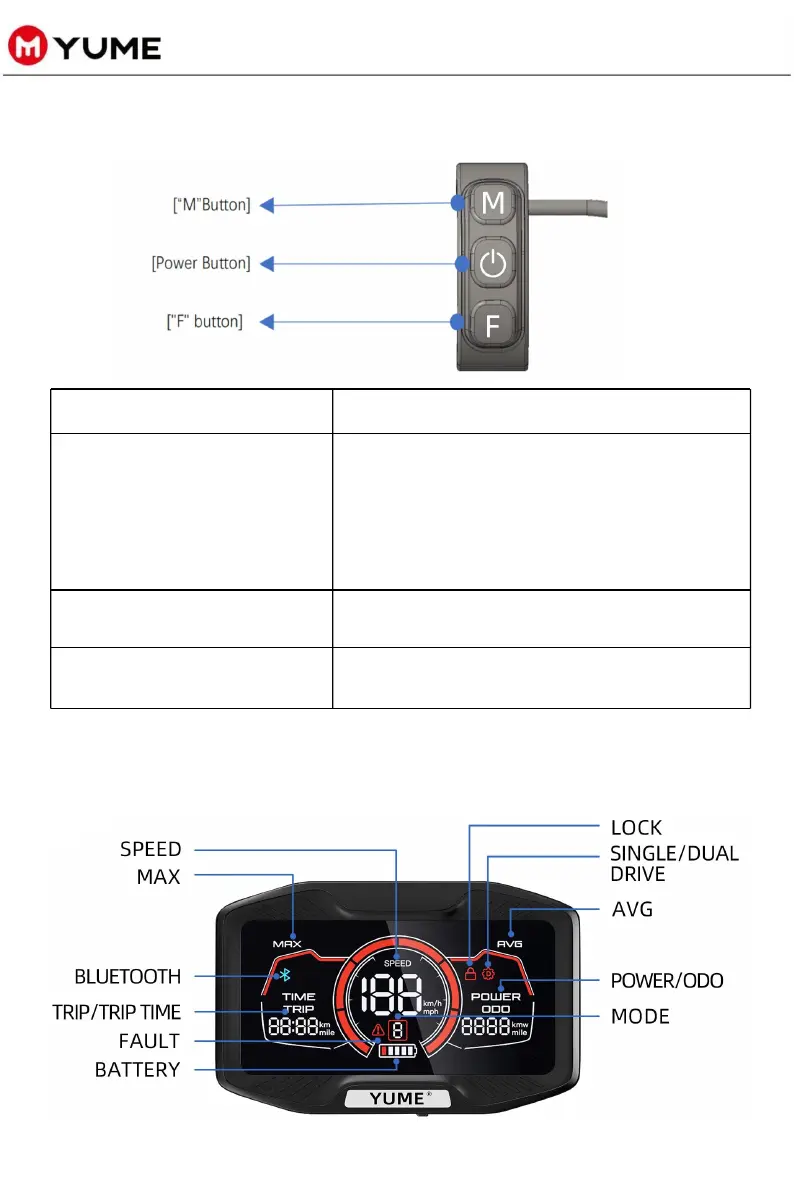
DISPLAY BUTTON
Button Name
Function
【
Power But
ton
】
Press and
hold the [
power Butt
on] for
3
seconds to
switch on
or off.
Press the
[Power Bu
tton] onc
e to switc
h the
display of M
AX and AV
G.
Press the
[Power Bu
tton] t
wice to swit
ch the
display units
TRIP, TRI
P TIME
,Voltage.
【
"M" Bu
tton
】
Press the
["M" B
utton] on
ce to cyc
le through
speed mode
s/gears.
【
"F" But
ton
】
Press the
["F" But
ton] once
to switch
between single
and dual m
otors driv
e.
13
DISPLAY INTERFACE
14
16
Table of Contents
Main Page
Default Chapter
2
Table of Contents
2
Precautions for Riding
3
Inspenction before Riding
3
Safety Precautions
4
Product Description
5
Structure Parameter
5
Structure Diagram
6
Product Packing List
8
Product Assembly Operations
9
Pole Unfolding Operation
9
Install the Handlebar
10
Install Command Centre
11
Product Use Operation
12
Pole Folding Operation
13
Display Function Operation
14
Display Button
15
Display Interface
15
Display Specification
17
Display P-Value Introduction
18
NFC Key Binding
19
Usage and Maintenance General
24
General Questions
26
Safety Tips
28
Related product manuals
YUME YMD4+
10 pages
YUME S10
10 pages



 To Next Page