Please disconnect the plug of adapter with mains
When it is dirty in single patient daily use, clean
Please using soft dry cloth stained with 75%
Please turn off the device and unplug the adapter
Do not let the alcohol flow into the monitor and
Important notes
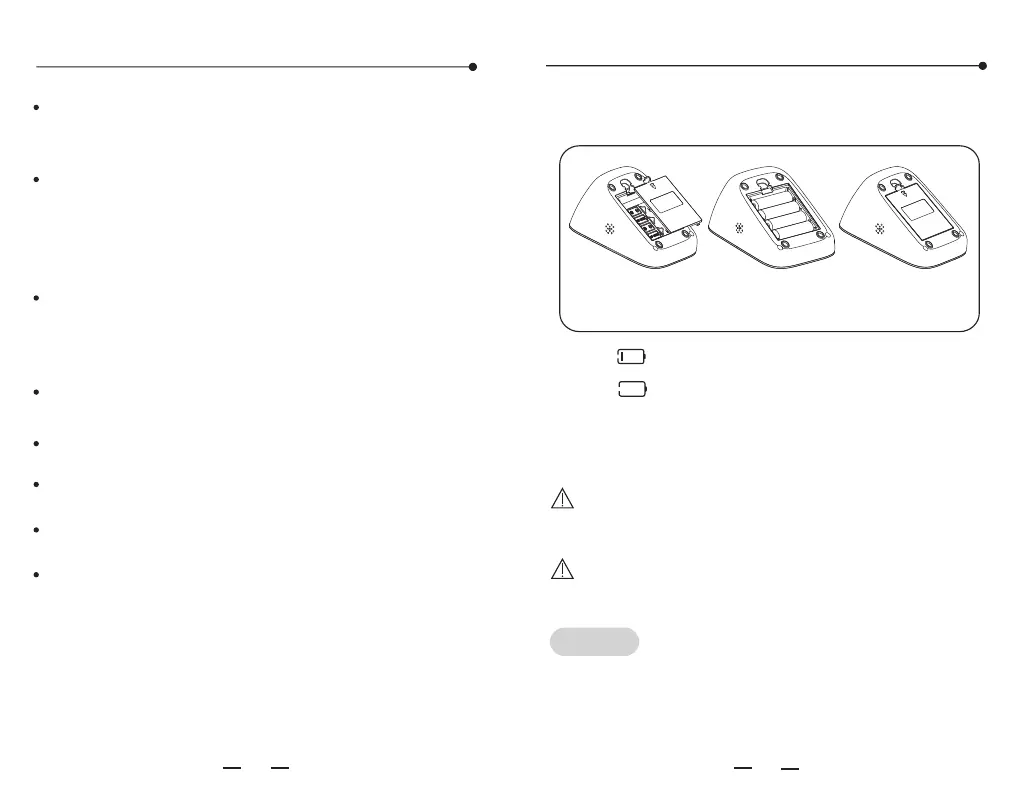
Battery installation
1. The " " icon means the battery is low.
Note:
2. The " " icon means the battery is running out.
Please replace all the batteries.
3. Please take out the batteries if the monitor will
not be used for a long time (over three months).
Note:
10 11
5V/1000mA DC external power can be
connected to the monitor. (Please use the
power adapter supplied by us.)
Please take out the batteries if use the DC
external power for a long time.
when you need to safely terminate operation of
ME EQUIPMENT.
the monitor with soft dry cloth. If it is necessary,
please use wiped soft cloth with water before
cleaning by soft cloth. Then clean the device
with 75% alcohol.
alcohol to clean the device in the case of many
people use it, but do not let the alcohol flow
into the monitor and arm cuff.
before cleaning.
arm cuff.
Do not interconnect this equipment to other
equipment not described in the instructions for use
Note: Do not diagnose with the measurement,
please follow doctor's instruction.
Note:
mode by designated person. This mode
is not accessible for regular users, and please contact
the manufacturer for method to enter into the mode.
Software version can be viewed in
engineering
Statement: If the monitor has not been used and
stored in the required temperature, altitude and
humidity range, it may not conformance to
specification.
Open the battery cover and install four AA batteries
properly. Then close the cover with a click sound.
Tips!
Please use only the authorized Yuwell AC adapter
(output DC 5V 1000mA). If you need to use a AC
adapter, the local dealer for you can contact
consultation about the relevant information.
Open the battery cover, and
install the batteries properly
Close the battery
cover


 To Next Page