16
Occasionally, you may be asked to remove the Micro SD Card and send it to your clinician. The
card will contain information collected about treatment. Follow the instructions provided below
before you attempt to remove or replace the card.
To remove and replace the Micro SD Card:
1. Unplug power to the Z1.
2. To remove Micro SD Card, gently push the Micro SD Card in toward the Z1 and
release. The Micro SD Card will “pop” out from the device. Grasp the Micro SD Card
gently and pull completely out of the Z1.
3. Plug in the Z1 Power Supply.
NOTE: The Z1 maintains at least 30 days of treatment history in memory
and will update the Micro SD Card when inserted.
User Software
See separate Z1 Software Guide for information on data viewing software. This guide may only be
available online.
Charging the Battery (PowerShell Only)
WARNING: Only charge the Battery
with the supplied Human Design Medical
PowerShell and the supplied Human Design
Medical Power Supply. Do not use any other
battery charger, AC adapter, or other device
to charge the Battery.
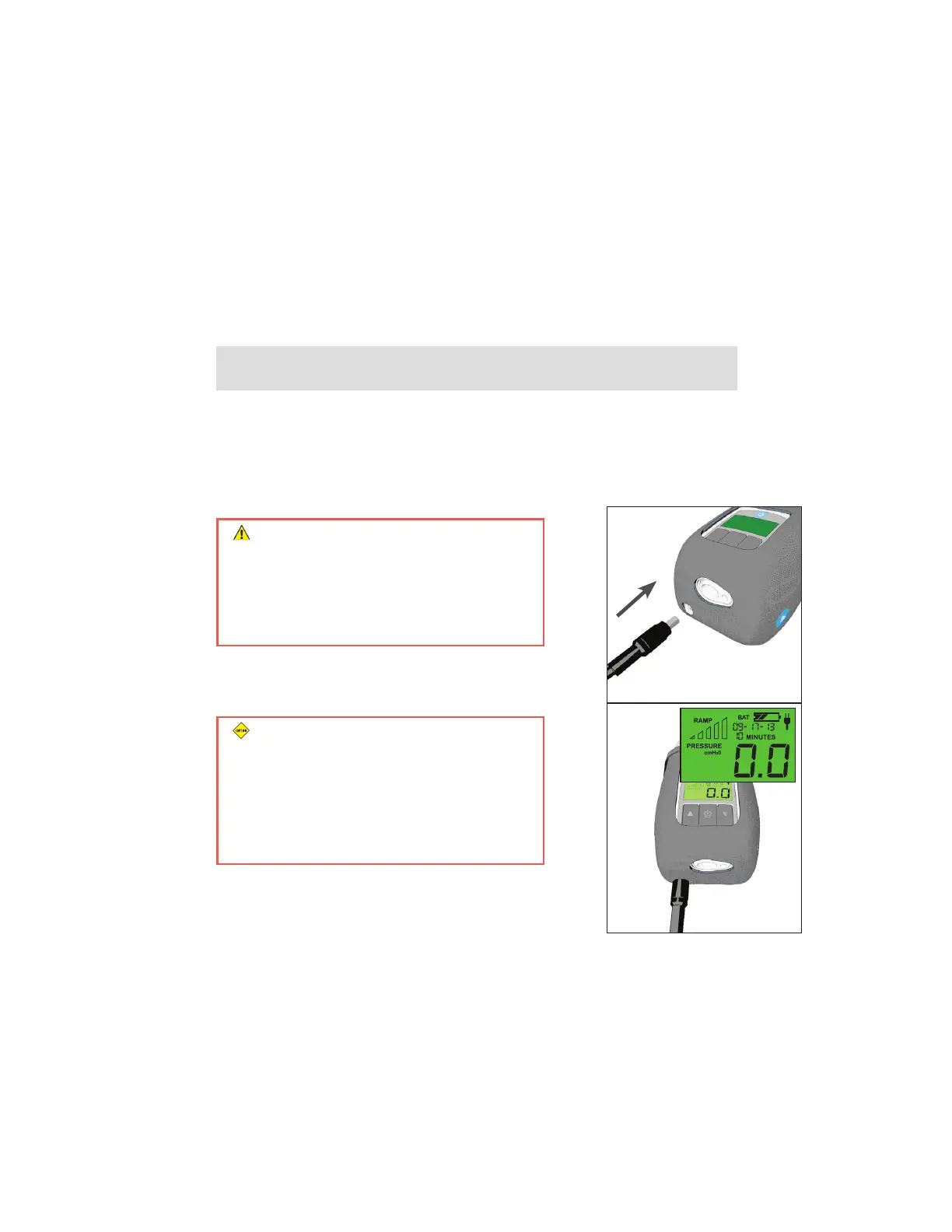
With both the Z1 and the Battery fully inserted into the
PowerShell, plug the Power Supply into the PowerShell as shown
and into a power outlet. (Figure 13)
CAUTION: Make sure your Battery is fully
charged before commencing CPAP therapy
using the PowerShell. The battery life of
a fully charged battery in the PowerShell
is typically 8 hours or longer, after which
treatment will terminate. To recharge the
Battery, see “Charging the Battery”.
Ensure the Z1 is in standby mode (display reads 0.0). The Battery
will not charge unless the Z1 is in standby mode. The Battery
status indicator on the Z1 will flash when the Battery is charging.
The number of solid bars indicates the current level of charge.
(Figure 14)
Figure 14
Figure 13


 To Next Page