CHARGING
Your Rugged Messenger features a powerful lithium polymer battery
that lasts for up to two years of normal use between charges*. It comes
with a charging cable you can use to charge your keyboard quickly and
conveniently. To charge your Rugged Messenger, follow these steps:
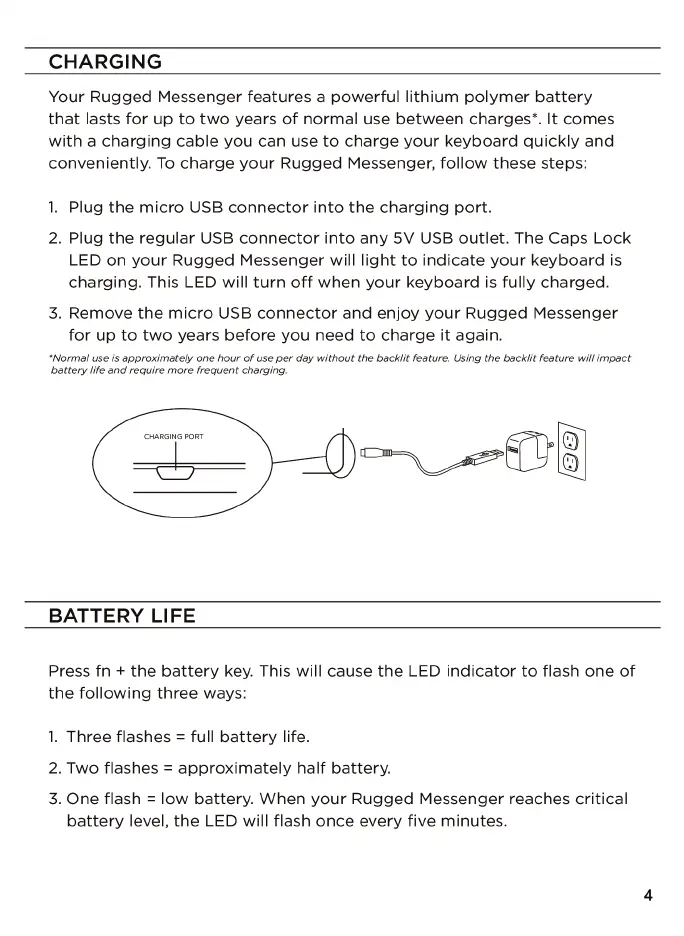
1. Plug the micro USB connector into the charging port.
2. Plug the regular USB connector into any 5V USB outlet. The Caps Lock
LED on your Rugged Messenger will light to indicate your keyboard is
charging. This LED will turn off when your keyboard is fully charged.
3. Remove the micro USB connector and enjoy your Rugged Messenger
for up to two years before you need to charge it again.
•Norma/ use is approximately one hour of use per day without the backlit feature. Using the backlit feature will impact
battery life and require more frequent charging.
CHARGING PORT
BATTERY LIFE
Press fn + the battery key. This will cause the LED indicator to flash one of
the following three ways:
1. Three flashes = full battery life.
2. Two flashes = approximately half battery.
3. One flash = low battery. When your Rugged Messenger reaches critical
battery level, the LED will flash once every five minutes.
4











 To Next Page