3
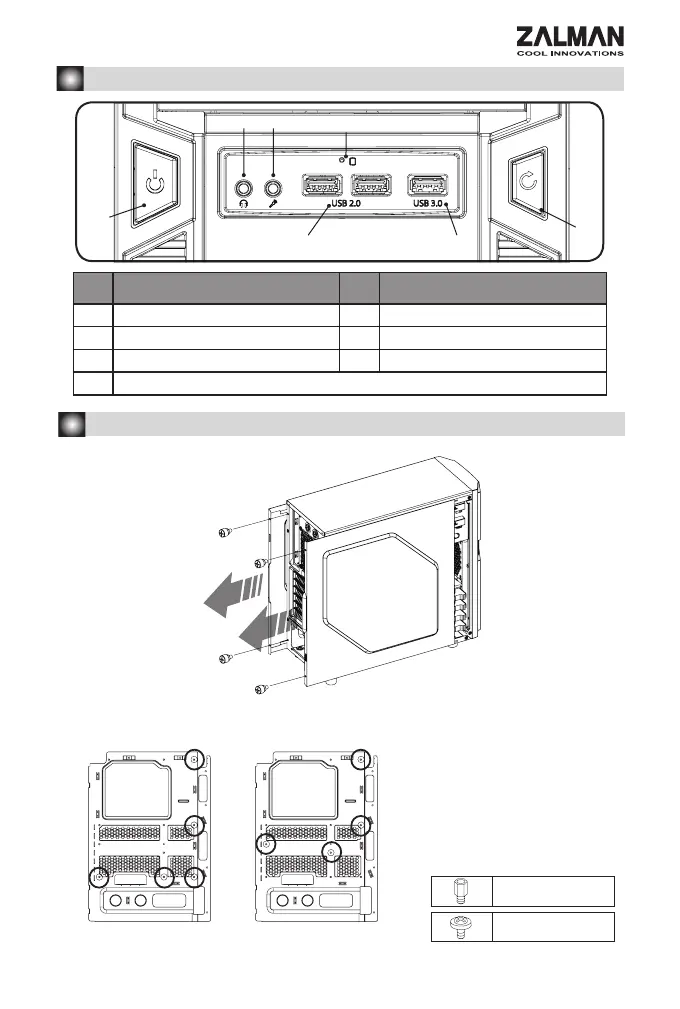
2. Front I/O Ports / I/O
# Part / # Part /
① Power Button / ② Reset Button /
③ USB 2.0 ④ USB 3.0
⑤ Headphones / ⑥ Mic /
⑦ HDD LED
①
②
③ ④
⑤ ⑥
⑦
3. Installation /
1) Side Panel Removal /
2) Motherboard Installation /
Stand-Off
B Bolt
- 6 Stand-Off
,
Stand-Off
.
- There are 6 Stand-offs
preinstalled. Please refer
to the diagrams below for
additional Stand Off positions
(based on motherboard type).
ATX M-ATX


 To Next Page
 Loading...