18
User’s manual
EN
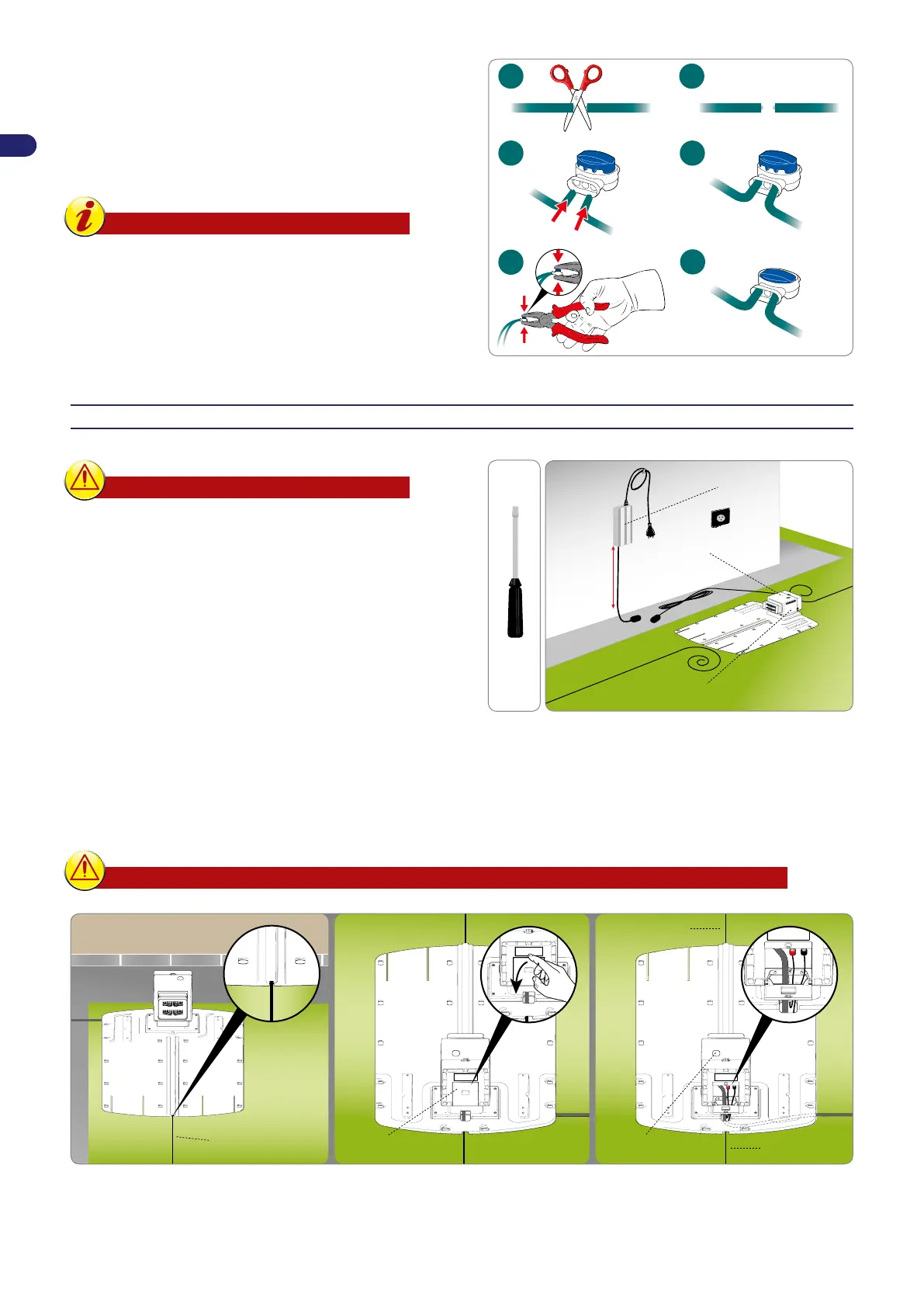
Joining of the perimeter wire
8VHDQRULJLQDOMRLQWLIDQRWKHUSHULPHWHUZLUHLVQHHGHGWRFRPSOHWH
the installation.
,QVHUWHDFKHQGRIWKHZLUHLQWKHMRLQWPDNLQJVXUHWKHZLUHVDUH
IXOO\LQVHUWHGVRWKDWWKHHQGVDUHYLVLEOHRQHDFKVLGH3UHVVWKH
button on the upper side all the way down using a pair of pliers.
Important
-
For a safe and secure electrical connection,
only use original joints.
-
Do not use insulating tape or other types of
joints that do not provide proper isolation
(lugs, terminals, etc.). After some time, soil
moisture causes oxidation and interruption
of the perimeter wire.
INSTALLATION OF THE CHARGING STATION AND POWER SUPPLY UNIT
Warning – Caution
Before carrying out any operations, disconnect the
robot from the mains power.
Position the power supply unit in an area that
cannot be reached by children. For example, at a
height above 160 cm (63 ").
Do not shorten or lengthen the cable getting to the
charging station, wrap as an 8 like form the excess
FRUGDVVKRZQLQWKHÀJXUH
The perimeter wire used for the installation cannot
be less than 50m, contact the closest customer
service centre .
protection (L)
current power supply unit (A)
transmitter (B)
H. min.
160 cm
(63.00 ")
1. 3RVLWLRQWKHFKDUJLQJVWDWLRQLQWKHSUHGHÀQHGDUHD
2. ,QVHUWWKHSHULPHWHUZLUH0DORQJWKHJXLGHLQWKHFKDUJLQJVWDWLRQ&XWWKHH[FHVVSHULPHWHUZLUHWRDERXWFPDERYHWKH
FRQQHFWRUV
3. &RQQHFWWKHVWDWLRQLQFRPLQJZLUHWRUHGWHUPLQDORIWKHWUDQVPLWWHU7&RQQHFWWKHVWDWLRQRXWFRPLQJZLUHWRWKHEODFN
terminal.
The terminals are used only to connect the original perimeter wire.
protection (L) transmitter (T)
perimeter wire (M)
connect to
the black terminal
connect to
the red terminal


 To Next Page