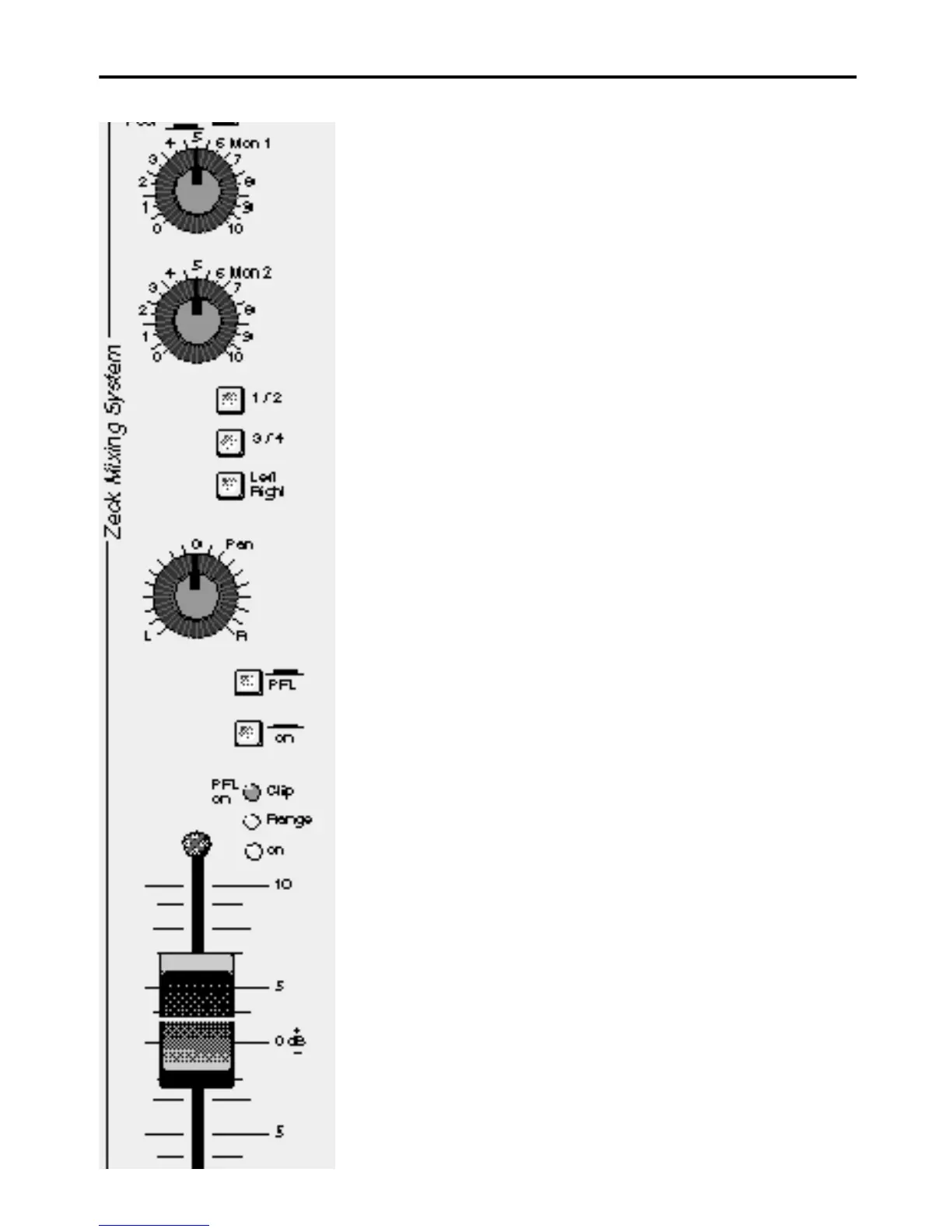
Mon 1, Mon 2
Monitorwege, die grundsätzlich vor dem
Fader (pre fade) liegen. Die Monitor-
lautstärke ist so unabhängig von der
Kanal- und Masterlautstärke.
1/2, 3/4, Left/Right, Pan
Wahlschalter für Untergruppen-Wege
bzw. Master Left/ Right (nur bei Mi-
schern mit Subgruppen). Bei allen
Schaltfunktionen bleibt der Panorama-
Regler aktiv. Er wirkt jeweils zwischen
den Untergruppen 1 und 2, 3 und 4
sowie bei gedrücktem Left/Right auf Ma-
ster. Will man z.B. Subgruppe 1 bele-
gen, drückt man den Schalter 1/2 und
dreht Pan nach links. Bei Mischern
ohne Subgruppen bestimmt der Panora-
ma-Regler die anteilige Verteilung des
Kanalsignales auf Master Left/Right.
PFL
Pre Fade Listening
Der PFL-Schalter ermöglicht das Mit-
hören des jeweiligen Kanalsignales über
Kopfhörer (Kopfhörerausgang in der Ma-
ster-Sektion). Man hört das Signal vor
dem Fader (pre fade) ab. Gleichzeitig
wird die Stärke des Kanalsignales auf
der Master-Right-LED Zeile
in dB angezeigt. Der PFL-Schalter er-
möglicht das genaue Einpegeln der
Kanäle verbunden mit Abhörkontrolle
Solo-Funktion PFL
In Verbindung mit dem Schalter
PFL/Solo in der Mastersektion ist eine
weitere Einzelkontrolle der Kanäle mög-
lich. Ist der Schalter PFL/Solo (Master-
sektion) gedrückt, wird nur der Kanal
über Master gegeben, bei dem PFL akti-
viert ist. So können Kanäle einzeln aku-
stisch im Saal abgehört werden.
on
Mit dem Schalter on wird der Kanal ein-
bzw. ausgeschaltet. Dies bietet Vorteile.
Beim Soundcheck kann man eingestell-
te Kanäle einschließlich Fader stehen-
lassen und abschalten. So läßt sich
jeder Kanal auch in der Lautstärke ein-
zeln einstellen und jederzeit durch
"Knopfdruck" mit jedem beliebigen ande-
ren Kanal vergleichen.
Mon 1, Mon 2
Monitor routes - pre fade. The Monitor
volume is independant of channel and
master faders.
1/2, 3/4, Left/Right, Pan
Selector switch for subgroups and/or
Master left/right. The panorama control
remains operational through all switch
selections. It functions respectively bet-
ween subgroups 1 and 2, 3 and 4 and
on the Master when the left/right button
is pressed.
Eg.: if subgroup 1 is required, one pres-
ses the 1/2 button and turns the pan to
the left. When mixing without subgroups
the panorama control determines the al-
loted share of the channel signal at ma-
ster left/right.
PFL
pre-fade listening
The PFL button facilitates direct li-
stening -in on any particular channel
(headphone output in master section).
This signal is pre-fade. When the PFL
button is pressed the channel signal
strength is simultaneously indicated in
dB on the master right LED bar graph.
The PFL switch provides for exact input
channel level settings and a sound-con-
trol of each individual channel
Solo-Function PFL
Further individual channel control is faci-
litated by the PFL/Solo switch in the
master section. If the PFL/Solo switch
(master section) is pressed, only the
PFL activated channel is routed over
master, thus allowing individual, acou-
stic channel control over the speakers.
on
The on switch activates and de-activa-
tes the channel. It is pre-fade. This type
of switching offers various advantages:
eg. channel-setting made during a
sound check can be left as they are
(fader too) and the channel switched off.
Each channel can be regulated and
compared to any other channel simply
by means of a push-button.
FMS Input Modul e
11


 To Next Page
 Loading...