Step 5
Ensure you plug your cable into the correct port connection.
Step 6
Power on your instrument and now you should see your
second monitor with your CIRRUS windows desktop.
Step 7
Your social distance set-up is ready to go.
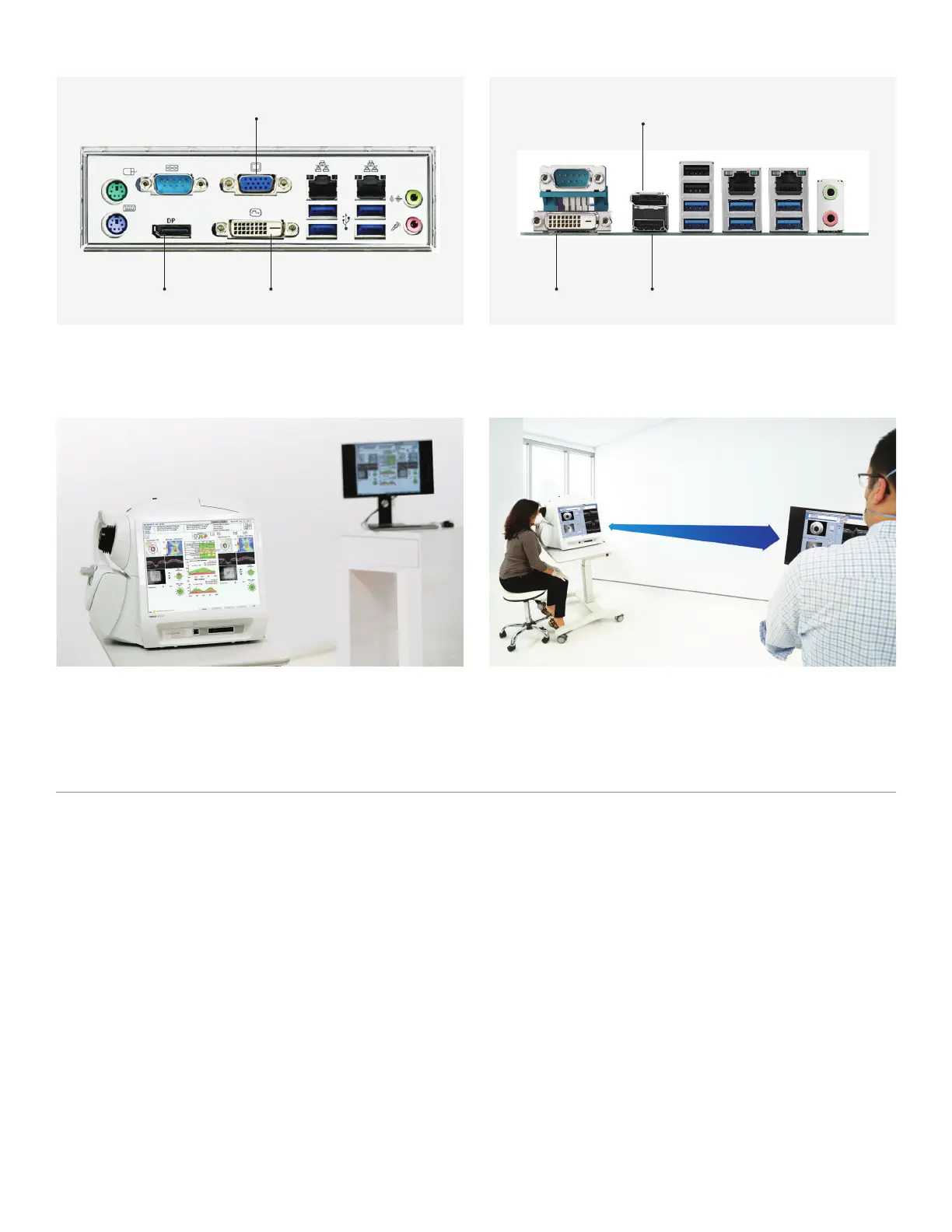
CIRRUS 5000/500 CIRRUS 6000
DVI Port
Display Port
VGA Port HDMI
Display Port
DVI Port
6 ft. safe distance
Extended set-up using cable connection
Available Ports and Compatibility and Recommended Cable Lengths
If you would like to operate your CIRRUS at a safe social distance, you have the option to use peripheral
accessories to help you do so. All you need is an external monitor, keyboard, and mouse.
Recommended Cable Lengths
•
Passive VGA cables (five meters/15 feet or less
is recommended)
•
Passive DVI cables (dual-link cables,15 meters/
49 feet or less is recommended)
•
Passive DisplayPort cables (five meters/15 feet
or less is recommended)
•
Passive HDMI cables (20 meters/65 feet or less
is recommended)
Recommended Keyboard Extension
You may choose to extend the length of your corded
keyboard cable using a passive USB extension cable.
It’s recommended that you limit the length of your
extension cable to a maximum of six meters/19 feet
to ensure reliability.
Wireless Keyboard and Mouse
You may also opt to forgo cables and use wireless
accessories.











 To Next Page