Operation
000000-1253-546 VISUCAM C 31.07.2003
54
Switching off the VISUCAM C
• To exit the software, activate the menu command File – Quit.
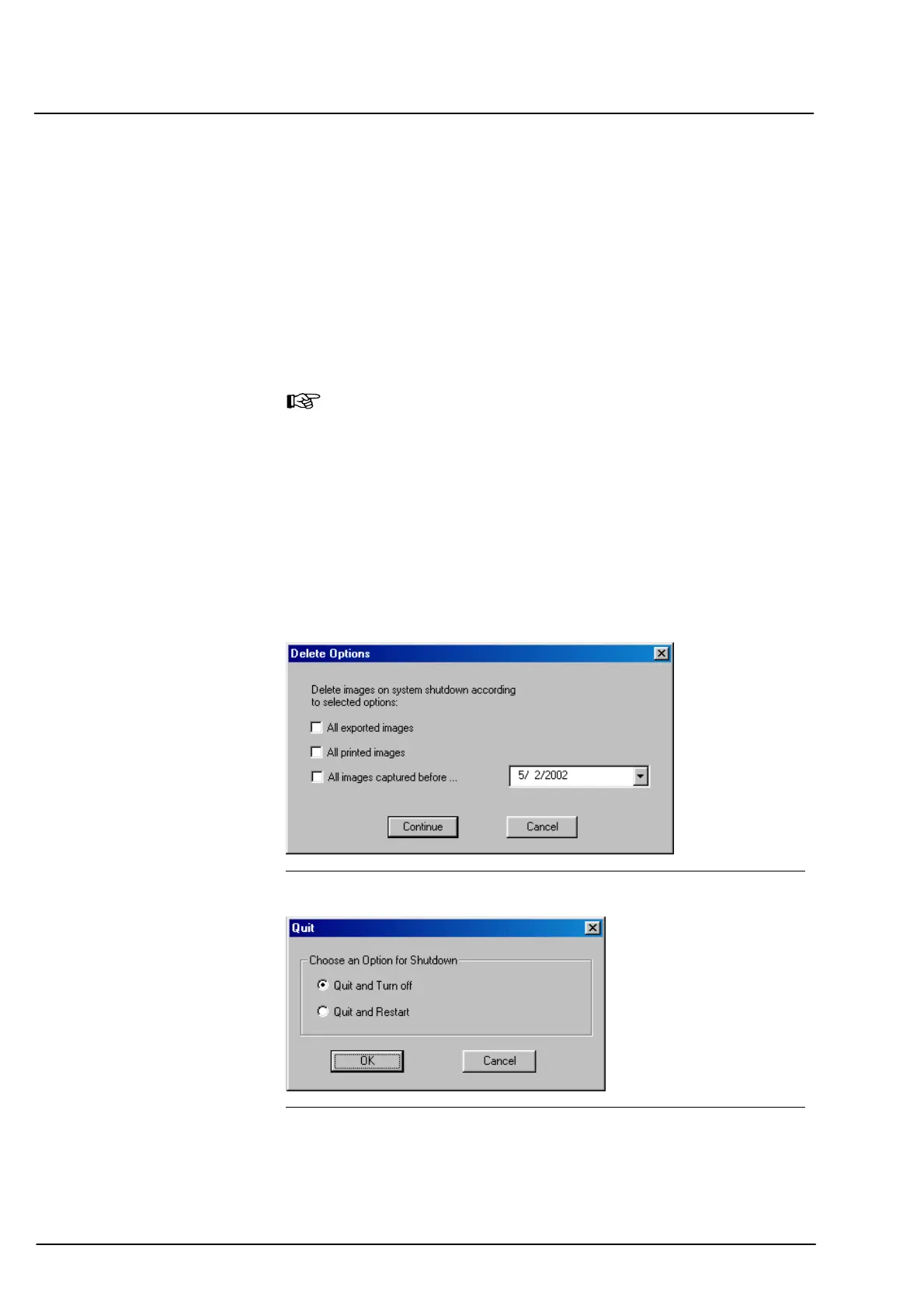
This will bring up the Delete Options dialog box (Fig. 30). In this dialog
box, you can take your choice which of the images shall be deleted.
• Activate the respective check box.
When activating the ”All images captured before...” option, you can
enter the desired date via the keyboard (click on textbox) or the
calendar (click on arrow beside the list box).
Note
If you do not activate any of the Delete Options, no images will be
deleted.
• Confirm your choice by a click on the
CONTINUE button or abort the
procedure by a click on the
CANCEL button.
On clicking the
CONTINUE button, the Quit dialog box appears
(Fig. 31).
• In the Quit dialog box, choose the desired option.
After confirming your choice with
OK, the system will be shut down.
By a click on the
CANCEL button, the quit procedure will be aborted.
• Switch-off the power switches (1, Fig. 4 and 2, Fig. 5).
Fig. 30 Delete Options dialog box
Fig. 31 Quit dialog box


 To Next Page