40 CM4822-001_v02
1. Using dark roasted coffee beans or
over ne coffee powder;
2. The lter of the brewer is clogged.
1. Adjust grinder wheel to rougher;
2. Start brewer cleaning procedure.
Dispenser valve is blocked. Restart coffee machine.
Transport and recycle
Please save the packaging of the coffee
machineforfuturetransportation.
Makesureto emptywaterinsidethemachine
beforetransportation,otherwise,itwilldamage
themachine.
Afteremptying thewaterway,please wipe the
machinebothinsideandoutsidetodry.
Once the empty waterway program was
executed,thesystemwillreruntotheprogram
of“rst-timeuse”,whenthecoffeemachineis
usedagain.
While emptying the waterway, there will be a
high-temperature steam sprays from coffee
spout. Please pay special attention to avoid
beingscalded.
1
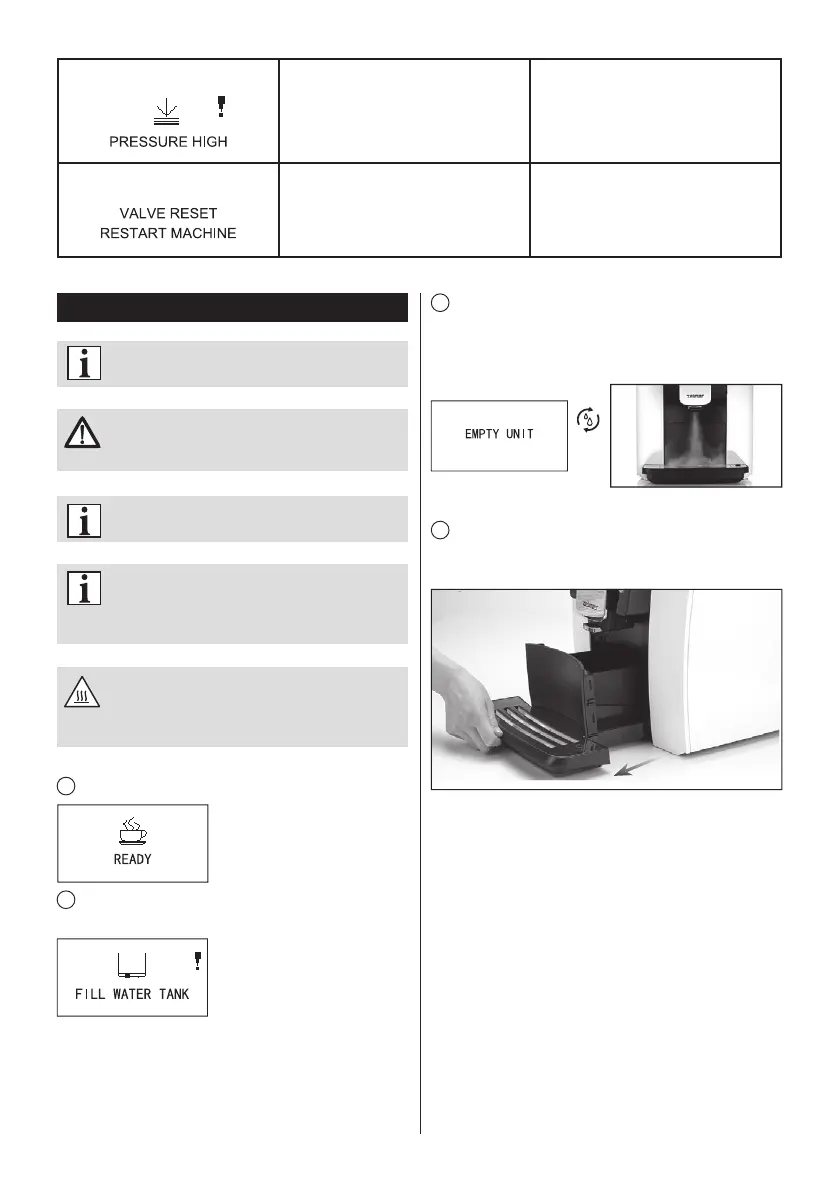
The machine is on the status of “READY”.
2
Take out the water tank, and the machine indicates “FILL
WATER TANK”.
3
Long pressing the cleaning button until the screen
shows „EMPTY UNIT”, the machine begins to clean up the
waterway automatically, and steam will spray from the coffee
spout, please keep distance to avoid scalding.
4
After emptying the waterway, the machine will
automatically power off. Take the drip tray out after the power
is switched off, and clear the water in the drip tray.


 To Next Page