EasyManua.ls Logo

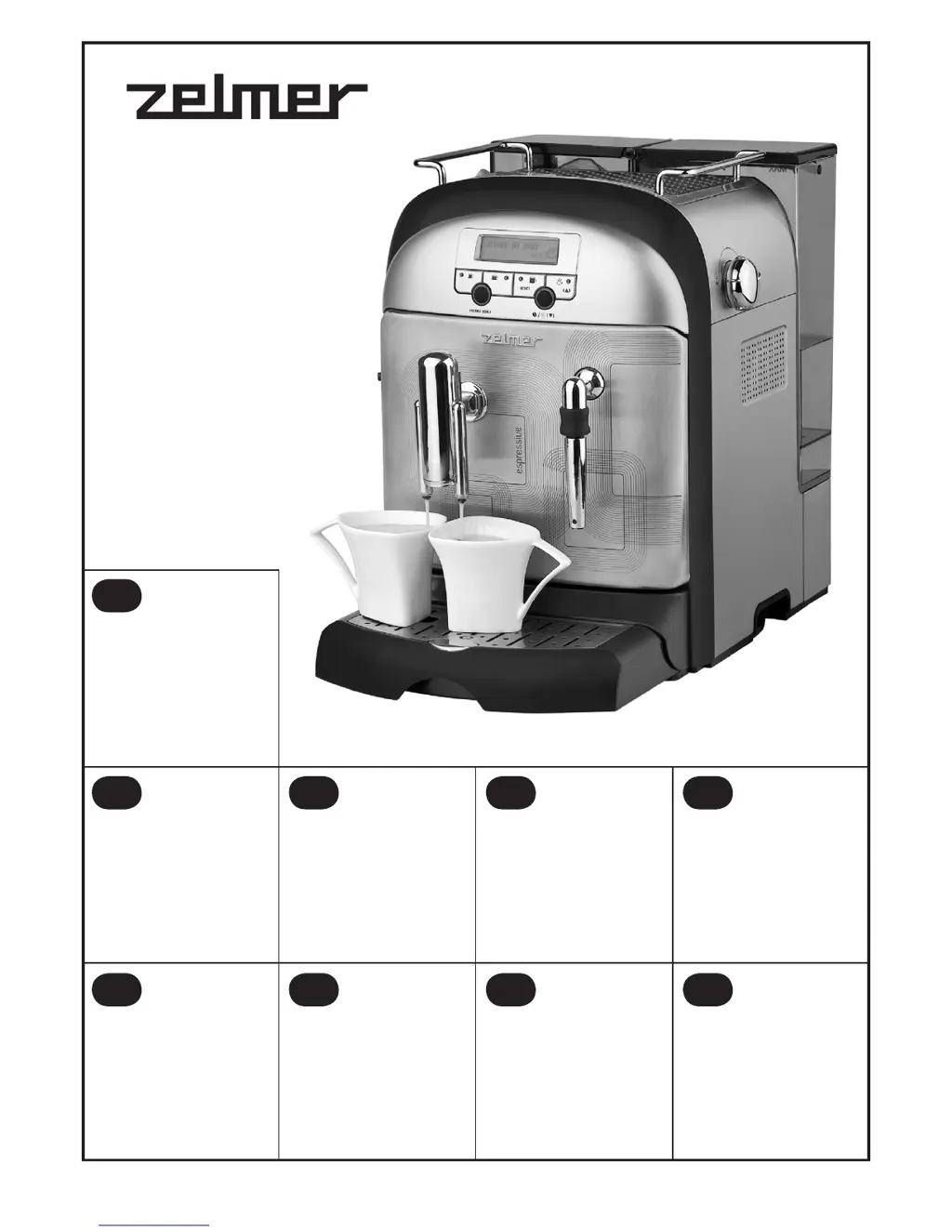
Zelmer 13Z011 - User Manual

Zelmer 13Z011
228 pages
Go to English
Print Icon
To Next Page IconTo Next Page
Loading...
Інструкція з експлуатації
ЕСПРЕСО - КАВОВАРКА
ZELMER Тип 13Z011
Инструкция за експлоатация
ЕСПРЕСО МАШИНА
ZELMER Тип 13Z011
153–178
BG
179–203
UA
Инструкция по эксплуатации
КОФЕМАШИНА
ZELMER Тип 13Z011
127–152
RU
User manual
COFFEE MAKER
ZELMER Type 13Z011
204–227
EN
Kezelési utasítás
ESZPRESSZÓ KÁVÉFŐZŐ
ZELMER Típus 13Z011
77–101
HU
Návod na použitie
ESPRESSO KÁVOVAR
ZELMER Typ 13Z011
Instrucţiuni de folosire
APARAT ESPRESSO CU POMPĂ
DE PRESIUNE
ZELMER Tип 13Z011
102–126
RO
52–76
SK
Instrukcja użytkowania
EKSPRES CIŚNIENIOWY
ZELMER Typ 13Z011
2–26
Návod k obsluze
PŘÍSTROJ NA ESPRESO
ZELMER Typ 13Z011
27–51
CZ
PL

Table of Contents

Questions and Answers

  • C
    Christina MartinezJul 31, 2025
    How to fix Zelmer Coffee Maker when coffee doesn't flow and pump is loud?
    • A
      Alex JohnsonJul 31, 2025
      If coffee isn't flowing from your Zelmer Coffee Maker after pressing buttons (A), (B), or (C), and the pump sounds louder than normal: * Ensure the water tank is correctly inserted and contains water. * Refill the tank if empty. * Without pressing any buttons, turn the steam knob to the position for about 30 seconds, then turn it OFF. This should resolve the issue.
  • A
    alexandra70Aug 4, 2025
    What to do if Zelmer Coffee Maker shows 'WATER FLOW ERROR'?
    • R
      Ricky GreeneAug 4, 2025
      If your Zelmer Coffee Maker displays a 'WATER FLOW ERROR,' and coffee isn't flowing while the pump is quieter than usual, try the following: * Unplug the coffee maker. * Clean the brewing head unit. * Then, prepare a large cup of coffee. If the coffee flows correctly afterward, the problem is solved.
  • A
    Alexandra CoxAug 8, 2025
    Why is Zelmer Coffee Maker brewing weak coffee?
    • T
      Theodore HuntAug 8, 2025
      If the coffee brewed by your Zelmer Coffee Maker is too weak, consider the following: * Check if the coffee beans container has coffee beans. * Clean the ground coffee inlet channel. * Also, check the position of the knobs.
  • Y
    ykingAug 13, 2025
    What to do if Zelmer Coffee Maker brewing head is loud and cannot be removed?
    • L
      loganbobAug 13, 2025
      If the brewing head unit of your Zelmer Coffee Maker is unusually loud and cannot be removed, follow these steps: 1. Turn off the coffee maker using the switch. 2. Remove the dregs box and close the service door. 3. Turn the coffee maker back on and press and hold the (B) button until it starts. 4. Once it stops, turn it off again and remove the brewing head unit. 5. Thoroughly clean the brewing head unit, ensure it's in the correct starting position, and reinstall it. 6. Turn the coffee maker back on. If the problem persists, return it to the nearest service point.
  • C
    Chad WareAug 17, 2025
    How to fix Zelmer Coffee Maker when brewing head is loud but removable?
    • T
      Teresa CampbellAug 17, 2025
      If the brewing head unit in your Zelmer Coffee Maker is louder than usual but can be removed, it might be due to foreign objects. To resolve this: * Turn off the coffee maker. * Remove the brewing head unit. * Clean the brewing head unit thoroughly.
  • A
    Allen GonzalezAug 21, 2025
    What to do if water is in the bean coffee container of Zelmer Coffee Maker?
    • S
      seanrogersAug 21, 2025
      If you find water in the bean coffee container of your Zelmer Coffee Maker: * Immediately switch off the coffee maker. * Dry the bean coffee container using a water-absorbing cloth. If the problem persists, return the coffee maker to the nearest service point.
  • M
    mannvanessaAug 25, 2025
    How to fix Zelmer Coffee Maker when there is no steam?
    • A
      Andrew FloresAug 26, 2025
      If your Zelmer Coffee Maker is not emitting steam, clean the steam nozzle.

Summary

Important Safety Instructions

Technical Parameters and Product Features

Technical Parameters

Details technical data like power, water tank capacity, and compliance standards.

Product Features

Overview of the automatic coffee maker's functions, pressure, and user interface.

Appliance Components Identification

Control Panel and LCD Display Functions

Brewing Head Unit Description

Before Initial Use and Setup

Water Tank and Coffee Dosing

Filling the Water Tank

Instructions for safely filling the water tank with fresh, cold water.

Dosing Bean Coffee

How to fill the bean container and adjust the grinder settings.

Coffee Preparation and Maintenance

Ground Coffee Dosing

Instructions for using ground coffee and the measuring spoon.

Cup Warming

Methods for warming cups to improve coffee quality and froth.

Emptying Drip Tray and Dregs Box

Procedures for emptying the drip tray and dregs box.

Self-Test and Coffee Preparation

Running the self-test and initiating the brewing of coffee.

Preparing Coffee - Multiple Cups

Preparing Medium Cup

Steps to brew a single medium cup of coffee.

Preparing Large Cup

Steps to brew a single large cup of coffee.

Preparing Two Small Cups

Instructions for brewing two small cups simultaneously.

Preparing Two Medium Cups

Instructions for brewing two medium cups simultaneously.

Preparing Two Large Cups

Instructions for brewing two large cups simultaneously.

Hot Water and Steam Functions

Preparing Hot Water

Steps to dispense hot water for beverages or cleaning.

Preparing Steam (Frothing Milk)

Detailed guide on how to froth milk using the steam nozzle.

Setting Cup Volumes

Setting Small Cup Quantity

Procedure to adjust the volume for a small coffee cup.

Setting Medium Cup Quantity

Procedure to adjust the volume for a medium coffee cup.

Setting Large Cup Quantity

Procedure to adjust the volume for a large coffee cup.

Programming Modes

Economy Mode Setting

How to activate and set the energy saving mode duration.

Programming Options

Setting the Language

Steps to change the menu language of the coffee maker.

Setting Small Cup Temperature

How to adjust the brewing temperature for small cups.

Brewing Temperature Settings

Setting Medium Cup Temperature

How to adjust the brewing temperature for medium cups.

Setting Large Cup Temperature

How to adjust the brewing temperature for large cups.

Pre-Brewing Function Settings

Setting Small Cup Pre-Brewing

How to enable and adjust the pre-brewing feature for small cups.

Setting Medium Cup Pre-Brewing

How to enable and adjust the pre-brewing feature for medium cups.

Pre-Brewing and Brewing Time

Setting Large Cup Pre-Brewing

How to enable and adjust the pre-brewing feature for large cups.

Setting Small Cup Brewing Time

Procedure to set the brewing duration for small cups.

Brewing Time Adjustments

Setting Medium Cup Brewing Time

Procedure to set the brewing duration for medium cups.

Setting Large Cup Brewing Time

Procedure to set the brewing duration for large cups.

Water Hardness and Descaling

Setting Water Hardness

How to set the water hardness level for descaling frequency.

Descaling Procedure

Instructions for initiating and performing the descaling process.

Descaling Process Details

Descaling Process Stages

Detailed explanation of the three stages of the descaling procedure.

Cup Count and Time Settings

Checking Brewed Cups

How to view the total number of small, medium, and large cups brewed.

Setting Current Time

Steps to set the current time and select 12/24 hour format.

Factory Settings and Warnings

Restoring Factory Settings

Procedure to reset all user settings to default factory values.

Warnings and Error Messages

Explains common error messages and their solutions.

Cleaning and General Care

Daily and Regular Cleaning Procedures

Instructions for cleaning parts like the dregs box, water tank, and brewing head unit.

Troubleshooting and Environmental Protection

Troubleshooting Common Issues

Lists common issues and their respective actions to resolve them.

Ecology and Disposal

Guidance on proper disposal of the appliance and packaging materials.

Zelmer 13Z011 Specifications

General IconGeneral
TypeEspresso Machine
Pump pressure15 bar
MaterialStainless Steel
ColorSilver
Water tank capacity1.5 l

Related product manuals