5
1 Getting started
Z-EMAP50 is optimised for in-car use. You can use it easily by tapping the screen buttons
and the map with your fingertips.
Latest Map Guarantee
When you start using the product, you have to download the latest available map free of
charge.
When you start using the product, you can download new maps in the next 1 year.
1.1 Initial set-up
When using the navigation software for the first time, an initial set-up process starts
automatically.
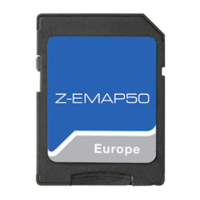
1. Select your preferred language, then tap
to confirm your
selection. Later you can change it in Regional settings (page 73).
2. Read the end-user licence agreement, and tap
if you agree with
the terms of use.
3. The Configuration Wizard starts. Tap
to continue.


 To Next Page