
 Need help?
Do you have a question about the Zengge D Series and is the answer not in the manual?
Control 16 million colors and brightness; save custom colors via DIY button for easy recall.
Provides 20 dynamic modes, custom color preservation, and candle light mode for ambiance.
App feature to sync lights with sound/music using built-in or external microphone input.
Synchronizes lighting rhythm with music by importing audio files from iTunes or PC.
Matches light color to TV screen via mobile camera for an immersive viewing atmosphere.
Captures background colors for light conversion in manual or auto camera modes.
Enables grouping multiple controllers for simultaneous or individual device management.
Allows setting timers for gradual or delayed light ON/OFF switching based on preferences.
Schedules automatic light ON/OFF at specified times, with custom colors or modes.
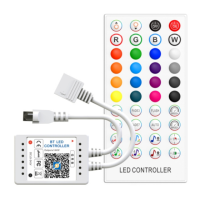
This document describes the ZJ-YBCDS-RGB1-140A RGB BT Sound-Control LED Controller (DSeries), a device designed to manage LED lighting with various control options.
The LED controller allows users to manage RGB LED strips or other constant voltage lights via Bluetooth using the ZENGGE app or a dedicated remote control. Its primary function is to provide dynamic and static color control, brightness adjustment, and various lighting effects, including sound-activated modes. The device supports 16 million colors and offers customizable lighting scenes.
The remote control offers quick access to essential functions:
The ZENGGE app provides comprehensive control and customization:
a) Colors:
b) Functions:
c) Microphone:
d) Music:
e) Cinema:
f) Camera (Camera capture background color function):
g) Group Feature:
h) Gradual change or delay switch function:
i) Light timer:
 General
| Brand | Zengge |
|---|---|
| Model | D Series |
| Category | Controller |
| Language | English |

 To Next Page